> ## Documentation Index
> Fetch the complete documentation index at: https://langchain-zh.cn/llms.txt
> Use this file to discover all available pages before exploring further.
# 云服务
如果您已准备好将应用部署到云服务,请遵循[云部署快速入门](/langsmith/deployment-quickstart)或[完整设置指南](/langsmith/deploy-to-cloud)。本页为参考目的,解释了云托管架构。
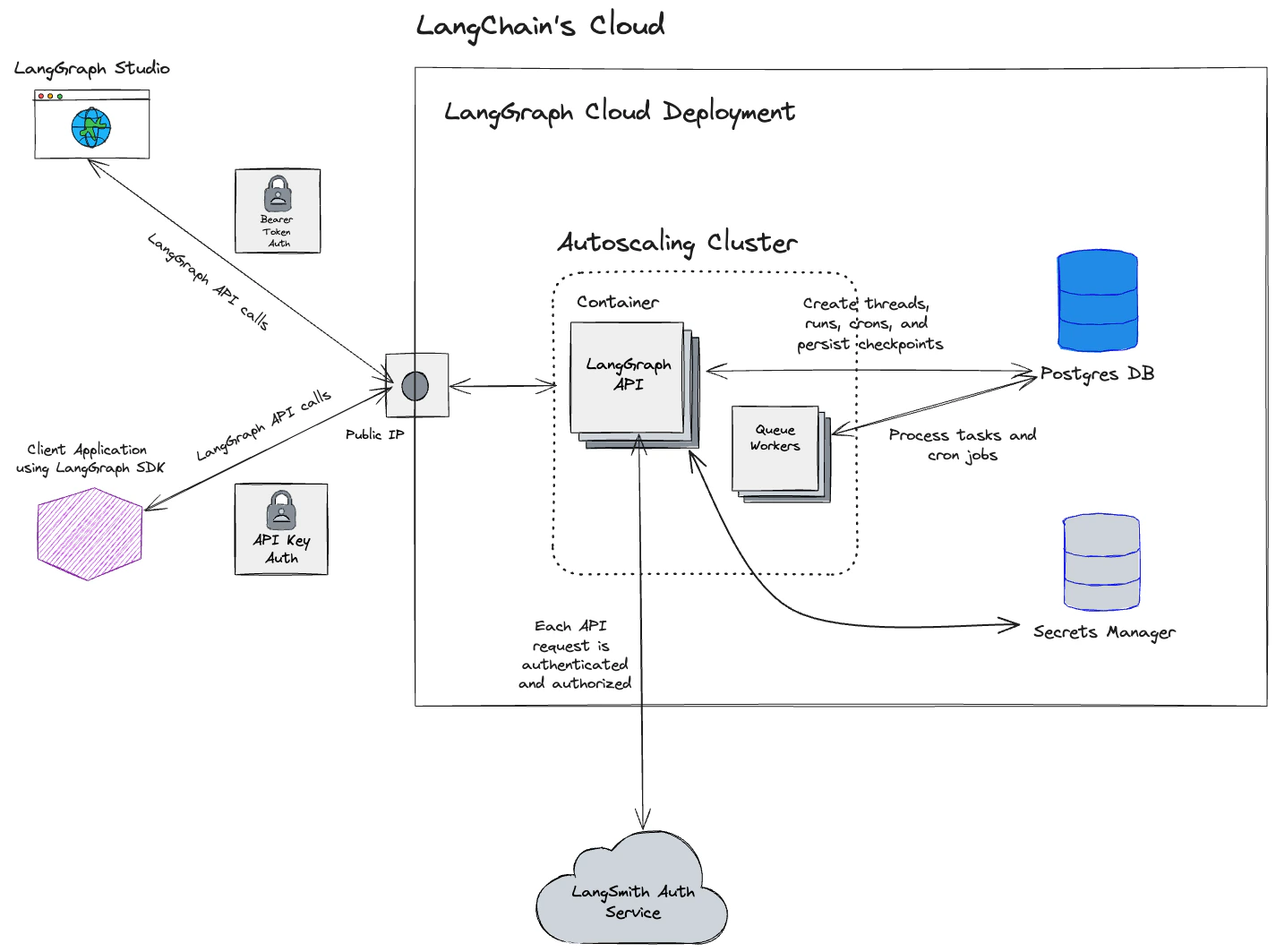
**云服务**选项是一个完全托管的模式,由 LangChain 托管和运营所有 LangSmith 基础设施与服务:
* **完全托管的基础设施**:LangChain 处理所有基础设施、更新、扩展和维护。
* **从 GitHub 部署**:连接您的代码仓库,点击几下即可部署。
* **自动化 CI/CD**:构建流程由平台自动处理。
* **LangSmith UI**:完全访问[可观测性](/langsmith/observability)、[评估](/langsmith/evaluation)、[部署管理](/langsmith/deployment)和[Studio](/langsmith/studio)。
| | **管理方** | **运行位置** |
| -------------------------------- | --------- | ------------- |
| **LangSmith 平台 (UI, API, 数据存储)** | LangChain | LangChain 的云端 |
| **您的智能体服务器** | LangChain | LangChain 的云端 |
| **您应用的 CI/CD** | LangChain | LangChain 的云端 |
 ## 开始使用
要将您的第一个应用程序部署到云服务,请遵循[云部署快速入门](/langsmith/deployment-quickstart)或参考[完整设置指南](/langsmith/deploy-to-cloud)。
## 云架构与可扩展性
本节仅适用于托管在 [https://smith.langchain.com](https://smith.langchain.com) 和 [https://eu.smith.langchain.com](https://eu.smith.langchain.com) 的云托管 LangSmith 服务。
有关自托管 LangSmith 解决方案的信息,请参阅[自托管文档](/langsmith/self-hosted)。
LangSmith 部署在 Google Cloud Platform (GCP) 上,并设计为高度可扩展。许多客户在生产工作负载中使用 LangSmith 进行 LLM 应用的可观测性、评估和智能体部署。
### 架构
基于美国的 LangSmith 服务部署在 GCP 的 `us-central1`(爱荷华州)区域。
[基于欧盟的 LangSmith 服务](https://eu.smith.langchain.com)现已可用(自 2024 年 7 月中旬起),部署在 GCP 的 `europe-west4`(荷兰)区域。如果您对该区域的企业计划感兴趣,请[联系我们的销售团队](https://www.langchain.com/contact-sales)。
#### 区域性存储
下表中的资源和服务存储在注册时所用 URL(美国或欧盟)对应的位置。云托管的 LangSmith 使用 [Supabase](https://supabase.com) 进行身份验证/授权,并使用 [ClickHouse Cloud](https://clickhouse.com/cloud) 作为数据仓库。
| | 美国 | 欧盟 |
| ------------------------------------- | ------------------------------------------------------------------ | ------------------------------------------------------------------------ |
| URL | [https://smith.langchain.com](https://smith.langchain.com) | [https://eu.smith.langchain.com](https://eu.smith.langchain.com) |
| API URL | [https://api.smith.langchain.com](https://api.smith.langchain.com) | [https://eu.api.smith.langchain.com](https://eu.api.smith.langchain.com) |
| GCP 区域 | us-central1 (爱荷华州) | europe-west4 (荷兰) |
| Supabase | AWS us-east-1 (弗吉尼亚北部) | AWS eu-central-1 (德国) |
| ClickHouse Cloud | us-central1 (爱荷华州) | europe-west4 (荷兰) |
| [LangSmith 部署](/langsmith/deployment) | us-central1 (爱荷华州) | europe-west4 (荷兰) |
更多信息请参阅[区域常见问题解答](/langsmith/regions-faq)。
#### 区域无关存储
此处列出的数据仅存储在美国:
* Stripe 和 Metronome 的支付与账单信息
#### GCP 服务
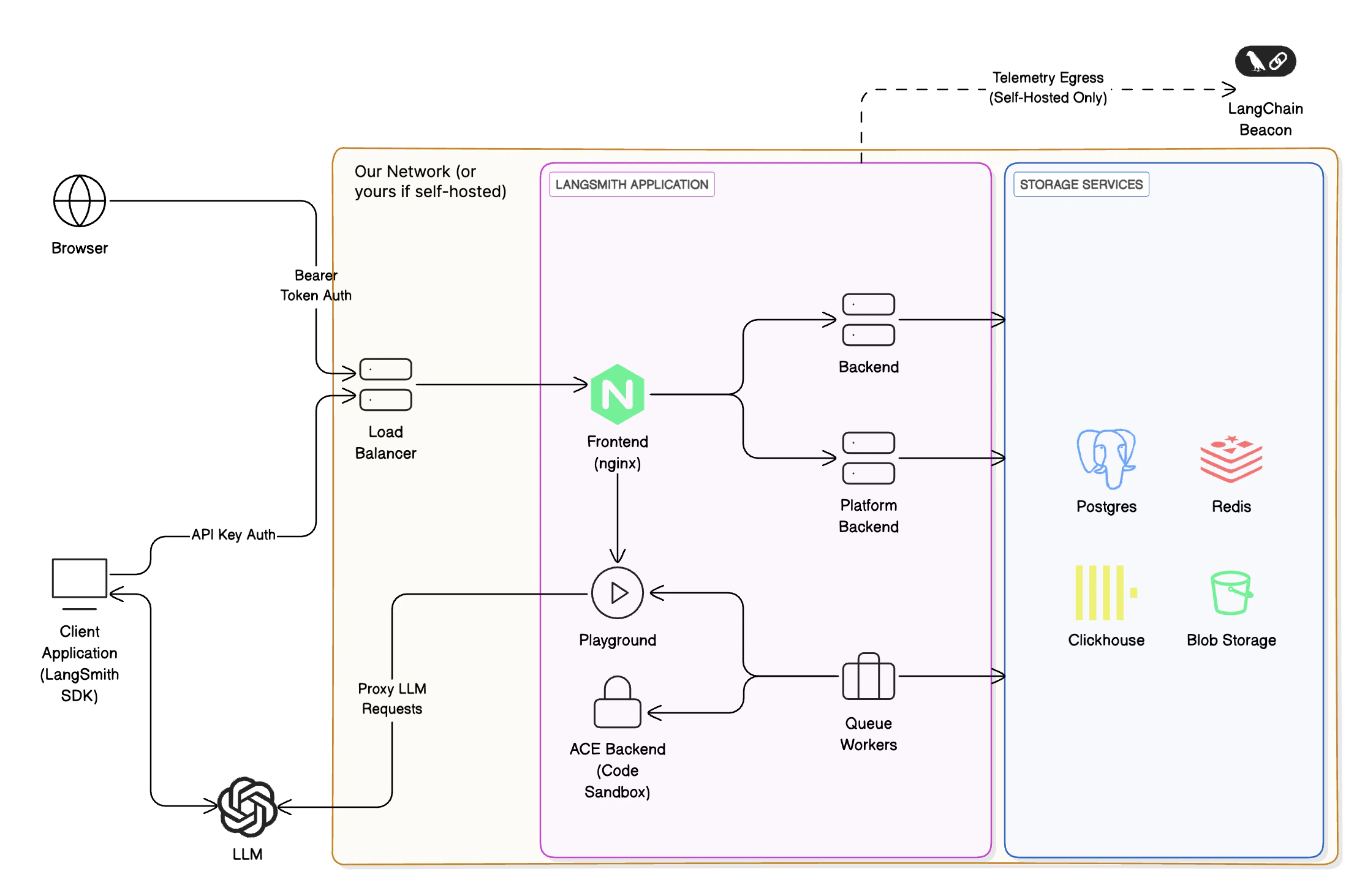
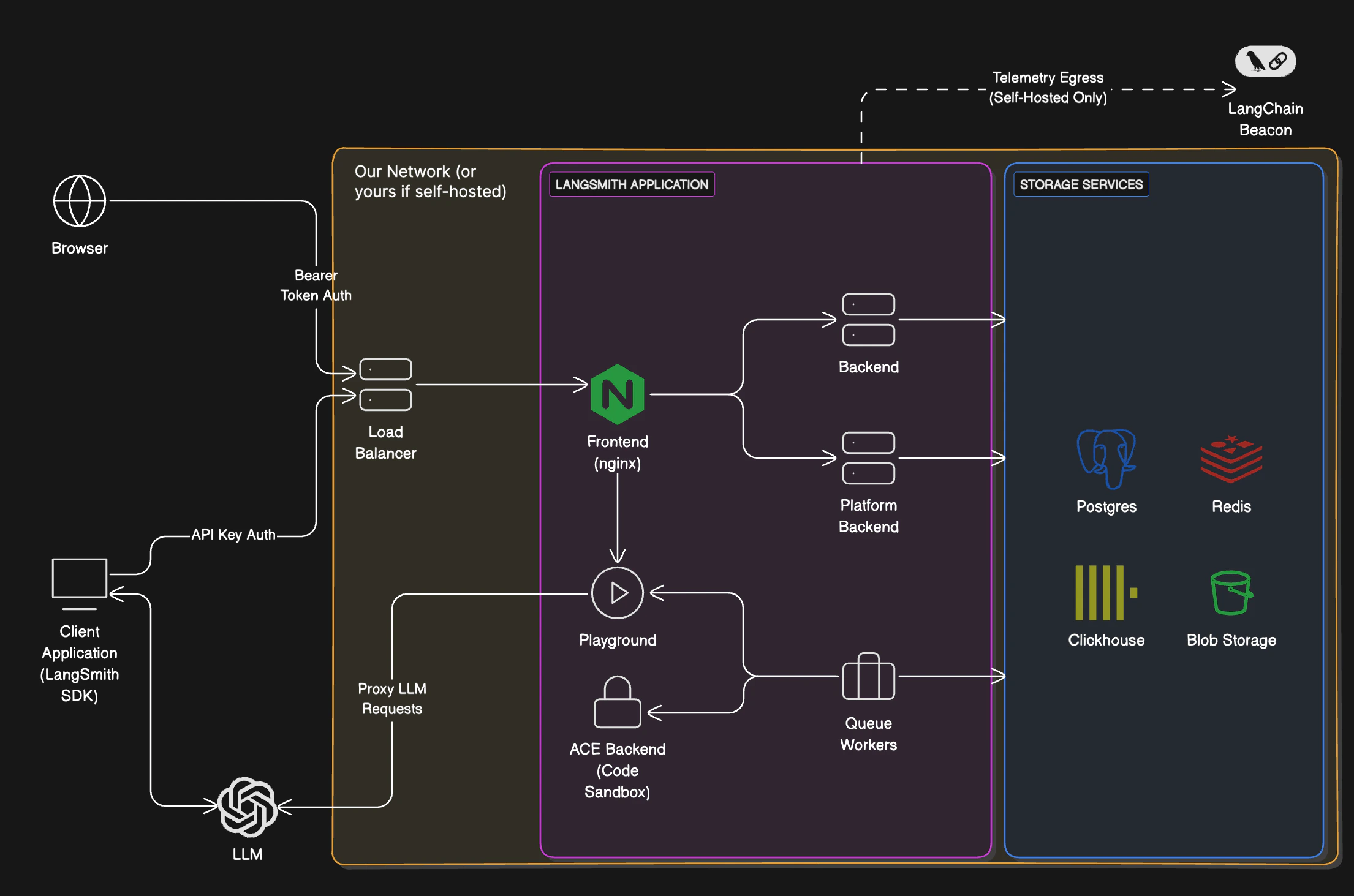
LangSmith 由以下服务组成,全部部署在 Google Kubernetes Engine (GKE) 上:
* LangSmith 前端:提供 LangSmith UI。
* LangSmith 后端:提供 LangSmith API。
* LangSmith 平台后端:处理身份验证和其他高容量任务。(内部服务)
* LangSmith Playground:处理向各种 LLM 提供商转发请求以支持 Playground 功能。
* LangSmith 队列:处理异步任务的处理。(内部服务)
LangSmith 使用以下 GCP 存储服务:
* Google Cloud Storage (GCS) 用于运行输入和输出。
* Google Cloud SQL PostgreSQL 用于事务性工作负载。
* Google Cloud Memorystore for Redis 用于队列和缓存。
* GCP 上的 Clickhouse Cloud 用于追踪数据摄取和分析。我们的服务通过私有端点连接到托管在同一 GCP 区域的 Clickhouse Cloud。
我们使用的一些其他 GCP 服务包括:
* Google Cloud Load Balancer 用于将流量路由到 LangSmith 服务。
* Google Cloud CDN 用于缓存静态资源。
* Google Cloud Armor 用于安全和速率限制。有关我们实施的速率限制的更多信息,请参阅[速率限制](/langsmith/administration-overview#rate-limits)。
### 允许列表 IP 地址
#### 从 LangChain SaaS 流出
所有离开 LangSmith 服务的流量都将通过 NAT 网关路由。所有流量将显示为来自以下 IP 地址:
| 美国 | 欧盟 |
| -------------- | -------------- |
| 34.59.65.97 | 34.13.192.67 |
| 34.67.51.221 | 34.147.105.64 |
| 34.46.212.37 | 34.90.22.166 |
| 34.132.150.88 | 34.147.36.213 |
| 35.188.222.201 | 34.32.137.113 |
| 34.58.194.127 | 34.91.238.184 |
| 34.59.97.173 | 35.204.101.241 |
| 104.198.162.55 | 35.204.48.32 |
如果您连接到自己的 AzureOpenAI 服务或 Playground 或在线评估可能需要的其他端点,将这些 IP 地址加入允许列表可能会有所帮助。
#### 进入 LangChain SaaS
langchain 端点映射到以下静态 IP 地址:
| 美国 | 欧盟 |
| -------------- | ------------ |
| 34.8.121.39 | 34.95.92.214 |
| 34.107.251.234 | 34.13.73.122 |
您可能需要将这些 IP 地址加入允许列表,以启用从您的私有网络到 LangSmith SaaS 端点(`api.smith.langchain.com`、`smith.langchain.com`、`beacon.langchain.com`、`eu.api.smith.langchain.com`、`eu.smith.langchain.com`、`eu.beacon.langchain.com`)的流量。
### 私有服务连接 (企业版)
**仅限企业版。** 私有服务连接仅适用于企业版客户。请联系您的客户代表或 [sales@langchain.dev](mailto:sales@langchain.dev) 以启用此功能。
GCP 上的企业版客户可以通过[私有服务连接 (PSC)](https://cloud.google.com/vpc/docs/private-service-connect) 连接到 LangSmith,提供私有连接,而无需将流量暴露到公共互联网。
#### 服务附件 URI
使用以下服务附件 URI 在您的 VPC 中创建 PSC 端点:
| 区域 | 服务附件 URI |
| ------------------- | ------------------------------------------------------------------------------------- |
| 美国 (`us-central1`) | `projects/langchain-prod/regions/us-central1/serviceAttachments/gateway-psc-publish` |
| 欧盟 (`europe-west4`) | `projects/langchain-prod/regions/europe-west4/serviceAttachments/gateway-psc-publish` |
#### PSC 域名
设置完成后,使用以下域名通过您的 PSC 连接连接到 LangSmith:
| 区域 | 域名 |
| -- | ---------------------------------------- |
| 美国 | `us-central1.p.api.smith.langchain.com` |
| 欧盟 | `europe-west4.p.api.smith.langchain.com` |
#### 设置
**请求访问权限:** 联系您的客户代表或 [sales@langchain.dev](mailto:sales@langchain.dev) 并提供您的 GCP 项目 ID。LangChain 会将您的项目添加到服务附件的允许消费者列表中。
授予访问权限后,使用 gcloud CLI 或 Terraform 创建 PSC 端点并配置 DNS。
#### 创建 PSC 端点
在您的 VPC 中创建一个指向服务附件的转发规则:
```bash gcloud CLI theme={"theme":{"light":"catppuccin-latte","dark":"catppuccin-mocha"}}
# 创建 PSC 端点
gcloud compute forwarding-rules create langsmith-psc-endpoint \
--region= \
--network= \
--subnet= \
--target-service-attachment=projects/langchain-prod/regions//serviceAttachments/gateway-psc-publish \
--load-balancing-scheme=""
# 获取分配的 IP 地址
gcloud compute forwarding-rules describe langsmith-psc-endpoint \
--region= \
--format="value(IPAddress)"
```
```hcl Terraform theme={"theme":{"light":"catppuccin-latte","dark":"catppuccin-mocha"}}
resource "google_compute_forwarding_rule" "langsmith_psc" {
name = "langsmith-psc-endpoint"
project = ""
region = ""
network = ""
subnetwork = ""
target = "projects/langchain-prod/regions//serviceAttachments/gateway-psc-publish"
load_balancing_scheme = ""
}
```
#### 配置 DNS
在您的 VPC 中创建一个私有 DNS 区域,并添加一条指向 PSC 端点 IP 的 A 记录:
```bash gcloud CLI theme={"theme":{"light":"catppuccin-latte","dark":"catppuccin-mocha"}}
# 创建私有 DNS 区域
gcloud dns managed-zones create langsmith-psc \
--dns-name=".p.api.smith.langchain.com." \
--visibility=private \
--networks=
# 添加一条指向 PSC 端点 IP 的 A 记录
gcloud dns record-sets create ".p.api.smith.langchain.com." \
--zone=langsmith-psc \
--type=A \
--rrdatas=
```
```hcl Terraform theme={"theme":{"light":"catppuccin-latte","dark":"catppuccin-mocha"}}
resource "google_dns_managed_zone" "langsmith_psc" {
name = "langsmith-psc"
project = ""
dns_name = ".p.api.smith.langchain.com."
visibility = "private"
private_visibility_config {
networks {
network_url = ""
}
}
}
resource "google_dns_record_set" "langsmith_psc" {
name = ".p.api.smith.langchain.com."
project = ""
managed_zone = google_dns_managed_zone.langsmith_psc.name
type = "A"
ttl = 300
rrdatas = [google_compute_forwarding_rule.langsmith_psc.ip_address]
}
```
#### 验证连接
从您的 VPC 中的一台虚拟机:
```bash theme={"theme":{"light":"catppuccin-latte","dark":"catppuccin-mocha"}}
curl https://.p.api.smith.langchain.com/ok
```
### API 速率限制
LangSmith 对 API 端点实施速率限制,以确保服务稳定性和公平使用。下表显示了美国和欧盟区域不同端点的速率限制。请注意:
* 速率限制表示为 `计数 / 间隔`,其中计数是间隔(以秒为单位)内允许的请求数。例如,`2000 / 10` 表示每 10 秒 2000 个请求。
* 当端点列中未指定 HTTP 方法时,速率限制适用于该端点的所有 HTTP 方法。
* 当列出特定方法(例如 `POST`、`GET`)时,速率限制仅适用于该方法。
| 匹配 / 端点 (方法) | 身份标识键 | 美国生产环境限制 | 欧盟生产环境限制 | 类别 |
| ------------------------------------------ | ---------------- | ---------- | --------- | ------------------------------------- |
| OPTIONS, `/info`, `*/v1/metadata/submit` | IP | 2000 / 10 | 2000 / 10 | [高吞吐量](#rate-limit-categories) |
| `/auth` | `x-api-key` | 2000 / 10 | 2000 / 10 | [高吞吐量](#rate-limit-categories) |
| `/auth` | `x-user-id` + IP | 2000 / 10 | 2000 / 10 | [高吞吐量](#rate-limit-categories) |
| `/v1/beacon` | IP | 2000 / 10 | 2000 / 10 | [高吞吐量](#rate-limit-categories) |
| `/repos` | `x-api-key` | 100 / 60 | 100 / 60 | [仓库](#rate-limit-categories) |
| `/repos` | `x-user-id` + IP | 100 / 60 | 100 / 60 | [仓库](#rate-limit-categories) |
| `POST /runs/batch` | `x-api-key` | 2000 / 10 | 2000 / 10 | [高吞吐量](#rate-limit-categories) |
| `POST /otel/v1/traces` | `x-api-key` | 2000 / 10 | 2000 / 10 | [运行数据摄取](#rate-limit-categories) |
| `POST` 包含 `/charts` | `x-api-key` | 750 / 600 | 750 / 600 | [图表](#rate-limit-categories) |
| `POST` 包含 `/charts` | `x-user-id` + IP | 750 / 600 | 750 / 600 | [图表](#rate-limit-categories) |
| `POST /runs/multipart` | `x-api-key` | 6000 / 10 | 6000 / 10 | [多部分数据摄取](#rate-limit-categories) |
| `POST /runs/query` | `x-api-key` | 15 / 10 | 15 / 10 | [运行查询 (API)](#rate-limit-categories) |
| `POST /runs/query` | `x-user-id` + IP | 300 / 10 | 300 / 10 | [运行查询 (用户)](#rate-limit-categories) |
| `/generate` | `x-api-key` | 30 / 3600 | 30 / 3600 | [生成](#rate-limit-categories) |
| `/generate` | `x-user-id` + IP | 30 / 3600 | 30 / 3600 | [生成](#rate-limit-categories) |
| `/commits` | `x-api-key` | 10000 / 60 | 2000 / 60 | [提交](#rate-limit-categories) |
| `/commits` | `x-user-id` + IP | 10000 / 60 | 2000 / 60 | [提交](#rate-limit-categories) |
| `DELETE /sessions` 或 `*/trigger` | `x-api-key` | 10 / 60 | 10 / 60 | [删除](#rate-limit-categories) |
| `DELETE /sessions` 或 `*/trigger` | `x-user-id` + IP | 30 / 60 | 30 / 60 | [删除](#rate-limit-categories) |
| `POST /runs` (单次运行数据摄取) | `x-api-key` | 2000 / 10 | 2000 / 10 | [运行数据摄取](#rate-limit-categories) |
| `PATCH` 包含 `/runs` | `x-api-key` | 2000 / 10 | 2000 / 10 | [运行数据摄取](#rate-limit-categories) |
| `POST /feedback` | `x-api-key` | 2000 / 10 | 2000 / 10 | [高吞吐量](#rate-limit-categories) |
| `GET /runs/{uuid}` 或 `/api/v1/runs/{uuid}` | `x-api-key` | 30 / 60 | 30 / 60 | [运行查找](#rate-limit-categories) |
| `GET` 包含 `/examples` | `x-api-key` | 5000 / 60 | 5000 / 60 | [示例](#rate-limit-categories) |
| 任何带有 `x-api-key` 的请求 | `x-api-key` | 1000 / 10 | 1000 / 10 | [默认 (API 密钥)](#rate-limit-categories) |
| 任何带有 `x-user-id` 的请求 | `x-user-id` + IP | 1000 / 10 | 1000 / 10 | [默认 (用户)](#rate-limit-categories) |
| `/public/download` | IP | 5000 / 60 | 5000 / 60 | [公共下载](#rate-limit-categories) |
| `/runs/stats` | `x-api-key` | 1 / 10 | 20 / 10 | [统计](#rate-limit-categories) |
| 所有其他 IP (兜底) | IP | 100 / 60 | 100 / 60 | [公共 (兜底)](#rate-limit-categories) |
#### 速率限制类别
* **高吞吐量**:用于核心操作(如身份验证、元数据和反馈)的通用高容量端点。
* **仓库**:仓库和提示管理操作。
* **运行数据摄取**:用于可观测性的单个追踪/运行数据摄取端点。
* **图表**:图表生成和可视化端点。
* **多部分数据摄取**:通过多部分上传进行批量运行数据摄取,用于高容量追踪。
* **运行查询 (API)**:基于 API 密钥的运行查询操作,对复杂查询有更严格的限制。
* **运行查询 (用户)**:基于用户的运行查询操作,为交互式使用提供更高的限制。
* **生成**:AI 驱动的代码和内容生成端点(为防止滥用而限制)。
* **提交**:提示版本控制和提交操作。
* **删除**:会话删除和工作流触发操作。
* **运行查找**:按 UUID 检索特定运行。
* **示例**:为少样本提示获取数据集示例。
* **默认 (API 密钥)**:未匹配特定模式的已认证 API 请求的兜底速率限制。
* **默认 (用户)**:未匹配特定模式的已认证用户请求的兜底速率限制。
* **公共下载**:用于共享资源的高容量公共下载端点。
* **统计**:运行统计和分析端点(应用区域特定限制)。
* **公共 (兜底)**:未经身份验证的公共访问的默认速率限制。
有关速率限制和其他服务限制的更多信息,请参阅[管理概述](/langsmith/administration-overview#rate-limits)。
***
## 开始使用
要将您的第一个应用程序部署到云服务,请遵循[云部署快速入门](/langsmith/deployment-quickstart)或参考[完整设置指南](/langsmith/deploy-to-cloud)。
## 云架构与可扩展性
本节仅适用于托管在 [https://smith.langchain.com](https://smith.langchain.com) 和 [https://eu.smith.langchain.com](https://eu.smith.langchain.com) 的云托管 LangSmith 服务。
有关自托管 LangSmith 解决方案的信息,请参阅[自托管文档](/langsmith/self-hosted)。
LangSmith 部署在 Google Cloud Platform (GCP) 上,并设计为高度可扩展。许多客户在生产工作负载中使用 LangSmith 进行 LLM 应用的可观测性、评估和智能体部署。
### 架构
基于美国的 LangSmith 服务部署在 GCP 的 `us-central1`(爱荷华州)区域。
[基于欧盟的 LangSmith 服务](https://eu.smith.langchain.com)现已可用(自 2024 年 7 月中旬起),部署在 GCP 的 `europe-west4`(荷兰)区域。如果您对该区域的企业计划感兴趣,请[联系我们的销售团队](https://www.langchain.com/contact-sales)。
#### 区域性存储
下表中的资源和服务存储在注册时所用 URL(美国或欧盟)对应的位置。云托管的 LangSmith 使用 [Supabase](https://supabase.com) 进行身份验证/授权,并使用 [ClickHouse Cloud](https://clickhouse.com/cloud) 作为数据仓库。
| | 美国 | 欧盟 |
| ------------------------------------- | ------------------------------------------------------------------ | ------------------------------------------------------------------------ |
| URL | [https://smith.langchain.com](https://smith.langchain.com) | [https://eu.smith.langchain.com](https://eu.smith.langchain.com) |
| API URL | [https://api.smith.langchain.com](https://api.smith.langchain.com) | [https://eu.api.smith.langchain.com](https://eu.api.smith.langchain.com) |
| GCP 区域 | us-central1 (爱荷华州) | europe-west4 (荷兰) |
| Supabase | AWS us-east-1 (弗吉尼亚北部) | AWS eu-central-1 (德国) |
| ClickHouse Cloud | us-central1 (爱荷华州) | europe-west4 (荷兰) |
| [LangSmith 部署](/langsmith/deployment) | us-central1 (爱荷华州) | europe-west4 (荷兰) |
更多信息请参阅[区域常见问题解答](/langsmith/regions-faq)。
#### 区域无关存储
此处列出的数据仅存储在美国:
* Stripe 和 Metronome 的支付与账单信息
#### GCP 服务
LangSmith 由以下服务组成,全部部署在 Google Kubernetes Engine (GKE) 上:
* LangSmith 前端:提供 LangSmith UI。
* LangSmith 后端:提供 LangSmith API。
* LangSmith 平台后端:处理身份验证和其他高容量任务。(内部服务)
* LangSmith Playground:处理向各种 LLM 提供商转发请求以支持 Playground 功能。
* LangSmith 队列:处理异步任务的处理。(内部服务)
LangSmith 使用以下 GCP 存储服务:
* Google Cloud Storage (GCS) 用于运行输入和输出。
* Google Cloud SQL PostgreSQL 用于事务性工作负载。
* Google Cloud Memorystore for Redis 用于队列和缓存。
* GCP 上的 Clickhouse Cloud 用于追踪数据摄取和分析。我们的服务通过私有端点连接到托管在同一 GCP 区域的 Clickhouse Cloud。
我们使用的一些其他 GCP 服务包括:
* Google Cloud Load Balancer 用于将流量路由到 LangSmith 服务。
* Google Cloud CDN 用于缓存静态资源。
* Google Cloud Armor 用于安全和速率限制。有关我们实施的速率限制的更多信息,请参阅[速率限制](/langsmith/administration-overview#rate-limits)。
### 允许列表 IP 地址
#### 从 LangChain SaaS 流出
所有离开 LangSmith 服务的流量都将通过 NAT 网关路由。所有流量将显示为来自以下 IP 地址:
| 美国 | 欧盟 |
| -------------- | -------------- |
| 34.59.65.97 | 34.13.192.67 |
| 34.67.51.221 | 34.147.105.64 |
| 34.46.212.37 | 34.90.22.166 |
| 34.132.150.88 | 34.147.36.213 |
| 35.188.222.201 | 34.32.137.113 |
| 34.58.194.127 | 34.91.238.184 |
| 34.59.97.173 | 35.204.101.241 |
| 104.198.162.55 | 35.204.48.32 |
如果您连接到自己的 AzureOpenAI 服务或 Playground 或在线评估可能需要的其他端点,将这些 IP 地址加入允许列表可能会有所帮助。
#### 进入 LangChain SaaS
langchain 端点映射到以下静态 IP 地址:
| 美国 | 欧盟 |
| -------------- | ------------ |
| 34.8.121.39 | 34.95.92.214 |
| 34.107.251.234 | 34.13.73.122 |
您可能需要将这些 IP 地址加入允许列表,以启用从您的私有网络到 LangSmith SaaS 端点(`api.smith.langchain.com`、`smith.langchain.com`、`beacon.langchain.com`、`eu.api.smith.langchain.com`、`eu.smith.langchain.com`、`eu.beacon.langchain.com`)的流量。
### 私有服务连接 (企业版)
**仅限企业版。** 私有服务连接仅适用于企业版客户。请联系您的客户代表或 [sales@langchain.dev](mailto:sales@langchain.dev) 以启用此功能。
GCP 上的企业版客户可以通过[私有服务连接 (PSC)](https://cloud.google.com/vpc/docs/private-service-connect) 连接到 LangSmith,提供私有连接,而无需将流量暴露到公共互联网。
#### 服务附件 URI
使用以下服务附件 URI 在您的 VPC 中创建 PSC 端点:
| 区域 | 服务附件 URI |
| ------------------- | ------------------------------------------------------------------------------------- |
| 美国 (`us-central1`) | `projects/langchain-prod/regions/us-central1/serviceAttachments/gateway-psc-publish` |
| 欧盟 (`europe-west4`) | `projects/langchain-prod/regions/europe-west4/serviceAttachments/gateway-psc-publish` |
#### PSC 域名
设置完成后,使用以下域名通过您的 PSC 连接连接到 LangSmith:
| 区域 | 域名 |
| -- | ---------------------------------------- |
| 美国 | `us-central1.p.api.smith.langchain.com` |
| 欧盟 | `europe-west4.p.api.smith.langchain.com` |
#### 设置
**请求访问权限:** 联系您的客户代表或 [sales@langchain.dev](mailto:sales@langchain.dev) 并提供您的 GCP 项目 ID。LangChain 会将您的项目添加到服务附件的允许消费者列表中。
授予访问权限后,使用 gcloud CLI 或 Terraform 创建 PSC 端点并配置 DNS。
#### 创建 PSC 端点
在您的 VPC 中创建一个指向服务附件的转发规则:
```bash gcloud CLI theme={"theme":{"light":"catppuccin-latte","dark":"catppuccin-mocha"}}
# 创建 PSC 端点
gcloud compute forwarding-rules create langsmith-psc-endpoint \
--region= \
--network= \
--subnet= \
--target-service-attachment=projects/langchain-prod/regions//serviceAttachments/gateway-psc-publish \
--load-balancing-scheme=""
# 获取分配的 IP 地址
gcloud compute forwarding-rules describe langsmith-psc-endpoint \
--region= \
--format="value(IPAddress)"
```
```hcl Terraform theme={"theme":{"light":"catppuccin-latte","dark":"catppuccin-mocha"}}
resource "google_compute_forwarding_rule" "langsmith_psc" {
name = "langsmith-psc-endpoint"
project = ""
region = ""
network = ""
subnetwork = ""
target = "projects/langchain-prod/regions//serviceAttachments/gateway-psc-publish"
load_balancing_scheme = ""
}
```
#### 配置 DNS
在您的 VPC 中创建一个私有 DNS 区域,并添加一条指向 PSC 端点 IP 的 A 记录:
```bash gcloud CLI theme={"theme":{"light":"catppuccin-latte","dark":"catppuccin-mocha"}}
# 创建私有 DNS 区域
gcloud dns managed-zones create langsmith-psc \
--dns-name=".p.api.smith.langchain.com." \
--visibility=private \
--networks=
# 添加一条指向 PSC 端点 IP 的 A 记录
gcloud dns record-sets create ".p.api.smith.langchain.com." \
--zone=langsmith-psc \
--type=A \
--rrdatas=
```
```hcl Terraform theme={"theme":{"light":"catppuccin-latte","dark":"catppuccin-mocha"}}
resource "google_dns_managed_zone" "langsmith_psc" {
name = "langsmith-psc"
project = ""
dns_name = ".p.api.smith.langchain.com."
visibility = "private"
private_visibility_config {
networks {
network_url = ""
}
}
}
resource "google_dns_record_set" "langsmith_psc" {
name = ".p.api.smith.langchain.com."
project = ""
managed_zone = google_dns_managed_zone.langsmith_psc.name
type = "A"
ttl = 300
rrdatas = [google_compute_forwarding_rule.langsmith_psc.ip_address]
}
```
#### 验证连接
从您的 VPC 中的一台虚拟机:
```bash theme={"theme":{"light":"catppuccin-latte","dark":"catppuccin-mocha"}}
curl https://.p.api.smith.langchain.com/ok
```
### API 速率限制
LangSmith 对 API 端点实施速率限制,以确保服务稳定性和公平使用。下表显示了美国和欧盟区域不同端点的速率限制。请注意:
* 速率限制表示为 `计数 / 间隔`,其中计数是间隔(以秒为单位)内允许的请求数。例如,`2000 / 10` 表示每 10 秒 2000 个请求。
* 当端点列中未指定 HTTP 方法时,速率限制适用于该端点的所有 HTTP 方法。
* 当列出特定方法(例如 `POST`、`GET`)时,速率限制仅适用于该方法。
| 匹配 / 端点 (方法) | 身份标识键 | 美国生产环境限制 | 欧盟生产环境限制 | 类别 |
| ------------------------------------------ | ---------------- | ---------- | --------- | ------------------------------------- |
| OPTIONS, `/info`, `*/v1/metadata/submit` | IP | 2000 / 10 | 2000 / 10 | [高吞吐量](#rate-limit-categories) |
| `/auth` | `x-api-key` | 2000 / 10 | 2000 / 10 | [高吞吐量](#rate-limit-categories) |
| `/auth` | `x-user-id` + IP | 2000 / 10 | 2000 / 10 | [高吞吐量](#rate-limit-categories) |
| `/v1/beacon` | IP | 2000 / 10 | 2000 / 10 | [高吞吐量](#rate-limit-categories) |
| `/repos` | `x-api-key` | 100 / 60 | 100 / 60 | [仓库](#rate-limit-categories) |
| `/repos` | `x-user-id` + IP | 100 / 60 | 100 / 60 | [仓库](#rate-limit-categories) |
| `POST /runs/batch` | `x-api-key` | 2000 / 10 | 2000 / 10 | [高吞吐量](#rate-limit-categories) |
| `POST /otel/v1/traces` | `x-api-key` | 2000 / 10 | 2000 / 10 | [运行数据摄取](#rate-limit-categories) |
| `POST` 包含 `/charts` | `x-api-key` | 750 / 600 | 750 / 600 | [图表](#rate-limit-categories) |
| `POST` 包含 `/charts` | `x-user-id` + IP | 750 / 600 | 750 / 600 | [图表](#rate-limit-categories) |
| `POST /runs/multipart` | `x-api-key` | 6000 / 10 | 6000 / 10 | [多部分数据摄取](#rate-limit-categories) |
| `POST /runs/query` | `x-api-key` | 15 / 10 | 15 / 10 | [运行查询 (API)](#rate-limit-categories) |
| `POST /runs/query` | `x-user-id` + IP | 300 / 10 | 300 / 10 | [运行查询 (用户)](#rate-limit-categories) |
| `/generate` | `x-api-key` | 30 / 3600 | 30 / 3600 | [生成](#rate-limit-categories) |
| `/generate` | `x-user-id` + IP | 30 / 3600 | 30 / 3600 | [生成](#rate-limit-categories) |
| `/commits` | `x-api-key` | 10000 / 60 | 2000 / 60 | [提交](#rate-limit-categories) |
| `/commits` | `x-user-id` + IP | 10000 / 60 | 2000 / 60 | [提交](#rate-limit-categories) |
| `DELETE /sessions` 或 `*/trigger` | `x-api-key` | 10 / 60 | 10 / 60 | [删除](#rate-limit-categories) |
| `DELETE /sessions` 或 `*/trigger` | `x-user-id` + IP | 30 / 60 | 30 / 60 | [删除](#rate-limit-categories) |
| `POST /runs` (单次运行数据摄取) | `x-api-key` | 2000 / 10 | 2000 / 10 | [运行数据摄取](#rate-limit-categories) |
| `PATCH` 包含 `/runs` | `x-api-key` | 2000 / 10 | 2000 / 10 | [运行数据摄取](#rate-limit-categories) |
| `POST /feedback` | `x-api-key` | 2000 / 10 | 2000 / 10 | [高吞吐量](#rate-limit-categories) |
| `GET /runs/{uuid}` 或 `/api/v1/runs/{uuid}` | `x-api-key` | 30 / 60 | 30 / 60 | [运行查找](#rate-limit-categories) |
| `GET` 包含 `/examples` | `x-api-key` | 5000 / 60 | 5000 / 60 | [示例](#rate-limit-categories) |
| 任何带有 `x-api-key` 的请求 | `x-api-key` | 1000 / 10 | 1000 / 10 | [默认 (API 密钥)](#rate-limit-categories) |
| 任何带有 `x-user-id` 的请求 | `x-user-id` + IP | 1000 / 10 | 1000 / 10 | [默认 (用户)](#rate-limit-categories) |
| `/public/download` | IP | 5000 / 60 | 5000 / 60 | [公共下载](#rate-limit-categories) |
| `/runs/stats` | `x-api-key` | 1 / 10 | 20 / 10 | [统计](#rate-limit-categories) |
| 所有其他 IP (兜底) | IP | 100 / 60 | 100 / 60 | [公共 (兜底)](#rate-limit-categories) |
#### 速率限制类别
* **高吞吐量**:用于核心操作(如身份验证、元数据和反馈)的通用高容量端点。
* **仓库**:仓库和提示管理操作。
* **运行数据摄取**:用于可观测性的单个追踪/运行数据摄取端点。
* **图表**:图表生成和可视化端点。
* **多部分数据摄取**:通过多部分上传进行批量运行数据摄取,用于高容量追踪。
* **运行查询 (API)**:基于 API 密钥的运行查询操作,对复杂查询有更严格的限制。
* **运行查询 (用户)**:基于用户的运行查询操作,为交互式使用提供更高的限制。
* **生成**:AI 驱动的代码和内容生成端点(为防止滥用而限制)。
* **提交**:提示版本控制和提交操作。
* **删除**:会话删除和工作流触发操作。
* **运行查找**:按 UUID 检索特定运行。
* **示例**:为少样本提示获取数据集示例。
* **默认 (API 密钥)**:未匹配特定模式的已认证 API 请求的兜底速率限制。
* **默认 (用户)**:未匹配特定模式的已认证用户请求的兜底速率限制。
* **公共下载**:用于共享资源的高容量公共下载端点。
* **统计**:运行统计和分析端点(应用区域特定限制)。
* **公共 (兜底)**:未经身份验证的公共访问的默认速率限制。
有关速率限制和其他服务限制的更多信息,请参阅[管理概述](/langsmith/administration-overview#rate-limits)。
***
[Edit this page on GitHub](https://github.com/langchain-ai/docs/edit/main/src/i18n\zh-CN\langsmith\cloud.mdx) or [file an issue](https://github.com/langchain-ai/docs/issues/new/choose).
[Connect these docs](/use-these-docs) to Claude, VSCode, and more via MCP for real-time answers.