> ## Documentation Index
> Fetch the complete documentation index at: https://langchain-zh.cn/llms.txt
> Use this file to discover all available pages before exploring further.
# 评估一个复杂的智能体
在本教程中,我们将构建一个客户支持机器人,帮助用户在数字音乐商店中导航。然后,我们将介绍针对聊天机器人运行三种最有效的评估类型:
* **[最终响应](#最终响应评估器)**:评估智能体的最终回复。
* **[轨迹](#轨迹评估器)**:评估智能体是否遵循了预期路径(例如工具调用序列)以得出最终答案。
* **[单步](#单步评估器)**:孤立地评估智能体的任何步骤(例如,对于给定步骤是否选择了适当的第一个工具)。
我们将使用 [LangGraph](https://github.com/langchain-ai/langgraph) 构建智能体,但此处展示的技术和 LangSmith 功能与框架无关。
## 环境设置
### 配置环境
让我们安装所需的依赖项:
```bash pip theme={"theme":{"light":"catppuccin-latte","dark":"catppuccin-mocha"}}
pip install -U langgraph "langchain[openai]"
```
```bash uv theme={"theme":{"light":"catppuccin-latte","dark":"catppuccin-mocha"}}
uv add langgraph "langchain[openai]"
```
让我们为 OpenAI 和 [LangSmith](https://smith.langchain.com) 设置环境变量:
```python theme={"theme":{"light":"catppuccin-latte","dark":"catppuccin-mocha"}}
import getpass
import os
def _set_env(var: str) -> None:
if not os.environ.get(var):
os.environ[var] = getpass.getpass(f"设置 {var}: ")
os.environ["LANGSMITH_TRACING"] = "true"
_set_env("LANGSMITH_API_KEY")
_set_env("OPENAI_API_KEY")
```
### 下载数据库
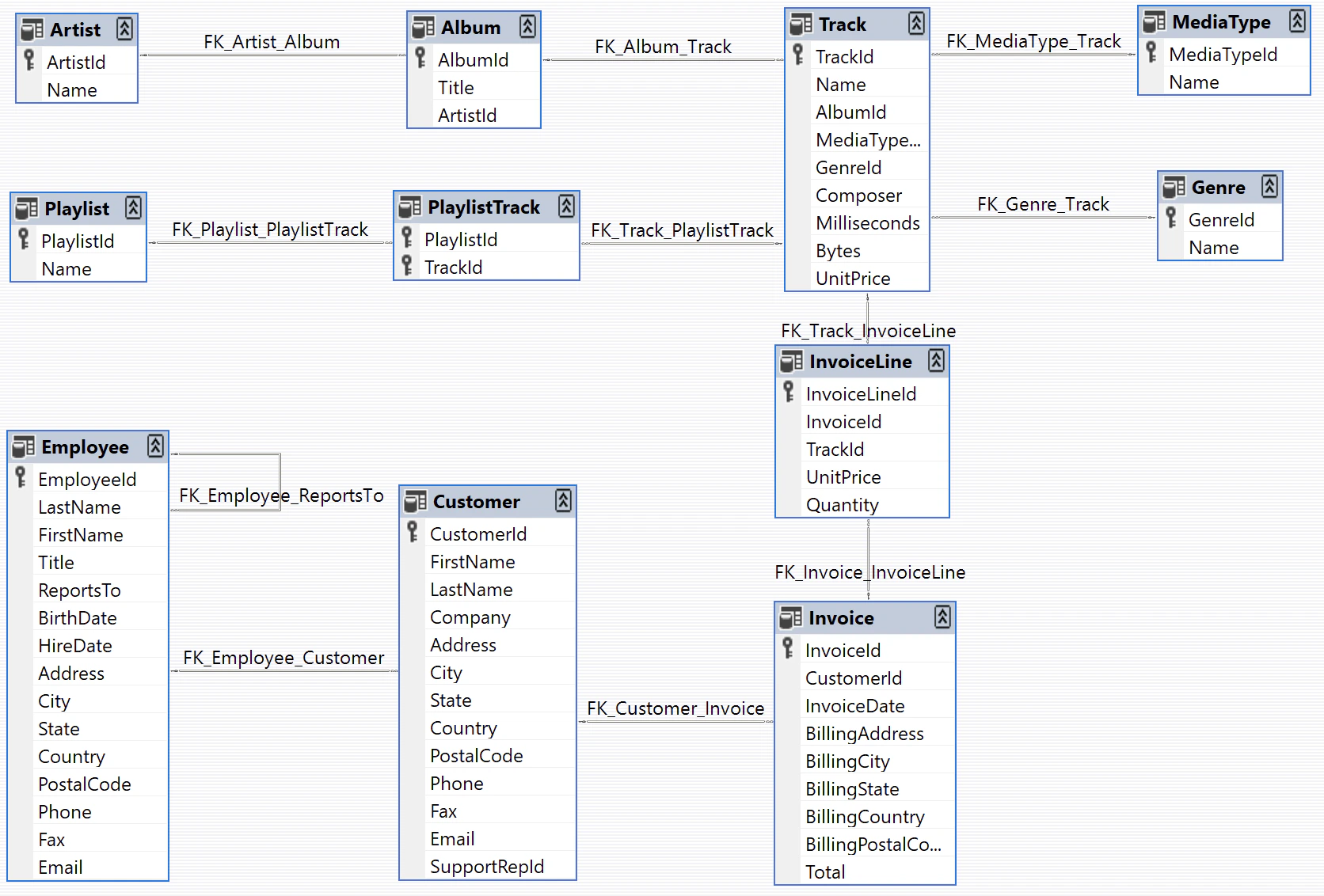
我们将为本教程创建一个 SQLite 数据库。SQLite 是一个轻量级数据库,易于设置和使用。我们将加载 `chinook` 数据库,这是一个代表数字媒体商店的示例数据库。有关更多信息,请参阅 [Chinook 示例数据库](https://www.sqlitetutorial.net/sqlite-sample-database/)。
为了方便起见,我们将数据库托管在一个公共 GCS 存储桶中:
```python theme={"theme":{"light":"catppuccin-latte","dark":"catppuccin-mocha"}}
import requests
url = "https://storage.googleapis.com/benchmarks-artifacts/chinook/Chinook.db"
response = requests.get(url)
if response.status_code == 200:
# 以二进制写入模式打开本地文件
with open("chinook.db", "wb") as file:
# 将响应内容(文件)写入本地文件
file.write(response.content)
print("文件已下载并保存为 Chinook.db")
else:
print(f"文件下载失败。状态码:{response.status_code}")
```
以下是数据库中数据的示例:
```python theme={"theme":{"light":"catppuccin-latte","dark":"catppuccin-mocha"}}
import sqlite3
# ... 数据库连接和查询代码
```
```
[(1, 'AC/DC'), (2, 'Accept'), (3, 'Aerosmith'), (4, 'Alanis Morissette'), (5, 'Alice In Chains'), (6, 'Antônio Carlos Jobim'), (7, 'Apocalyptica'), (8, 'Audioslave'), (9, 'BackBeat'), (10, 'Billy Cobham')]
```
以下是数据库模式(图片来自 [https://github.com/lerocha/chinook-database](https://github.com/lerocha/chinook-database)):
 ### 定义客户支持智能体
我们将创建一个对数据库访问权限有限的 [LangGraph](https://langchain-ai.github.io/langgraph/) 智能体。出于演示目的,我们的智能体将支持两种基本类型的请求:
* 查询:客户可以根据其他标识信息查找歌曲标题、艺术家姓名和专辑。例如:“你们有哪些 Jimi Hendrix 的歌曲?”
* 退款:客户可以要求退还他们过去购买的款项。例如:“我叫 Claude Shannon,我想退还上周购买的一件商品,你能帮我吗?”
为了简化本演示,我们将通过删除相应的数据库记录来实现退款。我们将跳过实现用户身份验证和其他生产安全措施。
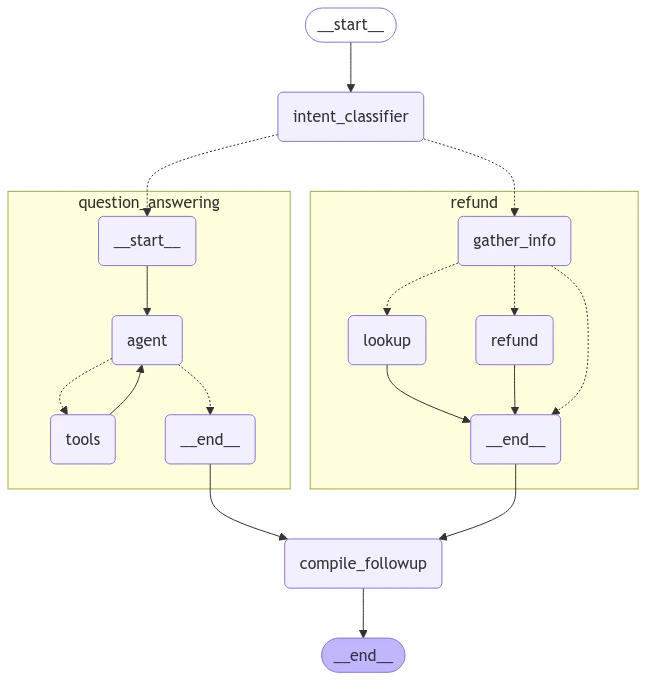
智能体的逻辑将构建为两个独立的子图(一个用于查询,一个用于退款),并带有一个将请求路由到相应子图的父图。
#### 退款智能体
让我们构建退款处理智能体。该智能体需要:
1. 在数据库中找到客户的购买记录
2. 删除相关的 Invoice 和 InvoiceLine 记录以处理退款
我们将创建两个 SQL 辅助函数:
1. 一个通过删除记录来执行退款的函数
2. 一个查找客户购买历史记录的函数
为了简化测试,我们将为这些函数添加一个“模拟”模式。当启用模拟模式时,这些函数将模拟数据库操作,而不实际修改任何数据。
```python theme={"theme":{"light":"catppuccin-latte","dark":"catppuccin-mocha"}}
import sqlite3
def _refund(invoice_id: int | None, invoice_line_ids: list[int] | None, mock: bool = False) -> float:
...
def _lookup( ...
```
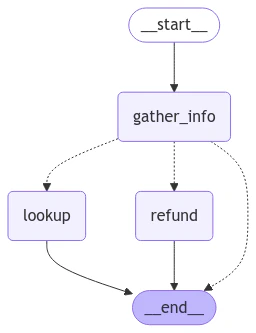
现在让我们定义我们的图。我们将使用一个包含三个主要路径的简单架构:
1. 从对话中提取客户和购买信息
2. 将请求路由到以下三个路径之一:
* 退款路径:如果我们有足够的购买详细信息(发票 ID 或发票行 ID)来处理退款
* 查询路径:如果我们有足够的客户信息(姓名和电话)来搜索他们的购买历史记录
* 回复路径:如果需要更多信息,则回复用户请求他们提供具体的详细信息
图的状态将跟踪:
* 对话历史记录(用户和智能体之间的消息)
* 从对话中提取的所有客户和购买信息
* 要发送给用户的下一条消息(后续文本)
````python theme={"theme":{"light":"catppuccin-latte","dark":"catppuccin-mocha"}}
from typing import Literal
import json
from langchain.chat_models import init_chat_model
from langchain_core.runnables import RunnableConfig
from langgraph.graph import END, StateGraph
from langgraph.graph.message import AnyMessage, add_messages
from langgraph.types import Command, interrupt
from tabulate import tabulate
from typing_extensions import Annotated, TypedDict
# 图状态。
class State(TypedDict):
"""智能体状态。"""
messages: Annotated[list[AnyMessage], add_messages]
followup: str | None
invoice_id: int | None
invoice_line_ids: list[int] | None
customer_first_name: str | None
customer_last_name: str | None
customer_phone: str | None
track_name: str | None
album_title: str | None
artist_name: str | None
purchase_date_iso_8601: str | None
# 从对话中提取用户/购买信息的指令。
gather_info_instructions = """您正在管理一个销售歌曲曲目的在线音乐商店。\
客户可以一次购买多个曲目,这些购买记录在数据库中,\
每次购买对应一张发票,每个购买的曲目对应一组关联的发票行。
您的任务是帮助希望退还一个或多个已购曲目的客户。\
为了能够退款给客户,客户必须指定发票 ID 以退还单次交易中购买的所有曲目,\
或者指定一个或多个发票行 ID 以退还单个曲目。
通常用户不会知道他们想要退款的特定发票 ID 或发票行 ID。\
在这种情况下,您可以通过要求他们指定以下信息来帮助他们查找发票:
- 必需:他们的名字、姓氏和电话号码。
- 可选:曲目名称、艺术家名称、专辑名称或购买日期。
如果客户未指定所需信息(发票/发票行 ID 或名字、姓氏、电话),
请要求他们指定。"""
# 提取模式,镜像图状态。
class PurchaseInformation(TypedDict):
"""关于客户希望退款的发票/发票行的所有已知信息。不要编造值,如果不了解其值,请将字段保留为 null。"""
invoice_id: int | None
invoice_line_ids: list[int] | None
customer_first_name: str | None
customer_last_name: str | None
customer_phone: str | None
track_name: str | None
album_title: str | None
artist_name: str | None
purchase_date_iso_8601: str | None
followup: Annotated[
str | None,
...,
"如果用户没有足够的识别信息,请告知他们所需信息并要求他们指定。",
]
# 用于执行提取的模型。
info_llm = init_chat_model("gpt-4.1-mini").with_structured_output(
PurchaseInformation, method="json_schema", include_raw=True
)
# 用于提取用户信息并路由到查询/退款/END 的图节点。
async def gather_info(state: State) -> Command[Literal["lookup", "refund", END]]:
info = await info_llm.ainvoke(
[
{"role": "system", "content": gather_info_instructions},
*state["messages"],
]
)
parsed = info["parsed"]
if any(parsed[k] for k in ("invoice_id", "invoice_line_ids")):
goto = "refund"
elif all(
parsed[k]
for k in ("customer_first_name", "customer_last_name", "customer_phone")
):
goto = "lookup"
else:
goto = END
update = {"messages": [info["raw"]], **parsed}
return Command(update=update, goto=goto)
# 用于执行退款的图节点。
# 注意,这里我们检查运行时配置中的 "env" 变量。
# 如果 "env" 设置为 "test",那么我们实际上不会从数据库中删除任何行。
# 这在我们运行评估时将变得重要。
def refund(state: State, config: RunnableConfig) -> dict:
# 是否模拟删除。如果可配置变量 'env' 设置为 'test',则为 True。
mock = config.get("configurable", {}).get("env", "prod") == "test"
refunded = _refund(
invoice_id=state["invoice_id"], invoice_line_ids=state["invoice_line_ids"], mock=mock
)
response = f"您已获得总计退款:${refunded:.2f}。还有其他我可以帮忙的吗?"
return {
"messages": [{"role": "assistant", "content": response}],
"followup": response,
}
# 用于查找用户购买的图节点
def lookup(state: State) -> dict:
args = (
state[k]
for k in (
"customer_first_name",
"customer_last_name",
"customer_phone",
"track_name",
"album_title",
"artist_name",
"purchase_date_iso_8601",
)
)
results = _lookup(*args)
if not results:
response = "根据您提供的信息,我们没有找到任何相关的购买记录。您确定输入的信息都正确吗?"
followup = response
else:
response = f"您希望退还以下哪笔购买?\n\n```json{json.dumps(results, indent=2)}\n```"
followup = f"您希望退还以下哪笔购买?\n\n{tabulate(results, headers='keys')}"
return {
"messages": [{"role": "assistant", "content": response}],
"followup": followup,
"invoice_line_ids": [res["invoice_line_id"] for res in results],
}
# 构建我们的图
graph_builder = StateGraph(State)
graph_builder.add_node(gather_info)
graph_builder.add_node(refund)
graph_builder.add_node(lookup)
graph_builder.set_entry_point("gather_info")
graph_builder.add_edge("lookup", END)
graph_builder.add_edge("refund", END)
refund_graph = graph_builder.compile()
````
我们可以可视化我们的退款图:
```
# 假设您在交互式 Python 环境中
from IPython.display import Image, display ...
```
### 定义客户支持智能体
我们将创建一个对数据库访问权限有限的 [LangGraph](https://langchain-ai.github.io/langgraph/) 智能体。出于演示目的,我们的智能体将支持两种基本类型的请求:
* 查询:客户可以根据其他标识信息查找歌曲标题、艺术家姓名和专辑。例如:“你们有哪些 Jimi Hendrix 的歌曲?”
* 退款:客户可以要求退还他们过去购买的款项。例如:“我叫 Claude Shannon,我想退还上周购买的一件商品,你能帮我吗?”
为了简化本演示,我们将通过删除相应的数据库记录来实现退款。我们将跳过实现用户身份验证和其他生产安全措施。
智能体的逻辑将构建为两个独立的子图(一个用于查询,一个用于退款),并带有一个将请求路由到相应子图的父图。
#### 退款智能体
让我们构建退款处理智能体。该智能体需要:
1. 在数据库中找到客户的购买记录
2. 删除相关的 Invoice 和 InvoiceLine 记录以处理退款
我们将创建两个 SQL 辅助函数:
1. 一个通过删除记录来执行退款的函数
2. 一个查找客户购买历史记录的函数
为了简化测试,我们将为这些函数添加一个“模拟”模式。当启用模拟模式时,这些函数将模拟数据库操作,而不实际修改任何数据。
```python theme={"theme":{"light":"catppuccin-latte","dark":"catppuccin-mocha"}}
import sqlite3
def _refund(invoice_id: int | None, invoice_line_ids: list[int] | None, mock: bool = False) -> float:
...
def _lookup( ...
```
现在让我们定义我们的图。我们将使用一个包含三个主要路径的简单架构:
1. 从对话中提取客户和购买信息
2. 将请求路由到以下三个路径之一:
* 退款路径:如果我们有足够的购买详细信息(发票 ID 或发票行 ID)来处理退款
* 查询路径:如果我们有足够的客户信息(姓名和电话)来搜索他们的购买历史记录
* 回复路径:如果需要更多信息,则回复用户请求他们提供具体的详细信息
图的状态将跟踪:
* 对话历史记录(用户和智能体之间的消息)
* 从对话中提取的所有客户和购买信息
* 要发送给用户的下一条消息(后续文本)
````python theme={"theme":{"light":"catppuccin-latte","dark":"catppuccin-mocha"}}
from typing import Literal
import json
from langchain.chat_models import init_chat_model
from langchain_core.runnables import RunnableConfig
from langgraph.graph import END, StateGraph
from langgraph.graph.message import AnyMessage, add_messages
from langgraph.types import Command, interrupt
from tabulate import tabulate
from typing_extensions import Annotated, TypedDict
# 图状态。
class State(TypedDict):
"""智能体状态。"""
messages: Annotated[list[AnyMessage], add_messages]
followup: str | None
invoice_id: int | None
invoice_line_ids: list[int] | None
customer_first_name: str | None
customer_last_name: str | None
customer_phone: str | None
track_name: str | None
album_title: str | None
artist_name: str | None
purchase_date_iso_8601: str | None
# 从对话中提取用户/购买信息的指令。
gather_info_instructions = """您正在管理一个销售歌曲曲目的在线音乐商店。\
客户可以一次购买多个曲目,这些购买记录在数据库中,\
每次购买对应一张发票,每个购买的曲目对应一组关联的发票行。
您的任务是帮助希望退还一个或多个已购曲目的客户。\
为了能够退款给客户,客户必须指定发票 ID 以退还单次交易中购买的所有曲目,\
或者指定一个或多个发票行 ID 以退还单个曲目。
通常用户不会知道他们想要退款的特定发票 ID 或发票行 ID。\
在这种情况下,您可以通过要求他们指定以下信息来帮助他们查找发票:
- 必需:他们的名字、姓氏和电话号码。
- 可选:曲目名称、艺术家名称、专辑名称或购买日期。
如果客户未指定所需信息(发票/发票行 ID 或名字、姓氏、电话),
请要求他们指定。"""
# 提取模式,镜像图状态。
class PurchaseInformation(TypedDict):
"""关于客户希望退款的发票/发票行的所有已知信息。不要编造值,如果不了解其值,请将字段保留为 null。"""
invoice_id: int | None
invoice_line_ids: list[int] | None
customer_first_name: str | None
customer_last_name: str | None
customer_phone: str | None
track_name: str | None
album_title: str | None
artist_name: str | None
purchase_date_iso_8601: str | None
followup: Annotated[
str | None,
...,
"如果用户没有足够的识别信息,请告知他们所需信息并要求他们指定。",
]
# 用于执行提取的模型。
info_llm = init_chat_model("gpt-4.1-mini").with_structured_output(
PurchaseInformation, method="json_schema", include_raw=True
)
# 用于提取用户信息并路由到查询/退款/END 的图节点。
async def gather_info(state: State) -> Command[Literal["lookup", "refund", END]]:
info = await info_llm.ainvoke(
[
{"role": "system", "content": gather_info_instructions},
*state["messages"],
]
)
parsed = info["parsed"]
if any(parsed[k] for k in ("invoice_id", "invoice_line_ids")):
goto = "refund"
elif all(
parsed[k]
for k in ("customer_first_name", "customer_last_name", "customer_phone")
):
goto = "lookup"
else:
goto = END
update = {"messages": [info["raw"]], **parsed}
return Command(update=update, goto=goto)
# 用于执行退款的图节点。
# 注意,这里我们检查运行时配置中的 "env" 变量。
# 如果 "env" 设置为 "test",那么我们实际上不会从数据库中删除任何行。
# 这在我们运行评估时将变得重要。
def refund(state: State, config: RunnableConfig) -> dict:
# 是否模拟删除。如果可配置变量 'env' 设置为 'test',则为 True。
mock = config.get("configurable", {}).get("env", "prod") == "test"
refunded = _refund(
invoice_id=state["invoice_id"], invoice_line_ids=state["invoice_line_ids"], mock=mock
)
response = f"您已获得总计退款:${refunded:.2f}。还有其他我可以帮忙的吗?"
return {
"messages": [{"role": "assistant", "content": response}],
"followup": response,
}
# 用于查找用户购买的图节点
def lookup(state: State) -> dict:
args = (
state[k]
for k in (
"customer_first_name",
"customer_last_name",
"customer_phone",
"track_name",
"album_title",
"artist_name",
"purchase_date_iso_8601",
)
)
results = _lookup(*args)
if not results:
response = "根据您提供的信息,我们没有找到任何相关的购买记录。您确定输入的信息都正确吗?"
followup = response
else:
response = f"您希望退还以下哪笔购买?\n\n```json{json.dumps(results, indent=2)}\n```"
followup = f"您希望退还以下哪笔购买?\n\n{tabulate(results, headers='keys')}"
return {
"messages": [{"role": "assistant", "content": response}],
"followup": followup,
"invoice_line_ids": [res["invoice_line_id"] for res in results],
}
# 构建我们的图
graph_builder = StateGraph(State)
graph_builder.add_node(gather_info)
graph_builder.add_node(refund)
graph_builder.add_node(lookup)
graph_builder.set_entry_point("gather_info")
graph_builder.add_edge("lookup", END)
graph_builder.add_edge("refund", END)
refund_graph = graph_builder.compile()
````
我们可以可视化我们的退款图:
```
# 假设您在交互式 Python 环境中
from IPython.display import Image, display ...
```
 #### 查询智能体
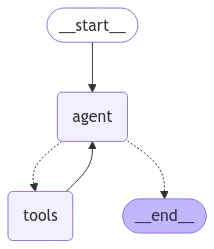
对于查询(即问答)智能体,我们将使用一个简单的 ReACT 架构,并为智能体提供用于根据各种过滤器查找曲目名称、艺术家姓名和专辑名称的工具。例如,您可以按特定艺术家查找专辑,按特定歌曲名称查找艺术家等。
```python theme={"theme":{"light":"catppuccin-latte","dark":"catppuccin-mocha"}}
from langchain.embeddings import init_embeddings
from langchain.tools import tool
from langchain_core.vectorstores import InMemoryVectorStore
from langchain.agents import create_agent
# 我们的 SQL 查询仅当我们在数据库中进行精确字符串值过滤时才有效。
# 为确保这一点,我们将提前为所有艺术家、曲目和专辑创建向量存储索引,
# 并使用这些索引来消除用户输入的歧义。例如,如果用户搜索“prince”的歌曲,
# 而我们的数据库将艺术家记录为“Prince”,理想情况下,当我们查询艺术家
# 向量存储以获取“prince”时,我们将返回“Prince”值,然后可以在 SQL 查询中使用它。
def index_fields() -> tuple[InMemoryVectorStore, InMemoryVectorStore, InMemoryVectorStore]: ...
track_store, artist_store, album_store = index_fields()
# 智能体工具
@tool
def lookup_track( ...
@tool
def lookup_album( ...
@tool
def lookup_artist( ...
# 智能体模型
qa_llm = init_chat_model("claude-sonnet-4-6")
# 预构建的 ReACT 智能体只期望状态具有 'messages' 键,因此
# 我们为退款智能体定义的状态也可以传递给我的查询智能体。
qa_graph = create_agent(qa_llm, tools=[lookup_track, lookup_artist, lookup_album])
```
```
display(Image(qa_graph.get_graph(xray=True).draw_mermaid_png()))
```
#### 查询智能体
对于查询(即问答)智能体,我们将使用一个简单的 ReACT 架构,并为智能体提供用于根据各种过滤器查找曲目名称、艺术家姓名和专辑名称的工具。例如,您可以按特定艺术家查找专辑,按特定歌曲名称查找艺术家等。
```python theme={"theme":{"light":"catppuccin-latte","dark":"catppuccin-mocha"}}
from langchain.embeddings import init_embeddings
from langchain.tools import tool
from langchain_core.vectorstores import InMemoryVectorStore
from langchain.agents import create_agent
# 我们的 SQL 查询仅当我们在数据库中进行精确字符串值过滤时才有效。
# 为确保这一点,我们将提前为所有艺术家、曲目和专辑创建向量存储索引,
# 并使用这些索引来消除用户输入的歧义。例如,如果用户搜索“prince”的歌曲,
# 而我们的数据库将艺术家记录为“Prince”,理想情况下,当我们查询艺术家
# 向量存储以获取“prince”时,我们将返回“Prince”值,然后可以在 SQL 查询中使用它。
def index_fields() -> tuple[InMemoryVectorStore, InMemoryVectorStore, InMemoryVectorStore]: ...
track_store, artist_store, album_store = index_fields()
# 智能体工具
@tool
def lookup_track( ...
@tool
def lookup_album( ...
@tool
def lookup_artist( ...
# 智能体模型
qa_llm = init_chat_model("claude-sonnet-4-6")
# 预构建的 ReACT 智能体只期望状态具有 'messages' 键,因此
# 我们为退款智能体定义的状态也可以传递给我的查询智能体。
qa_graph = create_agent(qa_llm, tools=[lookup_track, lookup_artist, lookup_album])
```
```
display(Image(qa_graph.get_graph(xray=True).draw_mermaid_png()))
```
 #### 父智能体
现在让我们定义一个结合了两个特定任务智能体的父智能体。父智能体的唯一工作是通过分类用户当前意图来路由到子智能体之一,并将输出编译为后续消息。
```python theme={"theme":{"light":"catppuccin-latte","dark":"catppuccin-mocha"}}
# 用于路由用户意图的模式。
# 我们将使用结构化输出强制模型仅返回
# 所需的输出。
class UserIntent(TypedDict):
"""用户在对话中的当前意图"""
intent: Literal["refund", "question_answering"]
# 具有结构化输出的路由模型
router_llm = init_chat_model("gpt-4.1-mini").with_structured_output(
UserIntent, method="json_schema", strict=True
)
# 路由指令。
route_instructions = """您正在管理一个销售歌曲曲目的在线音乐商店。\
您可以通过两种方式帮助客户:(1) 回答有关您商店销售的曲目的一般性问题,
(2) 帮助他们获得在您商店购买的商品的退款。
根据以下对话,判断用户当前是在寻求有关歌曲曲目的一般信息,
还是试图退还特定购买。
如果用户试图获得退款,则返回 'refund';如果他们在询问一般音乐问题,
则返回 'question_answering'。不要返回任何其他内容。不要试图回复用户。
"""
# 用于路由的节点。
async def intent_classifier(
state: State,
) -> Command[Literal["refund_agent", "question_answering_agent"]]:
response = router_llm.invoke(
[{"role": "system", "content": route_instructions}, *state["messages"]]
)
return Command(goto=response["intent"] + "_agent")
# 用于确保在智能体运行完成之前设置 'followup' 键的节点。
def compile_followup(state: State) -> dict:
"""如果未显式设置,则将 followup 设置为最后一条消息。"""
if not state.get("followup"):
return {"followup": state["messages"][-1].content}
return {}
# 智能体定义
graph_builder = StateGraph(State)
graph_builder.add_node(intent_classifier)
# 由于我们所有的子智能体都具有兼容的状态,
# 我们可以直接将它们添加为节点。
graph_builder.add_node("refund_agent", refund_graph)
graph_builder.add_node("question_answering_agent", qa_graph)
graph_builder.add_node(compile_followup)
graph_builder.set_entry_point("intent_classifier")
graph_builder.add_edge("refund_agent", "compile_followup")
graph_builder.add_edge("question_answering_agent", "compile_followup")
graph_builder.add_edge("compile_followup", END)
graph = graph_builder.compile()
```
我们可以可视化编译后的父图,包括其所有子图:
```python theme={"theme":{"light":"catppuccin-latte","dark":"catppuccin-mocha"}}
display(Image(graph.get_graph().draw_mermaid_png()))
```
#### 父智能体
现在让我们定义一个结合了两个特定任务智能体的父智能体。父智能体的唯一工作是通过分类用户当前意图来路由到子智能体之一,并将输出编译为后续消息。
```python theme={"theme":{"light":"catppuccin-latte","dark":"catppuccin-mocha"}}
# 用于路由用户意图的模式。
# 我们将使用结构化输出强制模型仅返回
# 所需的输出。
class UserIntent(TypedDict):
"""用户在对话中的当前意图"""
intent: Literal["refund", "question_answering"]
# 具有结构化输出的路由模型
router_llm = init_chat_model("gpt-4.1-mini").with_structured_output(
UserIntent, method="json_schema", strict=True
)
# 路由指令。
route_instructions = """您正在管理一个销售歌曲曲目的在线音乐商店。\
您可以通过两种方式帮助客户:(1) 回答有关您商店销售的曲目的一般性问题,
(2) 帮助他们获得在您商店购买的商品的退款。
根据以下对话,判断用户当前是在寻求有关歌曲曲目的一般信息,
还是试图退还特定购买。
如果用户试图获得退款,则返回 'refund';如果他们在询问一般音乐问题,
则返回 'question_answering'。不要返回任何其他内容。不要试图回复用户。
"""
# 用于路由的节点。
async def intent_classifier(
state: State,
) -> Command[Literal["refund_agent", "question_answering_agent"]]:
response = router_llm.invoke(
[{"role": "system", "content": route_instructions}, *state["messages"]]
)
return Command(goto=response["intent"] + "_agent")
# 用于确保在智能体运行完成之前设置 'followup' 键的节点。
def compile_followup(state: State) -> dict:
"""如果未显式设置,则将 followup 设置为最后一条消息。"""
if not state.get("followup"):
return {"followup": state["messages"][-1].content}
return {}
# 智能体定义
graph_builder = StateGraph(State)
graph_builder.add_node(intent_classifier)
# 由于我们所有的子智能体都具有兼容的状态,
# 我们可以直接将它们添加为节点。
graph_builder.add_node("refund_agent", refund_graph)
graph_builder.add_node("question_answering_agent", qa_graph)
graph_builder.add_node(compile_followup)
graph_builder.set_entry_point("intent_classifier")
graph_builder.add_edge("refund_agent", "compile_followup")
graph_builder.add_edge("question_answering_agent", "compile_followup")
graph_builder.add_edge("compile_followup", END)
graph = graph_builder.compile()
```
我们可以可视化编译后的父图,包括其所有子图:
```python theme={"theme":{"light":"catppuccin-latte","dark":"catppuccin-mocha"}}
display(Image(graph.get_graph().draw_mermaid_png()))
```
 #### 试一试
让我们来试用一下我们的自定义支持智能体!
```python theme={"theme":{"light":"catppuccin-latte","dark":"catppuccin-mocha"}}
state = await graph.ainvoke(
{"messages": [{"role": "user", "content": "你们有哪些詹姆斯·布朗的歌"}]}
)
print(state["followup"])
```
```
我在数据库中找到了 20 首詹姆斯·布朗的歌曲,全部来自专辑《Sex Machine》。它们是:...
```
```python theme={"theme":{"light":"catppuccin-latte","dark":"catppuccin-mocha"}}
state = await graph.ainvoke({"messages": [
{
"role": "user",
"content": "我叫 Aaron Mitchell,我的号码是 +1 (204) 452-6452。我买了一些齐柏林飞艇的歌,想退款",
}
]})
print(state["followup"])
```
```
您希望退还以下哪笔购买?...
```
## 评估
现在我们有了一个可测试版本的智能体,让我们运行一些评估。智能体评估至少可以关注以下 3 个方面:
* [最终响应](#最终响应评估器):输入是一个提示和可选的工具列表。输出是智能体的最终响应。
* [轨迹](#轨迹评估器):与之前一样,输入是一个提示和可选的工具列表。输出是工具调用列表。
* [单步](#单步评估器):与之前一样,输入是一个提示和可选的工具列表。输出是工具调用。
让我们运行每种类型的评估:
### 最终响应评估器
首先,让我们创建一个[数据集](/langsmith/evaluation-concepts#datasets)来评估智能体的端到端性能。为简单起见,我们将对最终响应和轨迹评估使用相同的数据集,因此我们将为每个示例问题添加真实响应和轨迹。我们将在下一节介绍轨迹。
```python theme={"theme":{"light":"catppuccin-latte","dark":"catppuccin-mocha"}}
from langsmith import Client
client = Client()
# 创建一个数据集
examples = [
{
"inputs": {
"question": "你们有多少首詹姆斯·布朗的歌",
},
"outputs": {
"response": "我们有 20 首詹姆斯·布朗的歌",
"trajectory": ["question_answering_agent", "lookup_track"]
}
},
{
"inputs": {
"question": "我叫 Aaron Mitchell,我想退款。",
},
"outputs": {
"response": "我需要更多信息来帮助您退款。请提供您的电话号码、发票 ID 或您希望退款的购买的订单项 ID。",
"trajectory": ["refund_agent"],
}
},
{
"inputs": {
"question": "我叫 Aaron Mitchell,我想退掉我买的齐柏林飞艇的歌。我的号码是 +1 (204) 452-6452",
},
"outputs": {
"response": '您希望退还以下哪笔购买?\n\n invoice_line_id track_name artist_name purchase_date quantity_purchased price_per_unit\n----------------- -------------------------------- ------------- ------------------- -------------------- ----------------\n 267 How Many More Times Led Zeppelin 2009-08-06 00:00:00 1 0.99\n 268 What Is And What Should Never Be Led Zeppelin 2009-08-06 00:00:00 1 0.99',
"trajectory": ["refund_agent", "lookup"],
},
},
{
"inputs": {
"question": "《Wish You Were Here》是谁唱的来着?你们还有他们的哪些其他专辑?",
},
"outputs": {
"response": "《Wish You Were Here》是平克·弗洛伊德的一张专辑",
"trajectory": ["question_answering_agent", "lookup_album"],
},
},
{
"inputs": {
"question": "我想要发票 237 的全额退款",
},
"outputs": {
"response": "您已获得退款 $0.99。",
"trajectory": ["refund_agent", "refund"],
}
},
]
dataset_name = "Chinook 客户服务机器人:端到端"
if not client.has_dataset(dataset_name=dataset_name):
dataset = client.create_dataset(dataset_name=dataset_name)
client.create_examples(
dataset_id=dataset.id,
examples=examples
)
```
我们将创建一个自定义的 [LLM 作为评判员](/langsmith/evaluation-concepts#llm-as-judge) 评估器,使用另一个模型将我们智能体在每个示例上的输出与参考响应进行比较,并判断它们是否等价:
```python theme={"theme":{"light":"catppuccin-latte","dark":"catppuccin-mocha"}}
# LLM 作为评判员的指令
grader_instructions = """您是一位给测验评分的老师。
您将收到一个问题、真实(正确)响应和学生响应。
请遵循以下评分标准:
(1) 仅根据学生响应相对于真实答案的事实准确性进行评分。
(2) 确保学生响应不包含任何相互矛盾的陈述。
(3) 如果学生响应包含比真实响应更多的信息,只要相对于真实响应在事实上是准确的,也是可以的。
正确性:
True 表示学生的响应符合所有标准。
False 表示学生的响应不符合所有标准。
请逐步解释您的推理,以确保您的推理和结论是正确的。"""
# LLM 作为评判员的输出模式
class Grade(TypedDict):
"""比较预期答案和实际答案,并对实际答案进行评分。"""
reasoning: Annotated[str, ..., "解释您判断实际响应是否正确的原因。"]
is_correct: Annotated[bool, ..., "如果学生响应大部分或完全正确,则为 True,否则为 False。"]
# 评判员 LLM
grader_llm = init_chat_model("gpt-4.1-mini", temperature=0).with_structured_output(Grade, method="json_schema", strict=True)
# 评估器函数
async def final_answer_correct(inputs: dict, outputs: dict, reference_outputs: dict) -> bool:
"""评估最终响应是否与参考响应等价。"""
# 注意,我们假设输出有一个 'response' 字典。我们需要确保
# 我们定义的目标函数包含这个键。
user = f"""问题:{inputs['question']}
真实响应:{reference_outputs['response']}
学生响应:{outputs['response']}"""
grade = await grader_llm.ainvoke([{"role": "system", "content": grader_instructions}, {"role": "user", "content": user}])
return grade["is_correct"]
```
现在我们可以运行评估了。我们的评估器假设我们的目标函数返回一个 'response' 键,所以让我们定义一个这样做的目标函数。
另外请记住,在我们的退款图中,我们使退款节点可配置,这样如果我们指定 `config={"env": "test"}`,我们将模拟退款而不实际更新数据库。在调用我们的图时,我们将在目标 `run_graph` 方法中使用此可配置变量:
```python theme={"theme":{"light":"catppuccin-latte","dark":"catppuccin-mocha"}}
# 目标函数
async def run_graph(inputs: dict) -> dict:
"""运行图并跟踪其所采取的轨迹以及最终响应。"""
result = await graph.ainvoke({"messages": [
{ "role": "user", "content": inputs['question']},
]}, config={"env": "test"})
return {"response": result["followup"]}
# 评估任务和结果
experiment_results = await client.aevaluate(
run_graph,
data=dataset_name,
evaluators=[final_answer_correct],
experiment_prefix="sql-agent-gpt4o-e2e",
num_repetitions=1,
max_concurrency=4,
)
experiment_results.to_pandas()
```
您可以在此处查看这些结果:[LangSmith 链接](https://smith.langchain.com/public/708d08f4-300e-4c75-9677-c6b71b0d28c9/d)。
### 轨迹评估器
随着智能体变得越来越复杂,它们拥有更多潜在的故障点。与其使用简单的通过/失败评估,通常最好使用可以在智能体采取了一些正确步骤(即使没有得出正确的最终答案)时给予部分分数的评估。
这就是轨迹评估的用武之地。轨迹评估:
1. 将智能体采取的实际步骤序列与预期序列进行比较
2. 根据正确完成的预期步骤数量计算得分
对于此示例,我们的端到端数据集包含我们希望智能体采取的有序步骤列表。让我们创建一个评估器,检查智能体的实际轨迹与这些预期步骤,并计算完成了多少百分比:
```python theme={"theme":{"light":"catppuccin-latte","dark":"catppuccin-mocha"}}
def trajectory_subsequence(outputs: dict, reference_outputs: dict) -> float:
"""检查智能体完成了多少所需步骤。"""
if len(reference_outputs['trajectory']) > len(outputs['trajectory']):
return False
i = j = 0
while i < len(reference_outputs['trajectory']) and j < len(outputs['trajectory']):
if reference_outputs['trajectory'][i] == outputs['trajectory'][j]:
i += 1
j += 1
return i / len(reference_outputs['trajectory'])
```
现在我们可以运行评估了。我们的评估器假设我们的目标函数返回一个 'trajectory' 键,所以让我们定义一个这样做的目标函数。我们需要使用 [LangGraph 的流式功能](https://langchain-ai.github.io/langgra/langsmith/observability-concepts/streaming/) 来记录轨迹。
请注意,我们正在重用与最终响应评估相同的数据集,因此我们可以同时运行两个评估器,并定义一个同时返回 "response" 和 "trajectory" 的目标函数。在实践中,为每种评估类型设置单独的数据集通常很有用,这就是我们在此分别展示它们的原因:
```python theme={"theme":{"light":"catppuccin-latte","dark":"catppuccin-mocha"}}
async def run_graph(inputs: dict) -> dict:
"""运行图并跟踪其所采取的轨迹以及最终响应。"""
trajectory = []
# 设置 subgraph=True 以流式传输来自主图子图的事件:https://langchain-ai.github.io/langgraph/how-tos/streaming-subgraphs/
# 设置 stream_mode="debug" 以流式传输所有可能的事件:https://langchain-ai.github.io/langgra/langsmith/observability-concepts/streaming
async for namespace, chunk in graph.astream({"messages": [
{
"role": "user",
"content": inputs['question'],
}
]}, subgraphs=True, stream_mode="debug"):
# 进入节点的事件类型
if chunk['type'] == 'task':
# 记录节点名称
trajectory.append(chunk['payload']['name'])
# 根据我们定义数据集的方式,我们还需要跟踪我们的问答 ReACT 智能体何时调用了特定工具。
# 当调用 ToolsNode(名为 "tools")时,可以通过查看最新输入消息的 AIMessage.tool_calls 来找到这些工具调用。
if chunk['payload']['name'] == 'tools' and chunk['type'] == 'task':
for tc in chunk['payload']['input']['messages'][-1].tool_calls:
trajectory.append(tc['name'])
return {"trajectory": trajectory}
experiment_results = await client.aevaluate(
run_graph,
data=dataset_name,
evaluators=[trajectory_subsequence],
experiment_prefix="sql-agent-gpt4o-trajectory",
num_repetitions=1,
max_concurrency=4,
)
experiment_results.to_pandas()
```
您可以在此处查看这些结果:[LangSmith 链接](https://smith.langchain.com/public/708d08f4-300e-4c75-9677-c6b71b0d28c9/d)。
### 单步评估器
虽然端到端测试为您提供有关智能体性能的最多信号,但出于调试和迭代智能体的目的,查明困难的特定步骤并直接评估它们可能会有所帮助。
在我们的案例中,智能体的一个关键部分是将用户意图正确路由到“退款”路径或“问答”路径。让我们创建一个数据集并运行一些评估来直接对这一个组件进行压力测试。
```python theme={"theme":{"light":"catppuccin-latte","dark":"catppuccin-mocha"}}
# 创建数据集
examples = [
{
"inputs": {"messages": [{"role": "user", "content": "我最近买了一些曲目,但我不喜欢它们"}]},
"outputs": {"route": "refund_agent"},
},
{
"inputs": {"messages": [{"role": "user", "content": "我在考虑买一些滚石乐队的曲子,有什么推荐吗?"}]},
"outputs": {"route": "question_answering_agent"},
},
{
"inputs": {"messages": [{"role": "user", "content": "我想退款订单 237"}, {"role": "assistant", "content": "我已为您退款总计 $1.98。今天还能为您做些什么?"}, {"role": "user", "content": "王子在 2000 年发行过专辑吗?"}]},
"outputs": {"route": "question_answering_agent"},
},
{
"inputs": {"messages": [{"role": "user", "content": "我最近买了一个《Yesterday》的翻唱版本,但记不清是谁唱的了,你们有哪些版本?"}]},
"outputs": {"route": "question_answering_agent"},
},
]
dataset_name = "Chinook 客户服务机器人:意图分类器"
if not client.has_dataset(dataset_name=dataset_name):
dataset = client.create_dataset(dataset_name=dataset_name)
client.create_examples(
dataset_id=dataset.id,
examples=examples
)
# 评估器
def correct(outputs: dict, reference_outputs: dict) -> bool:
"""检查智能体是否选择了正确的路由。"""
return outputs["route"] == reference_outputs["route"]
# 用于运行相关步骤的目标函数
async def run_intent_classifier(inputs: dict) -> dict:
# 注意,我们可以直接访问并运行图的 intent_classifier 节点。
command = await graph.nodes['intent_classifier'].ainvoke(inputs)
return {"route": command.goto}
# 运行评估
experiment_results = await client.aevaluate(
run_intent_classifier,
data=dataset_name,
evaluators=[correct],
experiment_prefix="sql-agent-gpt4o-intent-classifier",
max_concurrency=4,
)
```
您可以在此处查看这些结果:[LangSmith 链接](https://smith.langchain.com/public/f133dae2-8a88-43a0-9bfd-ab45bfa3920b/d)。
## 参考代码
以下是包含上述所有代码的合并脚本:
```python theme={"theme":{"light":"catppuccin-latte","dark":"catppuccin-mocha"}}
import json
import sqlite3
from typing import Literal
from langchain.chat_models import init_chat_model
from langchain.embeddings import init_embeddings
from langchain_core.runnables import RunnableConfig
from langchain.tools import tool
from langchain_core.vectorstores import InMemoryVectorStore
from langgraph.graph import END, StateGraph
from langgraph.graph.message import AnyMessage, add_messages
from langchain.agents import create_agent
from langgraph.types import Command, interrupt
from langsmith import Client
import requests
from tabulate import tabulate
from typing_extensions import Annotated, TypedDict
url = "https://storage.googleapis.com/benchmarks-artifacts/chinook/Chinook.db"
response = requests.get(url)
if response.status_code == 200:
# 以二进制写入模式打开本地文件
with open("chinook.db", "wb") as file:
# 将响应内容(文件)写入本地文件
file.write(response.content)
print("文件已下载并保存为 Chinook.db")
else:
print(f"文件下载失败。状态码:{response.status_code}")
def _refund(
invoice_id: int | None, invoice_line_ids: list[int] | None, mock: bool = False
) -> float:
"""给定发票 ID 和/或发票行 ID,删除 Chinook DB 中相关的 Invoice/InvoiceLine 记录。
参数:
invoice_id:要删除的发票。
invoice_line_ids:要删除的发票行。
mock:如果为 True,则不实际删除指定的发票/发票行。用于测试目的。
返回:
float:已删除(或模拟删除)的总金额。
"""
if invoice_id is None and invoice_line_ids is None:
return 0.0
# 连接到 Chinook 数据库
conn = sqlite3.connect("chinook.db")
cursor = conn.cursor()
total_refund = 0.0
try:
# 如果提供了 invoice_id,则删除整个发票及其行
if invoice_id is not None:
# 首先获取发票的总金额
cursor.execute(
"""
SELECT Total
FROM Invoice
WHERE InvoiceId = ?
""",
(invoice_id,),
)
result = cursor.fetchone()
if result:
total_refund += result[0]
# 首先删除发票行(由于外键约束)
if not mock:
cursor.execute(
"""
DELETE FROM InvoiceLine
WHERE InvoiceId = ?
""",
(invoice_id,),
)
# 然后删除发票
cursor.execute(
"""
DELETE FROM Invoice
WHERE InvoiceId = ?
""",
(invoice_id,),
)
# 如果提供了特定的发票行
if invoice_line_ids is not None:
# 获取指定发票行的总金额
placeholders = ",".join(["?" for _ in invoice_line_ids])
cursor.execute(
f"""
SELECT SUM(UnitPrice * Quantity)
FROM InvoiceLine
WHERE InvoiceLineId IN ({placeholders})
""",
invoice_line_ids,
)
result = cursor.fetchone()
if result and result[0]:
total_refund += result[0]
if not mock:
# 删除指定的发票行
cursor.execute(
f"""
DELETE FROM InvoiceLine
WHERE InvoiceLineId IN ({placeholders})
""",
invoice_line_ids,
)
# 提交更改
conn.commit()
except sqlite3.Error as e:
# 如果出错则回滚
conn.rollback()
raise e
finally:
# 关闭连接
conn.close()
return float(total_refund)
def _lookup(
customer_first_name: str,
customer_last_name: str,
customer_phone: str,
track_name: str | None,
album_title: str | None,
artist_name: str | None,
purchase_date_iso_8601: str | None,
) -> list[dict]:
"""在 Chinook DB 中查找与给定过滤器匹配的所有发票行 ID。
返回:
一个字典列表,每个字典包含键:{
'invoice_line_id',
'track_name',
'artist_name',
'purchase_date',
'quantity_purchased',
'price_per_unit'
}
"""
# 连接到数据库
conn = sqlite3.connect("chinook.db")
cursor = conn.cursor()
# 连接所有必要表的基础查询
query = """
SELECT
il.InvoiceLineId,
t.Name as track_name,
art.Name as artist_name,
i.InvoiceDate as purchase_date,
il.Quantity as quantity_purchased,
il.UnitPrice as price_per_unit
FROM InvoiceLine il
JOIN Invoice i ON il.InvoiceId = i.InvoiceId
JOIN Customer c ON i.CustomerId = c.CustomerId
JOIN Track t ON il.TrackId = t.TrackId
JOIN Album alb ON t.AlbumId = alb.AlbumId
JOIN Artist art ON alb.ArtistId = art.ArtistId
WHERE c.FirstName = ?
AND c.LastName = ?
AND c.Phone = ?
"""
# 查询参数
params = [customer_first_name, customer_last_name, customer_phone]
# 添加可选过滤器
if track_name:
query += " AND t.Name = ?"
params.append(track_name)
if album_title:
query += " AND alb.Title = ?"
params.append(album_title)
if artist_name:
query += " AND art.Name = ?"
params.append(artist_name)
if purchase_date_iso_8601:
query += " AND date(i.InvoiceDate) = date(?)"
params.append(purchase_date_iso_8601)
# 执行查询
cursor.execute(query, params)
# 获取结果
results = cursor.fetchall()
# 将结果转换为字典列表
output = []
for row in results:
output.append(
{
"invoice_line_id": row[0],
"track_name": row[1],
"artist_name": row[2],
"purchase_date": row[3],
"quantity_purchased": row[4],
"price_per_unit": row[5],
}
)
# 关闭连接
conn.close()
return output
# 图状态。
class State(TypedDict):
messages: list[AnyMessage]
```
***
#### 试一试
让我们来试用一下我们的自定义支持智能体!
```python theme={"theme":{"light":"catppuccin-latte","dark":"catppuccin-mocha"}}
state = await graph.ainvoke(
{"messages": [{"role": "user", "content": "你们有哪些詹姆斯·布朗的歌"}]}
)
print(state["followup"])
```
```
我在数据库中找到了 20 首詹姆斯·布朗的歌曲,全部来自专辑《Sex Machine》。它们是:...
```
```python theme={"theme":{"light":"catppuccin-latte","dark":"catppuccin-mocha"}}
state = await graph.ainvoke({"messages": [
{
"role": "user",
"content": "我叫 Aaron Mitchell,我的号码是 +1 (204) 452-6452。我买了一些齐柏林飞艇的歌,想退款",
}
]})
print(state["followup"])
```
```
您希望退还以下哪笔购买?...
```
## 评估
现在我们有了一个可测试版本的智能体,让我们运行一些评估。智能体评估至少可以关注以下 3 个方面:
* [最终响应](#最终响应评估器):输入是一个提示和可选的工具列表。输出是智能体的最终响应。
* [轨迹](#轨迹评估器):与之前一样,输入是一个提示和可选的工具列表。输出是工具调用列表。
* [单步](#单步评估器):与之前一样,输入是一个提示和可选的工具列表。输出是工具调用。
让我们运行每种类型的评估:
### 最终响应评估器
首先,让我们创建一个[数据集](/langsmith/evaluation-concepts#datasets)来评估智能体的端到端性能。为简单起见,我们将对最终响应和轨迹评估使用相同的数据集,因此我们将为每个示例问题添加真实响应和轨迹。我们将在下一节介绍轨迹。
```python theme={"theme":{"light":"catppuccin-latte","dark":"catppuccin-mocha"}}
from langsmith import Client
client = Client()
# 创建一个数据集
examples = [
{
"inputs": {
"question": "你们有多少首詹姆斯·布朗的歌",
},
"outputs": {
"response": "我们有 20 首詹姆斯·布朗的歌",
"trajectory": ["question_answering_agent", "lookup_track"]
}
},
{
"inputs": {
"question": "我叫 Aaron Mitchell,我想退款。",
},
"outputs": {
"response": "我需要更多信息来帮助您退款。请提供您的电话号码、发票 ID 或您希望退款的购买的订单项 ID。",
"trajectory": ["refund_agent"],
}
},
{
"inputs": {
"question": "我叫 Aaron Mitchell,我想退掉我买的齐柏林飞艇的歌。我的号码是 +1 (204) 452-6452",
},
"outputs": {
"response": '您希望退还以下哪笔购买?\n\n invoice_line_id track_name artist_name purchase_date quantity_purchased price_per_unit\n----------------- -------------------------------- ------------- ------------------- -------------------- ----------------\n 267 How Many More Times Led Zeppelin 2009-08-06 00:00:00 1 0.99\n 268 What Is And What Should Never Be Led Zeppelin 2009-08-06 00:00:00 1 0.99',
"trajectory": ["refund_agent", "lookup"],
},
},
{
"inputs": {
"question": "《Wish You Were Here》是谁唱的来着?你们还有他们的哪些其他专辑?",
},
"outputs": {
"response": "《Wish You Were Here》是平克·弗洛伊德的一张专辑",
"trajectory": ["question_answering_agent", "lookup_album"],
},
},
{
"inputs": {
"question": "我想要发票 237 的全额退款",
},
"outputs": {
"response": "您已获得退款 $0.99。",
"trajectory": ["refund_agent", "refund"],
}
},
]
dataset_name = "Chinook 客户服务机器人:端到端"
if not client.has_dataset(dataset_name=dataset_name):
dataset = client.create_dataset(dataset_name=dataset_name)
client.create_examples(
dataset_id=dataset.id,
examples=examples
)
```
我们将创建一个自定义的 [LLM 作为评判员](/langsmith/evaluation-concepts#llm-as-judge) 评估器,使用另一个模型将我们智能体在每个示例上的输出与参考响应进行比较,并判断它们是否等价:
```python theme={"theme":{"light":"catppuccin-latte","dark":"catppuccin-mocha"}}
# LLM 作为评判员的指令
grader_instructions = """您是一位给测验评分的老师。
您将收到一个问题、真实(正确)响应和学生响应。
请遵循以下评分标准:
(1) 仅根据学生响应相对于真实答案的事实准确性进行评分。
(2) 确保学生响应不包含任何相互矛盾的陈述。
(3) 如果学生响应包含比真实响应更多的信息,只要相对于真实响应在事实上是准确的,也是可以的。
正确性:
True 表示学生的响应符合所有标准。
False 表示学生的响应不符合所有标准。
请逐步解释您的推理,以确保您的推理和结论是正确的。"""
# LLM 作为评判员的输出模式
class Grade(TypedDict):
"""比较预期答案和实际答案,并对实际答案进行评分。"""
reasoning: Annotated[str, ..., "解释您判断实际响应是否正确的原因。"]
is_correct: Annotated[bool, ..., "如果学生响应大部分或完全正确,则为 True,否则为 False。"]
# 评判员 LLM
grader_llm = init_chat_model("gpt-4.1-mini", temperature=0).with_structured_output(Grade, method="json_schema", strict=True)
# 评估器函数
async def final_answer_correct(inputs: dict, outputs: dict, reference_outputs: dict) -> bool:
"""评估最终响应是否与参考响应等价。"""
# 注意,我们假设输出有一个 'response' 字典。我们需要确保
# 我们定义的目标函数包含这个键。
user = f"""问题:{inputs['question']}
真实响应:{reference_outputs['response']}
学生响应:{outputs['response']}"""
grade = await grader_llm.ainvoke([{"role": "system", "content": grader_instructions}, {"role": "user", "content": user}])
return grade["is_correct"]
```
现在我们可以运行评估了。我们的评估器假设我们的目标函数返回一个 'response' 键,所以让我们定义一个这样做的目标函数。
另外请记住,在我们的退款图中,我们使退款节点可配置,这样如果我们指定 `config={"env": "test"}`,我们将模拟退款而不实际更新数据库。在调用我们的图时,我们将在目标 `run_graph` 方法中使用此可配置变量:
```python theme={"theme":{"light":"catppuccin-latte","dark":"catppuccin-mocha"}}
# 目标函数
async def run_graph(inputs: dict) -> dict:
"""运行图并跟踪其所采取的轨迹以及最终响应。"""
result = await graph.ainvoke({"messages": [
{ "role": "user", "content": inputs['question']},
]}, config={"env": "test"})
return {"response": result["followup"]}
# 评估任务和结果
experiment_results = await client.aevaluate(
run_graph,
data=dataset_name,
evaluators=[final_answer_correct],
experiment_prefix="sql-agent-gpt4o-e2e",
num_repetitions=1,
max_concurrency=4,
)
experiment_results.to_pandas()
```
您可以在此处查看这些结果:[LangSmith 链接](https://smith.langchain.com/public/708d08f4-300e-4c75-9677-c6b71b0d28c9/d)。
### 轨迹评估器
随着智能体变得越来越复杂,它们拥有更多潜在的故障点。与其使用简单的通过/失败评估,通常最好使用可以在智能体采取了一些正确步骤(即使没有得出正确的最终答案)时给予部分分数的评估。
这就是轨迹评估的用武之地。轨迹评估:
1. 将智能体采取的实际步骤序列与预期序列进行比较
2. 根据正确完成的预期步骤数量计算得分
对于此示例,我们的端到端数据集包含我们希望智能体采取的有序步骤列表。让我们创建一个评估器,检查智能体的实际轨迹与这些预期步骤,并计算完成了多少百分比:
```python theme={"theme":{"light":"catppuccin-latte","dark":"catppuccin-mocha"}}
def trajectory_subsequence(outputs: dict, reference_outputs: dict) -> float:
"""检查智能体完成了多少所需步骤。"""
if len(reference_outputs['trajectory']) > len(outputs['trajectory']):
return False
i = j = 0
while i < len(reference_outputs['trajectory']) and j < len(outputs['trajectory']):
if reference_outputs['trajectory'][i] == outputs['trajectory'][j]:
i += 1
j += 1
return i / len(reference_outputs['trajectory'])
```
现在我们可以运行评估了。我们的评估器假设我们的目标函数返回一个 'trajectory' 键,所以让我们定义一个这样做的目标函数。我们需要使用 [LangGraph 的流式功能](https://langchain-ai.github.io/langgra/langsmith/observability-concepts/streaming/) 来记录轨迹。
请注意,我们正在重用与最终响应评估相同的数据集,因此我们可以同时运行两个评估器,并定义一个同时返回 "response" 和 "trajectory" 的目标函数。在实践中,为每种评估类型设置单独的数据集通常很有用,这就是我们在此分别展示它们的原因:
```python theme={"theme":{"light":"catppuccin-latte","dark":"catppuccin-mocha"}}
async def run_graph(inputs: dict) -> dict:
"""运行图并跟踪其所采取的轨迹以及最终响应。"""
trajectory = []
# 设置 subgraph=True 以流式传输来自主图子图的事件:https://langchain-ai.github.io/langgraph/how-tos/streaming-subgraphs/
# 设置 stream_mode="debug" 以流式传输所有可能的事件:https://langchain-ai.github.io/langgra/langsmith/observability-concepts/streaming
async for namespace, chunk in graph.astream({"messages": [
{
"role": "user",
"content": inputs['question'],
}
]}, subgraphs=True, stream_mode="debug"):
# 进入节点的事件类型
if chunk['type'] == 'task':
# 记录节点名称
trajectory.append(chunk['payload']['name'])
# 根据我们定义数据集的方式,我们还需要跟踪我们的问答 ReACT 智能体何时调用了特定工具。
# 当调用 ToolsNode(名为 "tools")时,可以通过查看最新输入消息的 AIMessage.tool_calls 来找到这些工具调用。
if chunk['payload']['name'] == 'tools' and chunk['type'] == 'task':
for tc in chunk['payload']['input']['messages'][-1].tool_calls:
trajectory.append(tc['name'])
return {"trajectory": trajectory}
experiment_results = await client.aevaluate(
run_graph,
data=dataset_name,
evaluators=[trajectory_subsequence],
experiment_prefix="sql-agent-gpt4o-trajectory",
num_repetitions=1,
max_concurrency=4,
)
experiment_results.to_pandas()
```
您可以在此处查看这些结果:[LangSmith 链接](https://smith.langchain.com/public/708d08f4-300e-4c75-9677-c6b71b0d28c9/d)。
### 单步评估器
虽然端到端测试为您提供有关智能体性能的最多信号,但出于调试和迭代智能体的目的,查明困难的特定步骤并直接评估它们可能会有所帮助。
在我们的案例中,智能体的一个关键部分是将用户意图正确路由到“退款”路径或“问答”路径。让我们创建一个数据集并运行一些评估来直接对这一个组件进行压力测试。
```python theme={"theme":{"light":"catppuccin-latte","dark":"catppuccin-mocha"}}
# 创建数据集
examples = [
{
"inputs": {"messages": [{"role": "user", "content": "我最近买了一些曲目,但我不喜欢它们"}]},
"outputs": {"route": "refund_agent"},
},
{
"inputs": {"messages": [{"role": "user", "content": "我在考虑买一些滚石乐队的曲子,有什么推荐吗?"}]},
"outputs": {"route": "question_answering_agent"},
},
{
"inputs": {"messages": [{"role": "user", "content": "我想退款订单 237"}, {"role": "assistant", "content": "我已为您退款总计 $1.98。今天还能为您做些什么?"}, {"role": "user", "content": "王子在 2000 年发行过专辑吗?"}]},
"outputs": {"route": "question_answering_agent"},
},
{
"inputs": {"messages": [{"role": "user", "content": "我最近买了一个《Yesterday》的翻唱版本,但记不清是谁唱的了,你们有哪些版本?"}]},
"outputs": {"route": "question_answering_agent"},
},
]
dataset_name = "Chinook 客户服务机器人:意图分类器"
if not client.has_dataset(dataset_name=dataset_name):
dataset = client.create_dataset(dataset_name=dataset_name)
client.create_examples(
dataset_id=dataset.id,
examples=examples
)
# 评估器
def correct(outputs: dict, reference_outputs: dict) -> bool:
"""检查智能体是否选择了正确的路由。"""
return outputs["route"] == reference_outputs["route"]
# 用于运行相关步骤的目标函数
async def run_intent_classifier(inputs: dict) -> dict:
# 注意,我们可以直接访问并运行图的 intent_classifier 节点。
command = await graph.nodes['intent_classifier'].ainvoke(inputs)
return {"route": command.goto}
# 运行评估
experiment_results = await client.aevaluate(
run_intent_classifier,
data=dataset_name,
evaluators=[correct],
experiment_prefix="sql-agent-gpt4o-intent-classifier",
max_concurrency=4,
)
```
您可以在此处查看这些结果:[LangSmith 链接](https://smith.langchain.com/public/f133dae2-8a88-43a0-9bfd-ab45bfa3920b/d)。
## 参考代码
以下是包含上述所有代码的合并脚本:
```python theme={"theme":{"light":"catppuccin-latte","dark":"catppuccin-mocha"}}
import json
import sqlite3
from typing import Literal
from langchain.chat_models import init_chat_model
from langchain.embeddings import init_embeddings
from langchain_core.runnables import RunnableConfig
from langchain.tools import tool
from langchain_core.vectorstores import InMemoryVectorStore
from langgraph.graph import END, StateGraph
from langgraph.graph.message import AnyMessage, add_messages
from langchain.agents import create_agent
from langgraph.types import Command, interrupt
from langsmith import Client
import requests
from tabulate import tabulate
from typing_extensions import Annotated, TypedDict
url = "https://storage.googleapis.com/benchmarks-artifacts/chinook/Chinook.db"
response = requests.get(url)
if response.status_code == 200:
# 以二进制写入模式打开本地文件
with open("chinook.db", "wb") as file:
# 将响应内容(文件)写入本地文件
file.write(response.content)
print("文件已下载并保存为 Chinook.db")
else:
print(f"文件下载失败。状态码:{response.status_code}")
def _refund(
invoice_id: int | None, invoice_line_ids: list[int] | None, mock: bool = False
) -> float:
"""给定发票 ID 和/或发票行 ID,删除 Chinook DB 中相关的 Invoice/InvoiceLine 记录。
参数:
invoice_id:要删除的发票。
invoice_line_ids:要删除的发票行。
mock:如果为 True,则不实际删除指定的发票/发票行。用于测试目的。
返回:
float:已删除(或模拟删除)的总金额。
"""
if invoice_id is None and invoice_line_ids is None:
return 0.0
# 连接到 Chinook 数据库
conn = sqlite3.connect("chinook.db")
cursor = conn.cursor()
total_refund = 0.0
try:
# 如果提供了 invoice_id,则删除整个发票及其行
if invoice_id is not None:
# 首先获取发票的总金额
cursor.execute(
"""
SELECT Total
FROM Invoice
WHERE InvoiceId = ?
""",
(invoice_id,),
)
result = cursor.fetchone()
if result:
total_refund += result[0]
# 首先删除发票行(由于外键约束)
if not mock:
cursor.execute(
"""
DELETE FROM InvoiceLine
WHERE InvoiceId = ?
""",
(invoice_id,),
)
# 然后删除发票
cursor.execute(
"""
DELETE FROM Invoice
WHERE InvoiceId = ?
""",
(invoice_id,),
)
# 如果提供了特定的发票行
if invoice_line_ids is not None:
# 获取指定发票行的总金额
placeholders = ",".join(["?" for _ in invoice_line_ids])
cursor.execute(
f"""
SELECT SUM(UnitPrice * Quantity)
FROM InvoiceLine
WHERE InvoiceLineId IN ({placeholders})
""",
invoice_line_ids,
)
result = cursor.fetchone()
if result and result[0]:
total_refund += result[0]
if not mock:
# 删除指定的发票行
cursor.execute(
f"""
DELETE FROM InvoiceLine
WHERE InvoiceLineId IN ({placeholders})
""",
invoice_line_ids,
)
# 提交更改
conn.commit()
except sqlite3.Error as e:
# 如果出错则回滚
conn.rollback()
raise e
finally:
# 关闭连接
conn.close()
return float(total_refund)
def _lookup(
customer_first_name: str,
customer_last_name: str,
customer_phone: str,
track_name: str | None,
album_title: str | None,
artist_name: str | None,
purchase_date_iso_8601: str | None,
) -> list[dict]:
"""在 Chinook DB 中查找与给定过滤器匹配的所有发票行 ID。
返回:
一个字典列表,每个字典包含键:{
'invoice_line_id',
'track_name',
'artist_name',
'purchase_date',
'quantity_purchased',
'price_per_unit'
}
"""
# 连接到数据库
conn = sqlite3.connect("chinook.db")
cursor = conn.cursor()
# 连接所有必要表的基础查询
query = """
SELECT
il.InvoiceLineId,
t.Name as track_name,
art.Name as artist_name,
i.InvoiceDate as purchase_date,
il.Quantity as quantity_purchased,
il.UnitPrice as price_per_unit
FROM InvoiceLine il
JOIN Invoice i ON il.InvoiceId = i.InvoiceId
JOIN Customer c ON i.CustomerId = c.CustomerId
JOIN Track t ON il.TrackId = t.TrackId
JOIN Album alb ON t.AlbumId = alb.AlbumId
JOIN Artist art ON alb.ArtistId = art.ArtistId
WHERE c.FirstName = ?
AND c.LastName = ?
AND c.Phone = ?
"""
# 查询参数
params = [customer_first_name, customer_last_name, customer_phone]
# 添加可选过滤器
if track_name:
query += " AND t.Name = ?"
params.append(track_name)
if album_title:
query += " AND alb.Title = ?"
params.append(album_title)
if artist_name:
query += " AND art.Name = ?"
params.append(artist_name)
if purchase_date_iso_8601:
query += " AND date(i.InvoiceDate) = date(?)"
params.append(purchase_date_iso_8601)
# 执行查询
cursor.execute(query, params)
# 获取结果
results = cursor.fetchall()
# 将结果转换为字典列表
output = []
for row in results:
output.append(
{
"invoice_line_id": row[0],
"track_name": row[1],
"artist_name": row[2],
"purchase_date": row[3],
"quantity_purchased": row[4],
"price_per_unit": row[5],
}
)
# 关闭连接
conn.close()
return output
# 图状态。
class State(TypedDict):
messages: list[AnyMessage]
```
***
[Edit this page on GitHub](https://github.com/langchain-ai/docs/edit/main/src/i18n\zh-CN\langsmith\evaluate-complex-agent.mdx) or [file an issue](https://github.com/langchain-ai/docs/issues/new/choose).
[Connect these docs](/use-these-docs) to Claude, VSCode, and more via MCP for real-time answers.