> ## Documentation Index
> Fetch the complete documentation index at: https://langchain-zh.cn/llms.txt
> Use this file to discover all available pages before exploring further.
# 在 GCP 上自托管 LangSmith
在 [Google Cloud Platform (GCP)](https://cloud.google.com/) 上运行 LangSmith 时,您可以设置为[完全自托管](/langsmith/self-hosted)或[混合](/langsmith/hybrid)模式。完全自托管模式部署一个完整的 LangSmith 平台,包含可观测性功能以及创建代理部署的选项。混合模式仅包含在您云内的数据平面中运行代理所需的基础设施,而我们的 SaaS 提供控制平面和可观测性功能。
本页提供:
* 部署到 GKE、配置托管服务和设置身份验证的[初始设置步骤](#initial-setup)。
* [GCP 特定的架构模式](#reference-architecture)和参考图表。
* [服务建议](#compute-options)和最佳实践。
* 关于卓越运营、安全性和可靠性的[Google Cloud Well-Architected 最佳实践](#google-cloud-well-architected-best-practices)。
LangChain 专门为 GCP 提供了 Terraform 模块,以帮助为 LangSmith 配置基础设施。这些模块可以快速设置 GKE 集群、Cloud SQL、Memorystore Redis、Cloud Storage 和网络资源。
查看 [GCP Terraform 模块](https://github.com/langchain-ai/terraform/tree/main/modules/gcp) 获取文档和示例。
## 初始设置
遵循 [Kubernetes 安装指南](/langsmith/kubernetes)。LangSmith 已在 Google Kubernetes Engine (GKE) 上测试。
**GKE 特定说明:**
* LangSmith 适用于标准 GKE 集群
* 使用 GCE 持久磁盘存储类
对于生产部署,连接到 GCP 托管服务:
在 GCS 中存储追踪数据
PostgreSQL 数据库
用于缓存的 Redis
分析数据库
使用 [Workload Identity](https://cloud.google.com/kubernetes-engine/docs/how-to/workload-identity) 对 LangSmith Pod 进行身份验证以访问 GCP 服务。
**关键页面:**
* [GCS HMAC 密钥身份验证](/langsmith/self-host-blob-storage#google-cloud-storage)
* [Cloud SQL IAM 身份验证](/langsmith/self-host-external-postgres#iam-authentication)
* [Memorystore IAM 身份验证](/langsmith/self-host-external-redis#iam-authentication)
完成这些初始设置步骤后,您可以查看以下完整的 GCP 架构和最佳实践。
## 参考架构
我们建议利用 GCP 的托管服务来提供一个可扩展、安全且具有弹性的平台。以下架构适用于自托管和混合模式,并符合 [Google Cloud Well-Architected Framework](https://docs.cloud.google.com/architecture/framework):
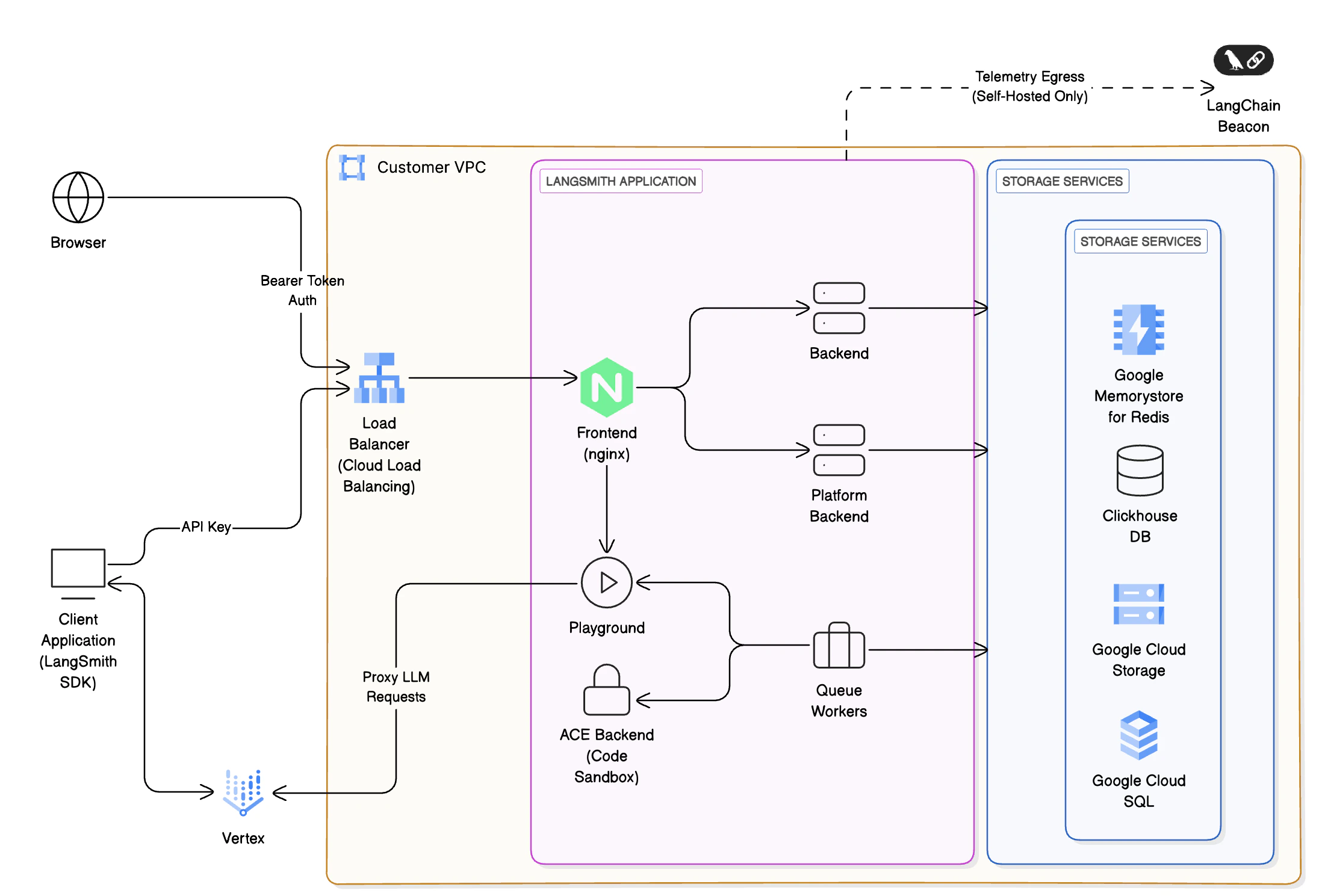 * **入口和网络**:请求通过您 [VPC](https://cloud.google.com/vpc) 内的 [Cloud Load Balancing](https://cloud.google.com/load-balancing) 进入,使用 [Cloud Armor](https://cloud.google.com/armor) 和基于 [IAM](https://cloud.google.com/iam) 的身份验证进行保护。
* **前端和后端服务**:容器在 [Google Kubernetes Engine (GKE)](https://cloud.google.com/kubernetes-engine) 上运行,在负载均衡器后面进行编排。根据需要将请求路由到集群内的其他服务。
* **存储和数据库**:
* [Cloud SQL for PostgreSQL](https://cloud.google.com/sql/docs/postgres):元数据、项目、用户以及已部署代理的短期和长期记忆。LangSmith 支持 PostgreSQL 14 或更高版本。
* [Memorystore for Redis](https://cloud.google.com/memorystore/docs/redis):缓存和作业队列。Memorystore 可以是单实例或集群模式,运行 Redis OSS 5 或更高版本。
* ClickHouse + [Persistent Disks](https://cloud.google.com/compute/docs/disks):分析和追踪存储。
* 除非安全或合规性原因不允许,否则我们建议使用[外部托管的 ClickHouse 解决方案](/langsmith/self-host-external-clickhouse)。
* 混合部署不需要 ClickHouse。
* [Cloud Storage](https://cloud.google.com/storage):用于追踪工件和遥测的对象存储。
* **LLM 集成**:可选地将请求代理到 [Vertex AI](https://cloud.google.com/vertex-ai) 进行 LLM 推理。
* **监控和可观测性**:与 [Cloud Monitoring](https://cloud.google.com/monitoring) 和 [Cloud Logging](https://cloud.google.com/logging) 集成。
## 计算选项
LangSmith 支持多种计算选项,具体取决于您的需求:
| 计算选项 | 描述 | 适用场景 |
| -------------------------------- | ----------- | -------- |
| **Google Kubernetes Engine(首选)** | 高级扩展和多租户支持 | 大型企业 |
| **基于 Compute Engine** | 完全控制,自带基础设施 | 受监管或隔离环境 |
## Google Cloud Well-Architected 最佳实践
此参考设计旨在符合 Google Cloud Well-Architected Framework 的六大支柱:
### 卓越运营
* 使用 IaC([Terraform](https://www.terraform.io/) / [Deployment Manager](https://cloud.google.com/deployment-manager))自动化部署。
* 使用 [Secret Manager](https://cloud.google.com/secret-manager) 管理配置和敏感数据。
* 配置您的 LangSmith 实例以[导出遥测数据](/langsmith/export-backend),并通过 [Cloud Logging](https://cloud.google.com/logging) 持续监控。
* 管理 [LangSmith 部署](/langsmith/deployment) 的首选方法是创建一个 CI 流程,构建 [Agent Server](/langsmith/agent-server) 镜像并将其推送到 [Artifact Registry](https://cloud.google.com/artifact-registry)。在 PR 合并后将新版本部署到暂存或生产环境之前,为拉取请求创建一个测试部署。
### 安全性
* 使用具有最小权限策略的 [IAM](https://cloud.google.com/iam) 角色和 [Workload Identity](https://cloud.google.com/kubernetes-engine/docs/how-to/workload-identity) 进行安全的 Pod 到 GCP 服务身份验证。
* 启用静态加密([Cloud SQL](https://docs.cloud.google.com/sql/docs/postgres/cmek)、[Cloud Storage](https://cloud.google.com/storage/docs/encryption)、Persistent Disks)和传输中加密(TLS 1.2+)。
* 与 [Secret Manager](https://cloud.google.com/secret-manager) 集成以管理凭据。
* 使用 [Identity Platform](https://cloud.google.com/identity-platform) 或 [Workload Identity Federation](https://cloud.google.com/iam/docs/workload-identity-federation) 作为 IDP,结合 LangSmith 的内置身份验证和授权功能,以保护对代理及其工具的访问。
### 可靠性
* 跨区域复制 LangSmith [数据平面](/langsmith/data-plane):将相同的数据平面部署到不同区域的 Kubernetes 集群以进行 LangSmith 部署。跨多个区域部署 [Cloud SQL](https://cloud.google.com/sql/docs/postgres/high-availability) 和 [GKE](https://docs.cloud.google.com/kubernetes-engine/docs/concepts/configuration-overview) 服务。
* 使用 [Horizontal Pod Autoscaler](https://cloud.google.com/kubernetes-engine/docs/concepts/horizontalpodautoscaler) 和 [Cluster Autoscaler](https://cloud.google.com/kubernetes-engine/docs/concepts/cluster-autoscaler) 为后端工作器实现[自动扩缩](https://cloud.google.com/kubernetes-engine/docs/concepts/cluster-autoscaler)。
* 使用 [Cloud DNS](https://cloud.google.com/dns) 健康检查和故障转移策略。
### 性能优化
* 利用 [Compute Engine](https://cloud.google.com/compute) 实例进行优化计算,并选择合适的[机器类型](https://cloud.google.com/compute/docs/machine-types)。
* 使用 [Cloud Storage 生命周期策略](https://cloud.google.com/storage/docs/lifecycle) 处理不常访问的追踪数据,将其移动到 [Nearline](https://cloud.google.com/storage/docs/storage-classes#nearline) 或 [Coldline](https://cloud.google.com/storage/docs/storage-classes#coldline) 存储类别。
### 成本优化
* 使用[承诺使用折扣](https://cloud.google.com/compute/docs/instances/signing-up-committed-use-discounts) 和[持续使用折扣](https://cloud.google.com/compute/docs/sustained-use-discounts) 合理调整 [GKE](https://cloud.google.com/kubernetes-engine) 集群大小。
* 使用 [Cloud Billing](https://cloud.google.com/billing/docs) 仪表板和[成本管理](https://cloud.google.com/cost-management) 工具监控成本 KPI。
### 可持续性
* 使用按需计算和[自动扩缩](https://cloud.google.com/kubernetes-engine/docs/concepts/cluster-autoscaler) 最小化空闲工作负载。
* 使用 [Cloud Storage 生命周期策略](https://cloud.google.com/storage/docs/lifecycle) 将遥测存储在低延迟、低成本的层级中。
* 使用[计划操作](https://cloud.google.com/compute/docs/instances/schedule-instance-start-stop) 为非生产环境启用自动关机。
## 安全与合规
LangSmith 可以配置为:
* 仅限 [Private Service Connect](https://cloud.google.com/vpc/docs/private-service-connect) 访问(无公共互联网暴露,除了计费所需的出口流量)。
* 使用基于 [Cloud KMS](https://cloud.google.com/kms) 的加密密钥保护 Cloud Storage、Cloud SQL 和 Persistent Disks。
* 将审计日志记录到 [Cloud Logging](https://cloud.google.com/logging) 和 [Cloud Audit Logs](https://cloud.google.com/logging/docs/audit)。
客户可以根据需要在 [Assured Workloads](https://cloud.google.com/assured-workloads) 区域中部署,以满足 ISO、HIPAA 或其他法规要求。
## 监控与评估
使用 LangSmith 进行:
* 捕获在 [Vertex AI](https://cloud.google.com/vertex-ai) 上运行的 LLM 应用的追踪。
* 通过 [LangSmith 数据集](/langsmith/manage-datasets) 评估模型输出。
* 跟踪延迟、令牌使用情况和成功率。
与以下集成:
* [Cloud Monitoring](https://cloud.google.com/monitoring) 仪表板。
* [OpenTelemetry](https://opentelemetry.io/) 和 [Prometheus](https://prometheus.io/) 导出器。
***
* **入口和网络**:请求通过您 [VPC](https://cloud.google.com/vpc) 内的 [Cloud Load Balancing](https://cloud.google.com/load-balancing) 进入,使用 [Cloud Armor](https://cloud.google.com/armor) 和基于 [IAM](https://cloud.google.com/iam) 的身份验证进行保护。
* **前端和后端服务**:容器在 [Google Kubernetes Engine (GKE)](https://cloud.google.com/kubernetes-engine) 上运行,在负载均衡器后面进行编排。根据需要将请求路由到集群内的其他服务。
* **存储和数据库**:
* [Cloud SQL for PostgreSQL](https://cloud.google.com/sql/docs/postgres):元数据、项目、用户以及已部署代理的短期和长期记忆。LangSmith 支持 PostgreSQL 14 或更高版本。
* [Memorystore for Redis](https://cloud.google.com/memorystore/docs/redis):缓存和作业队列。Memorystore 可以是单实例或集群模式,运行 Redis OSS 5 或更高版本。
* ClickHouse + [Persistent Disks](https://cloud.google.com/compute/docs/disks):分析和追踪存储。
* 除非安全或合规性原因不允许,否则我们建议使用[外部托管的 ClickHouse 解决方案](/langsmith/self-host-external-clickhouse)。
* 混合部署不需要 ClickHouse。
* [Cloud Storage](https://cloud.google.com/storage):用于追踪工件和遥测的对象存储。
* **LLM 集成**:可选地将请求代理到 [Vertex AI](https://cloud.google.com/vertex-ai) 进行 LLM 推理。
* **监控和可观测性**:与 [Cloud Monitoring](https://cloud.google.com/monitoring) 和 [Cloud Logging](https://cloud.google.com/logging) 集成。
## 计算选项
LangSmith 支持多种计算选项,具体取决于您的需求:
| 计算选项 | 描述 | 适用场景 |
| -------------------------------- | ----------- | -------- |
| **Google Kubernetes Engine(首选)** | 高级扩展和多租户支持 | 大型企业 |
| **基于 Compute Engine** | 完全控制,自带基础设施 | 受监管或隔离环境 |
## Google Cloud Well-Architected 最佳实践
此参考设计旨在符合 Google Cloud Well-Architected Framework 的六大支柱:
### 卓越运营
* 使用 IaC([Terraform](https://www.terraform.io/) / [Deployment Manager](https://cloud.google.com/deployment-manager))自动化部署。
* 使用 [Secret Manager](https://cloud.google.com/secret-manager) 管理配置和敏感数据。
* 配置您的 LangSmith 实例以[导出遥测数据](/langsmith/export-backend),并通过 [Cloud Logging](https://cloud.google.com/logging) 持续监控。
* 管理 [LangSmith 部署](/langsmith/deployment) 的首选方法是创建一个 CI 流程,构建 [Agent Server](/langsmith/agent-server) 镜像并将其推送到 [Artifact Registry](https://cloud.google.com/artifact-registry)。在 PR 合并后将新版本部署到暂存或生产环境之前,为拉取请求创建一个测试部署。
### 安全性
* 使用具有最小权限策略的 [IAM](https://cloud.google.com/iam) 角色和 [Workload Identity](https://cloud.google.com/kubernetes-engine/docs/how-to/workload-identity) 进行安全的 Pod 到 GCP 服务身份验证。
* 启用静态加密([Cloud SQL](https://docs.cloud.google.com/sql/docs/postgres/cmek)、[Cloud Storage](https://cloud.google.com/storage/docs/encryption)、Persistent Disks)和传输中加密(TLS 1.2+)。
* 与 [Secret Manager](https://cloud.google.com/secret-manager) 集成以管理凭据。
* 使用 [Identity Platform](https://cloud.google.com/identity-platform) 或 [Workload Identity Federation](https://cloud.google.com/iam/docs/workload-identity-federation) 作为 IDP,结合 LangSmith 的内置身份验证和授权功能,以保护对代理及其工具的访问。
### 可靠性
* 跨区域复制 LangSmith [数据平面](/langsmith/data-plane):将相同的数据平面部署到不同区域的 Kubernetes 集群以进行 LangSmith 部署。跨多个区域部署 [Cloud SQL](https://cloud.google.com/sql/docs/postgres/high-availability) 和 [GKE](https://docs.cloud.google.com/kubernetes-engine/docs/concepts/configuration-overview) 服务。
* 使用 [Horizontal Pod Autoscaler](https://cloud.google.com/kubernetes-engine/docs/concepts/horizontalpodautoscaler) 和 [Cluster Autoscaler](https://cloud.google.com/kubernetes-engine/docs/concepts/cluster-autoscaler) 为后端工作器实现[自动扩缩](https://cloud.google.com/kubernetes-engine/docs/concepts/cluster-autoscaler)。
* 使用 [Cloud DNS](https://cloud.google.com/dns) 健康检查和故障转移策略。
### 性能优化
* 利用 [Compute Engine](https://cloud.google.com/compute) 实例进行优化计算,并选择合适的[机器类型](https://cloud.google.com/compute/docs/machine-types)。
* 使用 [Cloud Storage 生命周期策略](https://cloud.google.com/storage/docs/lifecycle) 处理不常访问的追踪数据,将其移动到 [Nearline](https://cloud.google.com/storage/docs/storage-classes#nearline) 或 [Coldline](https://cloud.google.com/storage/docs/storage-classes#coldline) 存储类别。
### 成本优化
* 使用[承诺使用折扣](https://cloud.google.com/compute/docs/instances/signing-up-committed-use-discounts) 和[持续使用折扣](https://cloud.google.com/compute/docs/sustained-use-discounts) 合理调整 [GKE](https://cloud.google.com/kubernetes-engine) 集群大小。
* 使用 [Cloud Billing](https://cloud.google.com/billing/docs) 仪表板和[成本管理](https://cloud.google.com/cost-management) 工具监控成本 KPI。
### 可持续性
* 使用按需计算和[自动扩缩](https://cloud.google.com/kubernetes-engine/docs/concepts/cluster-autoscaler) 最小化空闲工作负载。
* 使用 [Cloud Storage 生命周期策略](https://cloud.google.com/storage/docs/lifecycle) 将遥测存储在低延迟、低成本的层级中。
* 使用[计划操作](https://cloud.google.com/compute/docs/instances/schedule-instance-start-stop) 为非生产环境启用自动关机。
## 安全与合规
LangSmith 可以配置为:
* 仅限 [Private Service Connect](https://cloud.google.com/vpc/docs/private-service-connect) 访问(无公共互联网暴露,除了计费所需的出口流量)。
* 使用基于 [Cloud KMS](https://cloud.google.com/kms) 的加密密钥保护 Cloud Storage、Cloud SQL 和 Persistent Disks。
* 将审计日志记录到 [Cloud Logging](https://cloud.google.com/logging) 和 [Cloud Audit Logs](https://cloud.google.com/logging/docs/audit)。
客户可以根据需要在 [Assured Workloads](https://cloud.google.com/assured-workloads) 区域中部署,以满足 ISO、HIPAA 或其他法规要求。
## 监控与评估
使用 LangSmith 进行:
* 捕获在 [Vertex AI](https://cloud.google.com/vertex-ai) 上运行的 LLM 应用的追踪。
* 通过 [LangSmith 数据集](/langsmith/manage-datasets) 评估模型输出。
* 跟踪延迟、令牌使用情况和成功率。
与以下集成:
* [Cloud Monitoring](https://cloud.google.com/monitoring) 仪表板。
* [OpenTelemetry](https://opentelemetry.io/) 和 [Prometheus](https://prometheus.io/) 导出器。
***
[Edit this page on GitHub](https://github.com/langchain-ai/docs/edit/main/src/i18n\zh-CN\langsmith\gcp-self-hosted.mdx) or [file an issue](https://github.com/langchain-ai/docs/issues/new/choose).
[Connect these docs](/use-these-docs) to Claude, VSCode, and more via MCP for real-time answers.