> ## Documentation Index
> Fetch the complete documentation index at: https://langchain-zh.cn/llms.txt
> Use this file to discover all available pages before exploring further.
# 记录 LLM 调用
当您直接调用 LLM,而不通过 LangChain 或[支持的集成](/langsmith/integrations)时,需要提供特定的元数据,以便 LangSmith 能够显示令牌计数、计算成本,并让您在[Playground](/langsmith/prompt-engineering-concepts#playground)中使用正确的提供商和模型打开运行记录。
一个功能完整的 LLM 跟踪需要满足四个要求:
| 要求 | 操作 | 实现功能 |
| ------------------------------------- | ------------------------------------ | --------------------- |
| 1. 设置 `run_type="llm"` | 向 `@traceable` 传递 `run_type="llm"` | LLM 专用渲染、令牌/成本显示 |
| 2. 格式化输入/输出 | 使用 OpenAI、Anthropic 或 LangChain 消息格式 | 结构化消息渲染、Playground 支持 |
| 3. 设置 `ls_provider` 和 `ls_model_name` | 在 `metadata` 中同时传递两者 | 成本跟踪、Playground 模型选择 |
| 4. 提供令牌计数 | 在运行记录上设置 `usage_metadata` | 令牌计数和成本计算 |
如果您使用 LangChain OSS、[OpenAI 包装器](/langsmith/trace-openai) 或 [Anthropic 包装器](/langsmith/trace-anthropic),这些细节会自动处理。
本页示例使用 `traceable` 装饰器/包装器(Python 和 JS/TS 的推荐方法)。如果您直接使用 [RunTree](/langsmith/annotate-code#use-the-runtree-api) 或 [API](https://api.smith.langchain.com/redoc),同样适用这些要求。
## 消息格式
当跟踪自定义模型或自定义输入/输出格式时,必须遵循 LangChain 格式、OpenAI 补全格式或 Anthropic 消息格式。更多详情,请参考 [OpenAI 聊天补全](https://platform.openai.com/docs/api-reference/chat/create) 或 [Anthropic 消息](https://platform.claude.com/docs/en/api/messages) 文档。LangChain 格式如下:
包含对话内容的消息列表。
标识消息类型。可选值:system | reasoning | user | assistant | tool
消息内容。类型化字典列表。
可选值:text | image | file | audio | video | tool\_call | server\_tool\_call | server\_tool\_result。
文本内容。
文本的注释列表
额外的提供商特定数据。
文本内容。
额外的提供商特定数据。
指向图像位置的 URL。
Base64 编码的图像数据。
引用外部存储图像(例如,在提供商的文件系统或存储桶中)的引用 ID。
图像 [MIME 类型](https://www.iana.org/assignments/media-types/media-types.xhtml#image)(例如,`image/jpeg`、`image/png`)。
指向文件的 URL。
Base64 编码的文件数据。
引用外部存储文件(例如,在提供商的文件系统或存储桶中)的引用 ID。
文件 [MIME 类型](https://www.iana.org/assignments/media-types/media-types.xhtml#image)(例如,`application/pdf`)。
指向音频文件的 URL。
Base64 编码的音频数据。
引用外部存储音频文件(例如,在提供商的文件系统或存储桶中)的引用 ID。
音频 [MIME 类型](https://www.iana.org/assignments/media-types/media-types.xhtml#image)(例如,`audio/mpeg`、`audio/wav`)。
指向视频文件的 URL。
Base64 编码的视频数据。
引用外部存储视频文件(例如,在提供商的文件系统或存储桶中)的引用 ID。
视频 [MIME 类型](https://www.iana.org/assignments/media-types/media-types.xhtml#image)(例如,`video/mp4`、`video/webm`)。
传递给工具的参数。
此工具调用的唯一标识符。
此工具调用的唯一标识符。
要调用的工具名称。
传递给工具的参数。
对应服务器工具调用的标识符。
此工具调用的唯一标识符。
服务器端工具的执行状态。可选值:success | error。
已执行工具的输出。
必须与先前 assistant 消息的 tool\_calls\[i] 条目的 id 匹配。仅当 role 为 tool 时有效。
使用此字段发送模型的令牌计数和/或成本。更多详情请参阅 [提供令牌和成本信息](/langsmith/log-llm-trace#provide-token-and-cost-information)。
```python 文本和推理 theme={"theme":{"light":"catppuccin-latte","dark":"catppuccin-mocha"}}
inputs = {
"messages": [
{
"role": "user",
"content": [
{
"type": "text",
"text": "你好,能告诉我法国的首都是哪里吗?"
}
]
}
]
}
outputs = {
"messages": [
{
"role": "assistant",
"content": [
{
"type": "text",
"text": "法国的首都是巴黎。"
},
{
"type": "reasoning",
"text": "用户正在询问..."
}
]
}
]
}
```
```python 工具调用 theme={"theme":{"light":"catppuccin-latte","dark":"catppuccin-mocha"}}
input = {
"messages": [
{
"role": "user",
"content": [
{
"type": "text",
"text": "旧金山的天气怎么样?"
}
]
}
]
}
outputs = {
"messages": [
{
"role": "assistant",
"content": [{"type": "tool_call", "name": "get_weather", "args": {"city": "San Francisco"}, "id": "call_1"}],
},
{
"role": "tool",
"tool_call_id": "call_1",
"content": [
{
"type": "text",
"text": "{\"temperature\": \"18°C\", \"condition\": \"Sunny\"}"
}
]
},
{
"role": "assistant",
"content": [
{
"type": "text",
"text": "旧金山的天气是 18°C,晴朗。"
}
]
}
]
}
```
```python 多模态 theme={"theme":{"light":"catppuccin-latte","dark":"catppuccin-mocha"}}
inputs = {
"messages": [
{
"role": "user",
"content": [
{
"type": "text",
"text": "这只狗是什么品种?"
},
{
"type": "image",
"url": "https://fastly.picsum.photos/id/237/200/300.jpg?hmac=TmmQSbShHz9CdQm0NkEjx1Dyh_Y984R9LpNrpvH2D_U",
# 除了 url,您也可以提供 base64 编码的图像
# "base64": "",
"mime_type": "image/jpeg",
}
]
}
]
}
outputs = {
"messages": [
{
"role": "assistant",
"content": [
{
"type": "text",
"text": "这看起来像一只黑色拉布拉多犬。"
}
]
}
]
}
```
```python 服务器端工具调用 theme={"theme":{"light":"catppuccin-latte","dark":"catppuccin-mocha"}}
input = {
"messages": [
{
"role": "user",
"content": [
{
"type": "text",
"text": "AAPL 的价格是多少?"
}
]
}
]
}
output = {
"messages": [
{
"role": "assistant",
"content": [
{
"type": "server_tool_call",
"name": "web_search",
"args": {
"query": "price of AAPL",
"type": "search"
},
"id": "call_1"
},
{
"type": "server_tool_result",
"tool_call_id": "call_1",
"status": "success"
},
{
"type": "text",
"text": "AAPL 的价格是 150.00 美元"
}
]
}
]
}
```
## 将自定义 I/O 格式转换为 LangSmith 兼容格式
如果您使用自定义输入或输出格式,可以使用 [`@traceable` 装饰器](https://docs.smith.langchain.com/reference/python/run_helpers/langsmith.run_helpers.traceable)(Python)或 [`traceable` 函数](https://docs.smith.langchain.com/reference/js/functions/traceable.traceable)(TS)上的 `process_inputs`/`processInputs` 和 `process_outputs`/`processOutputs` 函数将其转换为 LangSmith 兼容格式。
`process_inputs`/`processInputs` 和 `process_outputs`/`processOutputs` 接受允许您在特定跟踪的输入和输出被记录到 LangSmith 之前对其进行转换的函数。它们可以访问跟踪的输入和输出,并可以返回包含处理后数据的新字典。
以下是如何使用 `process_inputs` 和 `process_outputs` 将自定义 I/O 格式转换为 LangSmith 兼容格式的模板示例:
```python Python theme={"theme":{"light":"catppuccin-latte","dark":"catppuccin-mocha"}}
class OriginalInputs(BaseModel):
"""您的应用程序的自定义请求形状"""
class OriginalOutputs(BaseModel):
"""您的应用程序的自定义响应形状。"""
class LangSmithInputs(BaseModel):
"""LangSmith 期望的输入格式。"""
class LangSmithOutputs(BaseModel):
"""LangSmith 期望的输出格式。"""
def process_inputs(inputs: dict) -> dict:
"""Dict -> OriginalInputs -> LangSmithInputs -> dict"""
def process_outputs(output: Any) -> dict:
"""OriginalOutputs -> LangSmithOutputs -> dict"""
@traceable(run_type="llm", process_inputs=process_inputs, process_outputs=process_outputs)
def chat_model(inputs: dict) -> dict:
"""
您的应用程序的模型调用。保持您的自定义 I/O 形状。
装饰器调用 process_* 来记录 LangSmith 兼容格式。
"""
```
## 在跟踪中识别自定义模型
使用自定义模型时,建议同时提供以下 `metadata` 字段,以便在查看跟踪和过滤时识别模型。
* `ls_provider`:模型的提供商,例如 "openai"、"anthropic" 等。
* `ls_model_name`:模型的名称,例如 "gpt-4.1-mini"、"claude-3-opus-20240229" 等。
```python Python theme={"theme":{"light":"catppuccin-latte","dark":"catppuccin-mocha"}}
from langsmith import traceable
inputs = [
{"role": "system", "content": "你是一个有用的助手。"},
{"role": "user", "content": "我想预订一张两人桌。"},
]
output = {
"choices": [
{
"message": {
"role": "assistant",
"content": "好的,您想预订什么时间?"
}
}
]
}
@traceable(
run_type="llm",
metadata={"ls_provider": "my_provider", "ls_model_name": "my_model"}
)
def chat_model(messages: list):
return output
chat_model(inputs)
```
```typescript TypeScript theme={"theme":{"light":"catppuccin-latte","dark":"catppuccin-mocha"}}
import { traceable } from "langsmith/traceable";
const messages = [
{ role: "system", content: "你是一个有用的助手。" },
{ role: "user", content: "我想预订一张两人桌。" }
];
const output = {
choices: [
{
message: {
role: "assistant",
content: "好的,您想预订什么时间?",
},
},
],
usage_metadata: {
input_tokens: 27,
output_tokens: 13,
total_tokens: 40,
},
};
// 也可以使用以下格式之一:
// const output = {
// message: {
// role: "assistant",
// content: "好的,您想预订什么时间?"
// }
// };
//
// const output = {
// role: "assistant",
// content: "好的,您想预订什么时间?"
// };
//
// const output = ["assistant", "好的,您想预订什么时间?"];
const chatModel = traceable(
async ({ messages }: { messages: { role: string; content: string }[] }) => {
return output;
},
{
run_type: "llm",
name: "chat_model",
metadata: {
ls_provider: "my_provider",
ls_model_name: "my_model"
}
}
);
await chatModel({ messages });
```
此代码将记录以下跟踪:
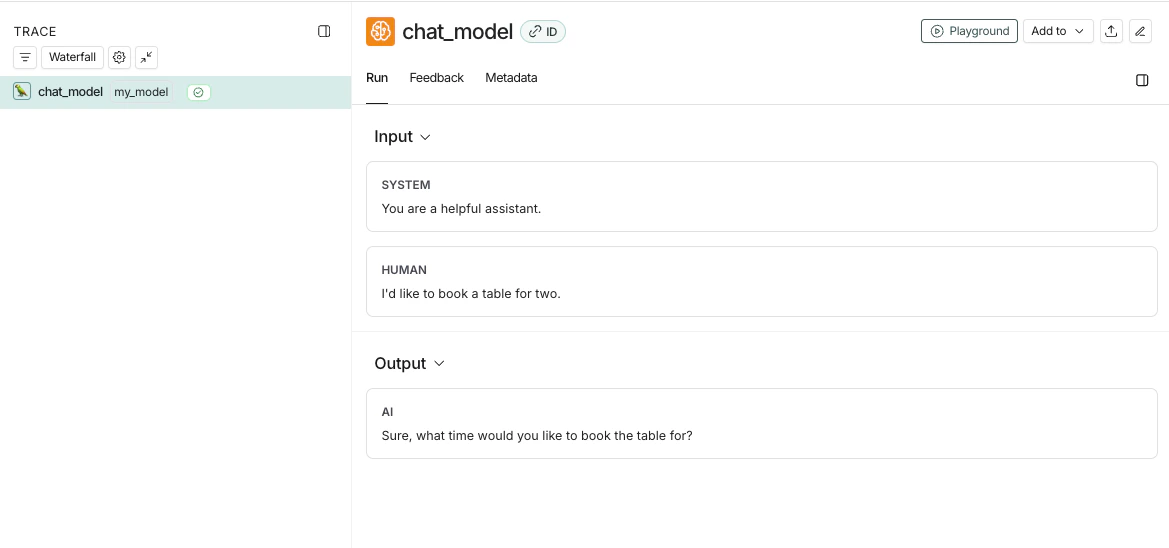
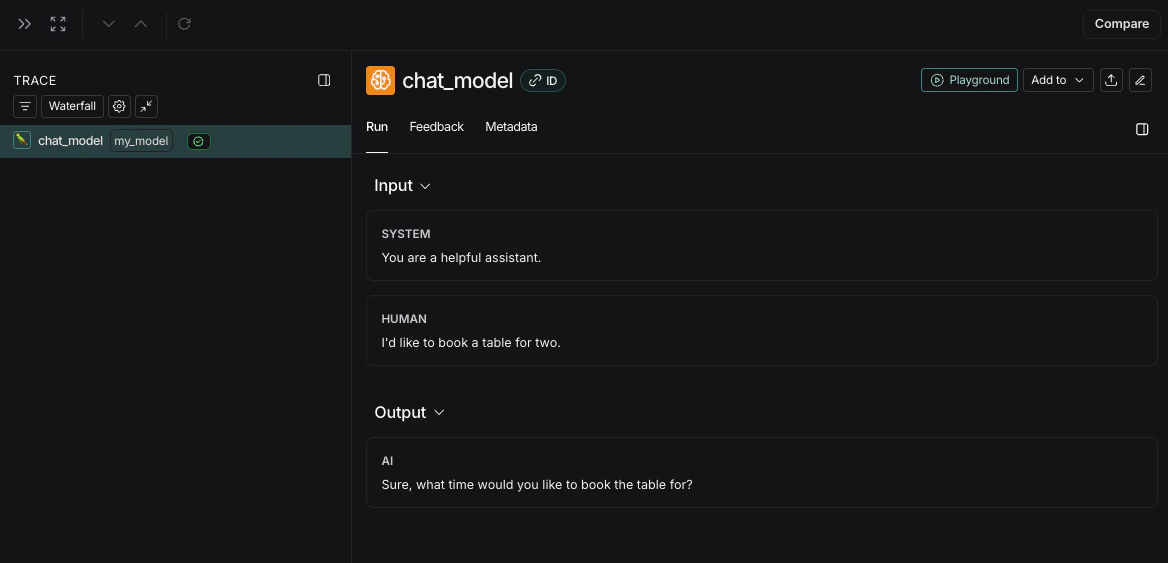
如果您实现自定义的流式聊天模型,可以将输出“归约”为非流式版本相同的格式。目前仅 Python 支持此功能。
```python theme={"theme":{"light":"catppuccin-latte","dark":"catppuccin-mocha"}}
def _reduce_chunks(chunks: list):
all_text = "".join([chunk["choices"][0]["message"]["content"] for chunk in chunks])
return {"choices": [{"message": {"content": all_text, "role": "assistant"}}]}
@traceable(
run_type="llm",
reduce_fn=_reduce_chunks,
metadata={"ls_provider": "my_provider", "ls_model_name": "my_model"}
)
def my_streaming_chat_model(messages: list):
for chunk in ["Hello, " + messages[1]["content"]]:
yield {
"choices": [
{
"message": {
"content": chunk,
"role": "assistant",
}
}
]
}
list(
my_streaming_chat_model(
[
{"role": "system", "content": "你是一个有用的助手。请向用户问好。"},
{"role": "user", "content": "polly the parrot"},
],
)
)
```
如果 `ls_model_name` 不在 `extra.metadata` 中,可能会使用 `extra.metadata` 中的其他字段来估算令牌计数。以下字段按优先级顺序使用:
1. `metadata.ls_model_name`
2. `inputs.model`
3. `inputs.model_name`
要了解更多关于如何使用 `metadata` 字段的信息,请参阅 [添加元数据和标签](/langsmith/add-metadata-tags) 指南。
## 提供令牌和成本信息
令牌计数支持成本计算,并显示在跟踪 UI 中。有两种提供方式:
* **在运行树上设置 `usage_metadata`**:在您的 `@traceable` 函数内部调用 `get_current_run_tree()` / `getCurrentRunTree()` 并设置 `usage_metadata` 字段。这不会改变您函数的返回值。
* **在输出中返回 `usage_metadata`**:在函数返回的字典中包含 `usage_metadata` 作为顶级键。
### 支持的 `usage_metadata` 字段
| 字段 | 类型 | 描述 |
| ---------------------- | -------- | ------------------------------------------------------- |
| `input_tokens` | `int` | 总输入/提示令牌数 |
| `output_tokens` | `int` | 总输出/补全令牌数 |
| `total_tokens` | `int` | 输入 + 输出的总和(可选,可以推断) |
| `input_token_details` | `object` | 细分:`cache_read`、`cache_creation`、`audio`、`text`、`image` |
| `output_token_details` | `object` | 细分:`reasoning`、`audio`、`text`、`image` |
要直接发送成本(用于非线性定价),您还可以包含 `input_cost`、`output_cost` 和 `total_cost` 字段。有关配置模型定价和在 UI 中查看成本的详细信息,请参阅 [成本跟踪](/langsmith/cost-tracking)。
## 首令牌时间
如果您使用 `traceable` 或我们的某个 SDK 包装器,LangSmith 将自动为流式 LLM 运行填充首令牌时间。
但是,如果您直接使用 `RunTree` API,则需要在运行树上添加 `new_token` 事件,以便正确填充首令牌时间。
示例如下:
```python Python theme={"theme":{"light":"catppuccin-latte","dark":"catppuccin-mocha"}}
from langsmith.run_trees import RunTree
run_tree = RunTree(
name="CustomChatModel",
run_type="llm",
inputs={ ... }
)
run_tree.post()
llm_stream = ...
first_token = None
for token in llm_stream:
if first_token is None:
first_token = token
run_tree.add_event({
"name": "new_token"
})
run_tree.end(outputs={ ... })
run_tree.patch()
```
```typescript TypeScript theme={"theme":{"light":"catppuccin-latte","dark":"catppuccin-mocha"}}
import { RunTree } from "langsmith";
const runTree = new RunTree({
name: "CustomChatModel",
run_type: "llm",
inputs: { ... },
});
await runTree.postRun();
const llmStream = ...;
let firstToken;
for (const token of llmStream) {
if (firstToken == null) {
firstToken = token;
runTree.addEvent({ name: "new_token" });
}
}
await runTree.end({
outputs: { ... },
});
await runTree.patchRun();
```
***
[Edit this page on GitHub](https://github.com/langchain-ai/docs/edit/main/src/i18n\zh-CN\langsmith\log-llm-trace.mdx) or [file an issue](https://github.com/langchain-ai/docs/issues/new/choose).
[Connect these docs](/use-these-docs) to Claude, VSCode, and more via MCP for real-time answers.