> ## Documentation Index
> Fetch the complete documentation index at: https://langchain-zh.cn/llms.txt
> Use this file to discover all available pages before exploring further.
# 如何模拟多轮交互
具有对话界面的 AI 应用(如聊天机器人)需要与用户进行多次交互,也称为对话*轮次*。在评估此类应用的性能时,核心概念如[构建数据集](/langsmith/evaluation-concepts#datasets)和定义[评估器](/langsmith/evaluation-concepts#evaluators)及指标来评判应用输出仍然有用。然而,您可能还会发现,在您的应用和用户之间运行一次*模拟*,然后评估这个动态创建的轨迹也很有帮助。
这样做的一些优势包括:
* 相比于基于预先存在的完整轨迹数据集进行评估,更容易上手
* 从初始查询到成功或失败解决的端到端覆盖
* 能够检测应用在多次迭代中的重复行为或上下文丢失
缺点是,由于您将评估范围扩大到包含多个轮次,因此相比基于数据集的静态输入评估应用的单一输出,一致性会降低。
 本指南将展示如何使用开源的 [`openevals`](https://github.com/langchain-ai/openevals) 包来模拟多轮交互并进行评估。该包包含预构建的评估器和其他用于评估 AI 应用的便捷资源。本指南也将使用 OpenAI 模型,不过您也可以使用其他供应商的模型。
## 设置
首先,确保已安装所需的依赖项:
```bash Python theme={"theme":{"light":"catppuccin-latte","dark":"catppuccin-mocha"}}
pip install -U langsmith openevals
```
```bash TypeScript theme={"theme":{"light":"catppuccin-latte","dark":"catppuccin-mocha"}}
npm install langsmith openevals
```
如果您使用 `yarn` 作为包管理器,还需要手动安装 `@langchain/core` 作为 `openevals` 的对等依赖项。这对于 LangSmith 评估来说通常不是必需的。
并设置环境变量:
```bash theme={"theme":{"light":"catppuccin-latte","dark":"catppuccin-mocha"}}
export LANGSMITH_TRACING="true"
export LANGSMITH_API_KEY="<您的 LangSmith API 密钥>"
export OPENAI_API_KEY="<您的 OpenAI API 密钥>"
```
## 运行模拟
开始前需要两个主要组件:
* `app`:您的应用程序,或包装它的函数。必须接受单个聊天消息(包含 "role" 和 "content" 键的字典)作为输入参数,并接受 `thread_id` 作为关键字参数。应接受其他关键字参数,因为未来版本可能会添加更多参数。返回一个至少包含 role 和 content 键的聊天消息作为输出。
* `user`:模拟用户。在本指南中,我们将使用一个名为 `create_llm_simulated_user` 的预构建导入函数,该函数使用 LLM 生成用户响应,不过您也可以[创建自己的模拟用户](https://github.com/langchain-ai/openevals?tab=readme-ov-file#custom-simulated-users)。
`openevals` 中的模拟器在每一轮中将来自 `user` 的单个聊天消息传递给您的 `app`。因此,如果需要,您应该根据 `thread_id` 在内部有状态地跟踪当前历史记录。
以下是一个模拟多轮客户支持交互的示例。本指南使用一个简单的聊天应用,该应用包装了对 OpenAI 聊天补全 API 的单个调用,但这里您可以调用您的应用程序或代理。在此示例中,我们的模拟用户扮演一个特别具有攻击性的客户角色:
```python Python theme={"theme":{"light":"catppuccin-latte","dark":"catppuccin-mocha"}}
from openevals.simulators import run_multiturn_simulation, create_llm_simulated_user
from openevals.types import ChatCompletionMessage
from langsmith.wrappers import wrap_openai
from openai import OpenAI
# 包装 OpenAI 客户端以进行追踪
client = wrap_openai(OpenAI())
history = {}
# 您的应用逻辑
def app(inputs: ChatCompletionMessage, *, thread_id: str, **kwargs):
if thread_id not in history:
history[thread_id] = []
history[thread_id].append(inputs)
# inputs 是一个包含 role 和 content 的消息对象
res = client.chat.completions.create(
model="gpt-4.1-mini",
messages=[
{
"role": "system",
"content": "您是一位耐心且善解人意的客户服务代理。",
},
] + history[thread_id],
)
response_message = res.choices[0].message
history[thread_id].append(response_message)
return response_message
user = create_llm_simulated_user(
system="您是一位咄咄逼人、充满敌意的客户,想要为您的汽车退款。",
model="openai:gpt-4.1-mini",
)
# 使用新函数直接运行模拟
simulator_result = run_multiturn_simulation(
app=app,
user=user,
max_turns=5,
)
print(simulator_result)
```
```typescript TypeScript theme={"theme":{"light":"catppuccin-latte","dark":"catppuccin-mocha"}}
import { OpenAI } from "openai";
import { wrapOpenAI } from "langsmith/wrappers/openai";
import {
createLLMSimulatedUser,
runMultiturnSimulation,
type ChatCompletionMessage,
} from "openevals";
// 包装 OpenAI 客户端以进行追踪
const client = wrapOpenAI(new OpenAI());
const history = {};
// 您的应用逻辑
const app = async ({ inputs, threadId }: { inputs: ChatCompletionMessage, threadId: string }) => {
if (history[threadId] === undefined) {
history[threadId] = [];
}
history[threadId].push(inputs);
const res = await client.chat.completions.create({
model: "gpt-4.1-mini",
messages: [
{
role: "system",
content:
"您是一位耐心且善解人意的客户服务代理。",
},
inputs,
],
});
const responseMessage = res.choices[0].message;
history[threadId].push(responseMessage);
return res.choices[0].message;
};
const user = createLLMSimulatedUser({
system: "您是一位咄咄逼人、充满敌意的客户,想要为您的汽车退款。",
model: "openai:gpt-4.1-mini",
});
const result = await runMultiturnSimulation({
app,
user,
maxTurns: 5,
});
console.log(result);
```
响应如下所示:
```json theme={"theme":{"light":"catppuccin-latte","dark":"catppuccin-mocha"}}
{
"trajectory": [
{
"role": "user",
"content": "这辆破车完全是个灾难!我要求立即全额退款。你们怎么敢卖给我这么一辆一文不值的车!",
"id": "chatcmpl-BUpXa07LaM7wXbyaNnng1Gtn5Dsbh"
},
{
"role": "assistant",
"content": "听到您的经历我深感抱歉,理解这一定非常令人沮丧。我希望尽可能顺利地解决这个问题。能否请您提供一些关于车辆问题的详细信息?一旦我掌握了更多信息,我将尽力协助您找到解决方案,无论是退款还是其他选择。感谢您的耐心。",
"refusal": null,
"annotations": [],
"id": "d7520f6a-7cf8-46f8-abe4-7df04f134482"
},
"...",
{
"role": "assistant",
"content": "我完全理解您的沮丧,并为您所经历的不便真诚致歉。\n\n请给我一点时间审查您的案例,我将尽我所能加快您的退款流程。非常感谢您的耐心,我致力于让您满意地解决此事。",
"refusal": null,
"annotations": [],
"id": "a0536d4f-9353-4cfa-84df-51c8d29e076d"
}
]
}
```
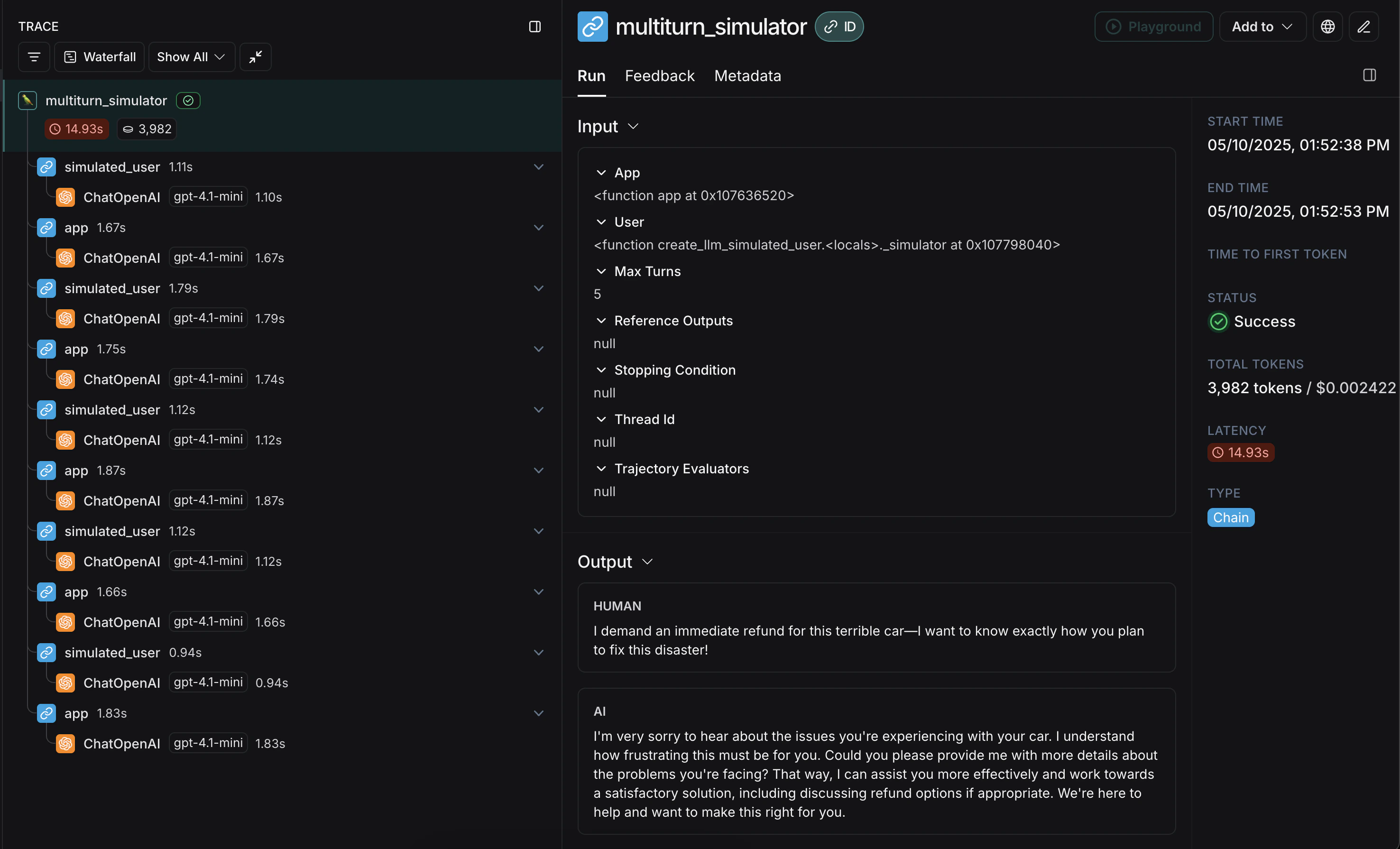
模拟首先从模拟的 `user` 生成初始查询,然后在 `app` 和 `user` 之间来回传递响应聊天消息,直到达到 `max_turns`(您也可以传递一个 `stopping_condition`,该函数接收当前轨迹并返回 `True` 或 `False` - [详见 OpenEvals README](https://github.com/langchain-ai/openevals?tab=readme-ov-file#multiturn-simulation))。返回值是构成对话**轨迹**的最终聊天消息列表。
有多种方式可以配置模拟用户,例如让它在模拟的前几轮返回固定响应,以及整体模拟的配置。完整详情请查看 [OpenEvals README](https://github.com/langchain-ai/openevals?tab=readme-ov-file#multiturn-simulation)。
最终的追踪将类似于[这样](https://smith.langchain.com/public/648ca37d-1c4d-4f7b-9b6a-89e35dc5d4f0/r),其中包含您的 `app` 和 `user` 的交替响应:
恭喜!您刚刚运行了第一次多轮模拟。接下来,我们将介绍如何在 LangSmith 实验中运行它。
## 在 LangSmith 实验中运行
您可以将多轮模拟的结果用作 LangSmith 实验的一部分,以跟踪性能并随时间推移观察进展。对于这些部分,熟悉至少一种 LangSmith 的 [`pytest`](/langsmith/pytest)(仅限 Python)、[`Vitest`/`Jest`](/langsmith/vitest-jest)(仅限 JS)或 [`evaluate`](/langsmith/evaluate-llm-application) 运行器会很有帮助。
### 使用 `pytest` 或 `Vitest/Jest`
请参阅以下指南,了解如何使用 LangSmith 与测试框架的集成来设置评估:
* [`pytest`](https://docs.smith.langchain.com/langsmith/pytest)
* [`Vitest` 或 `Jest`](https://docs.smith.langchain.com/langsmith/vitest-jest)
如果您使用 [LangSmith 测试框架集成](/langsmith/pytest)之一,可以在运行模拟时将 OpenEvals 评估器数组作为 `trajectory_evaluators` 参数传入。这些评估器将在模拟结束时运行,将最终的聊天消息列表作为 `outputs` 关键字参数接收。因此,您传入的 `trajectory_evaluator` 必须接受此关键字参数。
本指南将展示如何使用开源的 [`openevals`](https://github.com/langchain-ai/openevals) 包来模拟多轮交互并进行评估。该包包含预构建的评估器和其他用于评估 AI 应用的便捷资源。本指南也将使用 OpenAI 模型,不过您也可以使用其他供应商的模型。
## 设置
首先,确保已安装所需的依赖项:
```bash Python theme={"theme":{"light":"catppuccin-latte","dark":"catppuccin-mocha"}}
pip install -U langsmith openevals
```
```bash TypeScript theme={"theme":{"light":"catppuccin-latte","dark":"catppuccin-mocha"}}
npm install langsmith openevals
```
如果您使用 `yarn` 作为包管理器,还需要手动安装 `@langchain/core` 作为 `openevals` 的对等依赖项。这对于 LangSmith 评估来说通常不是必需的。
并设置环境变量:
```bash theme={"theme":{"light":"catppuccin-latte","dark":"catppuccin-mocha"}}
export LANGSMITH_TRACING="true"
export LANGSMITH_API_KEY="<您的 LangSmith API 密钥>"
export OPENAI_API_KEY="<您的 OpenAI API 密钥>"
```
## 运行模拟
开始前需要两个主要组件:
* `app`:您的应用程序,或包装它的函数。必须接受单个聊天消息(包含 "role" 和 "content" 键的字典)作为输入参数,并接受 `thread_id` 作为关键字参数。应接受其他关键字参数,因为未来版本可能会添加更多参数。返回一个至少包含 role 和 content 键的聊天消息作为输出。
* `user`:模拟用户。在本指南中,我们将使用一个名为 `create_llm_simulated_user` 的预构建导入函数,该函数使用 LLM 生成用户响应,不过您也可以[创建自己的模拟用户](https://github.com/langchain-ai/openevals?tab=readme-ov-file#custom-simulated-users)。
`openevals` 中的模拟器在每一轮中将来自 `user` 的单个聊天消息传递给您的 `app`。因此,如果需要,您应该根据 `thread_id` 在内部有状态地跟踪当前历史记录。
以下是一个模拟多轮客户支持交互的示例。本指南使用一个简单的聊天应用,该应用包装了对 OpenAI 聊天补全 API 的单个调用,但这里您可以调用您的应用程序或代理。在此示例中,我们的模拟用户扮演一个特别具有攻击性的客户角色:
```python Python theme={"theme":{"light":"catppuccin-latte","dark":"catppuccin-mocha"}}
from openevals.simulators import run_multiturn_simulation, create_llm_simulated_user
from openevals.types import ChatCompletionMessage
from langsmith.wrappers import wrap_openai
from openai import OpenAI
# 包装 OpenAI 客户端以进行追踪
client = wrap_openai(OpenAI())
history = {}
# 您的应用逻辑
def app(inputs: ChatCompletionMessage, *, thread_id: str, **kwargs):
if thread_id not in history:
history[thread_id] = []
history[thread_id].append(inputs)
# inputs 是一个包含 role 和 content 的消息对象
res = client.chat.completions.create(
model="gpt-4.1-mini",
messages=[
{
"role": "system",
"content": "您是一位耐心且善解人意的客户服务代理。",
},
] + history[thread_id],
)
response_message = res.choices[0].message
history[thread_id].append(response_message)
return response_message
user = create_llm_simulated_user(
system="您是一位咄咄逼人、充满敌意的客户,想要为您的汽车退款。",
model="openai:gpt-4.1-mini",
)
# 使用新函数直接运行模拟
simulator_result = run_multiturn_simulation(
app=app,
user=user,
max_turns=5,
)
print(simulator_result)
```
```typescript TypeScript theme={"theme":{"light":"catppuccin-latte","dark":"catppuccin-mocha"}}
import { OpenAI } from "openai";
import { wrapOpenAI } from "langsmith/wrappers/openai";
import {
createLLMSimulatedUser,
runMultiturnSimulation,
type ChatCompletionMessage,
} from "openevals";
// 包装 OpenAI 客户端以进行追踪
const client = wrapOpenAI(new OpenAI());
const history = {};
// 您的应用逻辑
const app = async ({ inputs, threadId }: { inputs: ChatCompletionMessage, threadId: string }) => {
if (history[threadId] === undefined) {
history[threadId] = [];
}
history[threadId].push(inputs);
const res = await client.chat.completions.create({
model: "gpt-4.1-mini",
messages: [
{
role: "system",
content:
"您是一位耐心且善解人意的客户服务代理。",
},
inputs,
],
});
const responseMessage = res.choices[0].message;
history[threadId].push(responseMessage);
return res.choices[0].message;
};
const user = createLLMSimulatedUser({
system: "您是一位咄咄逼人、充满敌意的客户,想要为您的汽车退款。",
model: "openai:gpt-4.1-mini",
});
const result = await runMultiturnSimulation({
app,
user,
maxTurns: 5,
});
console.log(result);
```
响应如下所示:
```json theme={"theme":{"light":"catppuccin-latte","dark":"catppuccin-mocha"}}
{
"trajectory": [
{
"role": "user",
"content": "这辆破车完全是个灾难!我要求立即全额退款。你们怎么敢卖给我这么一辆一文不值的车!",
"id": "chatcmpl-BUpXa07LaM7wXbyaNnng1Gtn5Dsbh"
},
{
"role": "assistant",
"content": "听到您的经历我深感抱歉,理解这一定非常令人沮丧。我希望尽可能顺利地解决这个问题。能否请您提供一些关于车辆问题的详细信息?一旦我掌握了更多信息,我将尽力协助您找到解决方案,无论是退款还是其他选择。感谢您的耐心。",
"refusal": null,
"annotations": [],
"id": "d7520f6a-7cf8-46f8-abe4-7df04f134482"
},
"...",
{
"role": "assistant",
"content": "我完全理解您的沮丧,并为您所经历的不便真诚致歉。\n\n请给我一点时间审查您的案例,我将尽我所能加快您的退款流程。非常感谢您的耐心,我致力于让您满意地解决此事。",
"refusal": null,
"annotations": [],
"id": "a0536d4f-9353-4cfa-84df-51c8d29e076d"
}
]
}
```
模拟首先从模拟的 `user` 生成初始查询,然后在 `app` 和 `user` 之间来回传递响应聊天消息,直到达到 `max_turns`(您也可以传递一个 `stopping_condition`,该函数接收当前轨迹并返回 `True` 或 `False` - [详见 OpenEvals README](https://github.com/langchain-ai/openevals?tab=readme-ov-file#multiturn-simulation))。返回值是构成对话**轨迹**的最终聊天消息列表。
有多种方式可以配置模拟用户,例如让它在模拟的前几轮返回固定响应,以及整体模拟的配置。完整详情请查看 [OpenEvals README](https://github.com/langchain-ai/openevals?tab=readme-ov-file#multiturn-simulation)。
最终的追踪将类似于[这样](https://smith.langchain.com/public/648ca37d-1c4d-4f7b-9b6a-89e35dc5d4f0/r),其中包含您的 `app` 和 `user` 的交替响应:
恭喜!您刚刚运行了第一次多轮模拟。接下来,我们将介绍如何在 LangSmith 实验中运行它。
## 在 LangSmith 实验中运行
您可以将多轮模拟的结果用作 LangSmith 实验的一部分,以跟踪性能并随时间推移观察进展。对于这些部分,熟悉至少一种 LangSmith 的 [`pytest`](/langsmith/pytest)(仅限 Python)、[`Vitest`/`Jest`](/langsmith/vitest-jest)(仅限 JS)或 [`evaluate`](/langsmith/evaluate-llm-application) 运行器会很有帮助。
### 使用 `pytest` 或 `Vitest/Jest`
请参阅以下指南,了解如何使用 LangSmith 与测试框架的集成来设置评估:
* [`pytest`](https://docs.smith.langchain.com/langsmith/pytest)
* [`Vitest` 或 `Jest`](https://docs.smith.langchain.com/langsmith/vitest-jest)
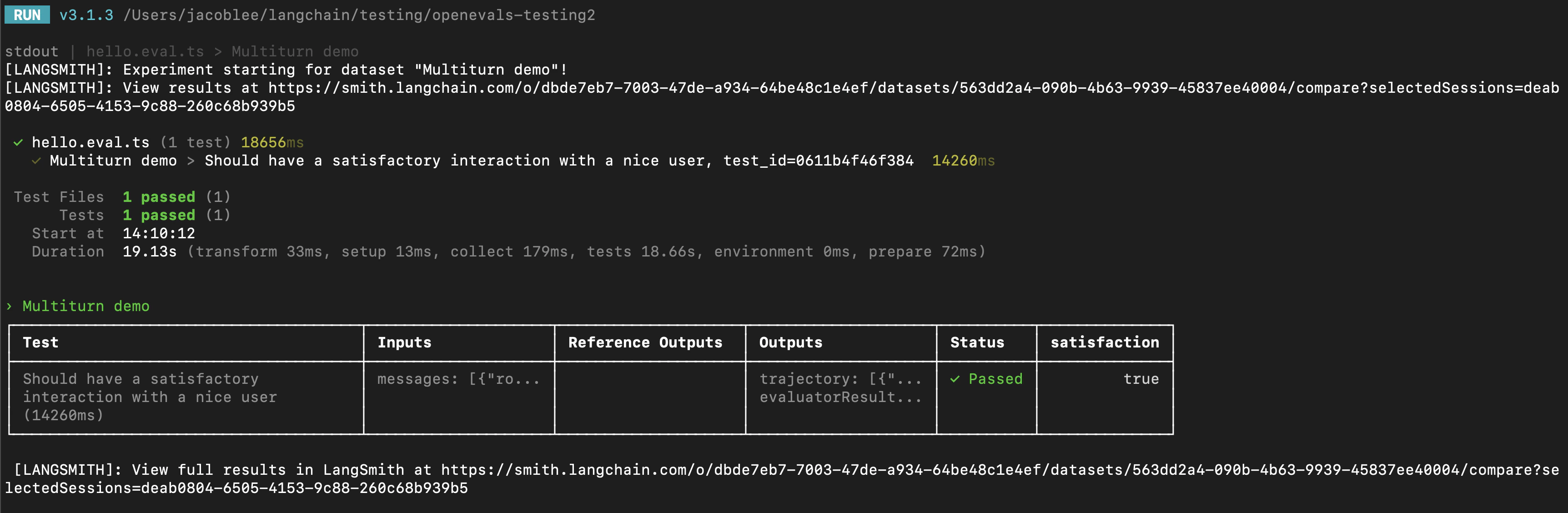
如果您使用 [LangSmith 测试框架集成](/langsmith/pytest)之一,可以在运行模拟时将 OpenEvals 评估器数组作为 `trajectory_evaluators` 参数传入。这些评估器将在模拟结束时运行,将最终的聊天消息列表作为 `outputs` 关键字参数接收。因此,您传入的 `trajectory_evaluator` 必须接受此关键字参数。
 以下是一个示例:
```python Python theme={"theme":{"light":"catppuccin-latte","dark":"catppuccin-mocha"}}
from openevals.simulators import run_multiturn_simulation, create_llm_simulated_user
from openevals.llm import create_llm_as_judge
from openevals.types import ChatCompletionMessage
from langsmith import testing as t
from langsmith.wrappers import wrap_openai
from openai import OpenAI
import pytest
@pytest.mark.langsmith
def test_multiturn_message_with_openai():
inputs = {"role": "user", "content": "我想为我的车退款!"}
t.log_inputs(inputs)
# 包装 OpenAI 客户端以进行追踪
client = wrap_openai(OpenAI())
history = {}
def app(inputs: ChatCompletionMessage, *, thread_id: str):
if thread_id not in history:
history[thread_id] = []
history[thread_id] = history[thread_id] + [inputs]
res = client.chat.completions.create(
model="gpt-4.1-nano",
messages=[
{
"role": "system",
"content": "您是一位耐心且善解人意的客户服务代理。",
}
]
+ history[thread_id],
)
response = res.choices[0].message
history[thread_id].append(response)
return response
user = create_llm_simulated_user(
system="您是一位想要为他们的车退款的友好客户。",
model="openai:gpt-4.1-nano",
fixed_responses=[
inputs,
],
)
trajectory_evaluator = create_llm_as_judge(
model="openai:o3-mini",
prompt="根据以下对话,用户是否满意?\n{outputs}",
feedback_key="satisfaction",
)
res = run_multiturn_simulation(
app=app,
user=user,
trajectory_evaluators=[trajectory_evaluator],
max_turns=5,
)
t.log_outputs(res)
# 可选地,断言评估器将交互评分为了满意。
# 如果 "score" 为 False,这将导致整个测试用例失败。
assert res["evaluator_results"][0]["score"]
```
```typescript TypeScript theme={"theme":{"light":"catppuccin-latte","dark":"catppuccin-mocha"}}
import { OpenAI } from "openai";
import { wrapOpenAI } from "langsmith/wrappers/openai";
import * as ls from "langsmith/vitest";
import { expect } from "vitest";
// import * as ls from "langsmith/jest";
// import { expect } from "@jest/globals";
import {
createLLMSimulatedUser,
runMultiturnSimulation,
createLLMAsJudge,
type ChatCompletionMessage,
} from "openevals";
const client = wrapOpenAI(new OpenAI());
ls.describe("多轮演示", () => {
ls.test(
"应该与友好用户进行满意的交互",
{
inputs: {
messages: [{ role: "user" as const, content: "我想为我的车退款!" }],
},
},
async ({ inputs }) => {
const history = {};
// 创建自定义应用函数
const app = async (
{ inputs, threadId }: { inputs: ChatCompletionMessage, threadId: string }
) => {
if (history[threadId] === undefined) {
history[threadId] = [];
}
history[threadId].push(inputs);
const res = await client.chat.completions.create({
model: "gpt-4.1-nano",
messages: [
{
role: "system",
content:
"您是一位耐心且善解人意的客户服务代理",
},
inputs,
],
});
const responseMessage = res.choices[0].message;
history[threadId].push(responseMessage);
return responseMessage;
};
const user = createLLMSimulatedUser({
system:
"您是一位想要为他们的车退款的友好客户。",
model: "openai:gpt-4.1-nano",
fixedResponses: inputs.messages,
});
const trajectoryEvaluator = createLLMAsJudge({
model: "openai:o3-mini",
prompt:
"根据以下对话,用户是否满意?\n{outputs}",
feedbackKey: "satisfaction",
});
const result = await runMultiturnSimulation({
app,
user,
trajectoryEvaluators: [trajectoryEvaluator],
maxTurns: 5,
});
ls.logOutputs(result);
// 可选地,断言评估器将交互评分为了满意。
// 如果 "score" 为 false,这将导致整个测试用例失败。
expect(result.evaluatorResults[0].score).toBe(true);
}
);
});
```
LangSmith 将自动检测并记录从传入的 `trajectory_evaluators` 返回的反馈,并将其添加到实验中。还要注意,测试用例使用模拟用户的 `fixed_responses` 参数以特定输入开始对话,您可以记录该输入并将其作为存储数据集的一部分。
您可能还会发现,将模拟用户的系统提示作为记录数据集的一部分会很方便。
### 使用 `evaluate`
您也可以使用 [`evaluate`](/langsmith/evaluate-llm-application) 运行器来评估模拟的多轮交互。这与 `pytest`/`Vitest`/`Jest` 示例在以下方面略有不同:
* 模拟应该是您的 `target` 函数的一部分,并且您的 target 函数应返回最终轨迹。
* 这将使轨迹成为 LangSmith 传递给您的评估器的 `outputs`。
* 不应使用 `trajectory_evaluators` 参数,而应将您的评估器作为参数传递给 `evaluate()` 方法。
* 您需要一个包含输入和(可选)参考轨迹的现有数据集。
以下是一个示例:
```python Python theme={"theme":{"light":"catppuccin-latte","dark":"catppuccin-mocha"}}
from openevals.simulators import run_multiturn_simulation, create_llm_simulated_user
from openevals.llm import create_llm_as_judge
from openevals.types import ChatCompletionMessage
from langsmith.wrappers import wrap_openai
from langsmith import Client
from openai import OpenAI
ls_client = Client()
examples = [
{
"inputs": {
"messages": [{ "role": "user", "content": "我想为我的车退款!" }]
},
},
]
dataset = ls_client.create_dataset(dataset_name="multiturn-starter")
ls_client.create_examples(
dataset_id=dataset.id,
examples=examples,
)
trajectory_evaluator = create_llm_as_judge(
model="openai:o3-mini",
prompt="根据以下对话,用户是否满意?\n{outputs}",
feedback_key="satisfaction",
)
def target(inputs: dict):
# 包装 OpenAI 客户端以进行追踪
client = wrap_openai(OpenAI())
history = {}
def app(next_message: ChatCompletionMessage, *, thread_id: str):
if thread_id not in history:
history[thread_id] = []
history[thread_id] = history[thread_id] + [next_message]
res = client.chat.completions.create(
model="gpt-4.1-nano",
messages=[
{
"role": "system",
"content": "您是一位耐心且善解人意的客户服务代理。",
}
]
+ history[thread_id],
)
response = res.choices[0].message
history[thread_id].append(response)
return response
user = create_llm_simulated_user(
system="您是一位想要为他们的车退款的友好客户。",
model="openai:gpt-4.1-nano",
fixed_responses=inputs["messages"],
)
res = run_multiturn_simulation(
app=app,
user=user,
max_turns=5,
)
return res["trajectory"]
results = ls_client.evaluate(
target,
data=dataset.name,
evaluators=[trajectory_evaluator],
)
```
```typescript TypeScript theme={"theme":{"light":"catppuccin-latte","dark":"catppuccin-mocha"}}
import { OpenAI } from "openai";
import { Client } from "langsmith";
import { wrapOpenAI } from "langsmith/wrappers/openai";
import { evaluate } from "langsmith/evaluation";
import {
createLLMSimulatedUser,
runMultiturnSimulation,
createLLMAsJudge,
type ChatCompletionMessage,
} from "openevals";
const lsClient = new Client();
const inputs = {
messages: [
{
role: "user",
content: "我想为我的车退款!",
},
],
};
const datasetName = "多轮";
const dataset = await lsClient.createDataset(datasetName);
await lsClient.createExamples([{ inputs, dataset_id: dataset.id }]);
const trajectoryEvaluator = createLLMAsJudge({
model: "openai:o3-mini",
prompt:
"根据以下对话,用户是否满意?\n{outputs}",
feedbackKey: "satisfaction",
});
const client = wrapOpenAI(new OpenAI());
const target = async (inputs: { messages: ChatCompletionMessage[]}) => {
const history = {};
// 创建自定义应用函数
const app = async (
{ inputs: nextMessage, threadId }: { inputs: ChatCompletionMessage, threadId: string }
) => {
if (history[threadId] === undefined) {
history[threadId] = [];
}
history[threadId].push(nextMessage);
const res = await client.chat.completions.create({
model: "gpt-4.1-nano",
messages: [
{
role: "system",
content:
"您是一位耐心且善解人意的客户服务代理",
},
nextMessage,
],
});
const responseMessage = res.choices[0].message;
history[threadId].push(responseMessage);
return responseMessage;
};
const user = createLLMSimulatedUser({
system:
"您是一位想要为他们的车退款的友好客户。",
model: "openai:gpt-4.1-nano",
fixedResponses: inputs.messages,
});
const result = await runMultiturnSimulation({
app,
user,
maxTurns: 5,
});
return result.trajectory;
};
await evaluate(target, {
data: datasetName,
evaluators: [trajectoryEvaluator],
});
```
## 修改模拟用户角色
上述示例对所有输入示例使用相同的模拟用户角色,该角色由传递给 `create_llm_simulated_user` 的 `system` 参数定义。如果您希望为数据集中的特定项目使用不同的角色,可以更新数据集示例以包含一个带有所需 `system` 提示的额外字段,然后在创建模拟用户时像这样传入该字段:
```python Python theme={"theme":{"light":"catppuccin-latte","dark":"catppuccin-mocha"}}
from openevals.simulators import run_multiturn_simulation, create_llm_simulated_user
from openevals.llm import create_llm_as_judge
from openevals.types import ChatCompletionMessage
from langsmith.wrappers import wrap_openai
from langsmith import Client
from openai import OpenAI
ls_client = Client()
examples = [
{
"inputs": {
"messages": [{ "role": "user", "content": "我想为我的车退款!" }],
"simulated_user_prompt": "您是一位愤怒且好斗的客户,想要为他们的车退款。"
},
},
{
"inputs": {
"messages": [{ "role": "user", "content": "请为我的车退款。" }],
"simulated_user_prompt": "您是一位想要为他们的车退款的友好客户。",
},
}
]
dataset = ls_client.create_dataset(dataset_name="multiturn-with-personas")
ls_client.create_examples(
dataset_id=dataset.id,
examples=examples,
)
trajectory_evaluator = create_llm_as_judge(
model="openai:o3-mini",
prompt="根据以下对话,用户是否满意?\n{outputs}",
feedback_key="satisfaction",
)
def target(inputs: dict):
# 包装 OpenAI 客户端以进行追踪
client = wrap_openai(OpenAI())
history = {}
def app(next_message: ChatCompletionMessage, *, thread_id: str):
if thread_id not in history:
history[thread_id] = []
history[thread_id] = history[thread_id] + [next_message]
res = client.chat.completions.create(
model="gpt-4.1-nano",
messages=[
{
"role": "system",
"content": "您是一位耐心且善解人意的客户服务代理。",
}
]
+ history[thread_id],
)
response = res.choices[0].message
history[thread_id].append(response)
return response
user = create_llm_simulated_user(
system=inputs["simulated_user_prompt"],
model="openai:gpt-4.1-nano",
fixed_responses=inputs["messages"],
)
res = run_multiturn_simulation(
app=app,
user=user,
max_turns=5,
)
return res["trajectory"]
results = ls_client.evaluate(
target,
data=dataset.name,
evaluators=[trajectory_evaluator],
)
```
```typescript TypeScript theme={"theme":{"light":"catppuccin-latte","dark":"catppuccin-mocha"}}
import { OpenAI } from "openai";
import { Client } from "langsmith";
import { wrapOpenAI } from "langsmith/wrappers/openai";
import { evaluate } from "langsmith/evaluation";
import {
createLLMSimulatedUser,
runMultiturnSimulation,
createLLMAsJudge,
type ChatCompletionMessage,
} from "openevals";
const lsClient = new Client();
const datasetName = "带角色的多轮";
const dataset = await lsClient.createDataset(datasetName);
const examples = [{
inputs: {
messages: [
{
role: "user",
content: "我想为我的车退款!",
},
],
simulated_user_prompt: "您是一位愤怒且好斗的客户,想要为他们的车退款。",
},
dataset_id: dataset.id,
}, {
inputs: {
messages: [
{
role: "user",
content: "请为我的车退款。"
}
],
simulated_user_prompt: "您是一位想要为他们的车退款的友好客户。",
},
dataset_id: dataset.id,
}];
await lsClient.createExamples(examples);
const trajectoryEvaluator = createLLMAsJudge({
model: "openai:o3-mini",
prompt:
"根据以下对话,用户是否满意?\n{outputs}",
feedbackKey: "satisfaction",
});
const client = wrapOpenAI(new OpenAI());
const target = async (inputs: {
messages: ChatCompletionMessage[],
simulated_user_prompt: string,
}) => {
const history = {};
// 创建自定义应用函数
const app = async (
{ inputs: nextMessage, threadId }: { inputs: ChatCompletionMessage, threadId: string }
) => {
if (history[threadId] === undefined) {
history[threadId] = [];
}
history[threadId].push(nextMessage);
const res = await client.chat.completions.create({
model: "gpt-4.1-nano",
messages: [
{
role: "system",
content:
"您是一位耐心且善解人意的客户服务代理",
},
nextMessage,
],
});
const responseMessage = res.choices[0].message;
history[threadId].push(responseMessage);
return responseMessage;
};
const user = createLLMSimulatedUser({
system: inputs.simulated_user_prompt,
model: "openai:gpt-4.1-nano",
fixedResponses: inputs.messages,
});
const result = await runMultiturnSimulation({
app,
user,
maxTurns: 5,
});
return result.trajectory;
};
await evaluate(target, {
data: datasetName,
evaluators: [trajectoryEvaluator],
});
```
## 后续步骤
您刚刚了解了一些模拟多轮交互并在 LangSmith 评估中运行它们的技术。
以下是一些您可能想要探索的后续主题:
* [在不同追踪中追踪多轮对话](/langsmith/threads)
* [在 Playground UI 中使用多条消息](/langsmith/multiple-messages)
* [在一个评估器中返回多个指标](/langsmith/multiple-scores)
您也可以探索 [OpenEvals 自述文件](https://github.com/langchain-ai/openevals)以获取更多关于预构建评估器的信息。
***
以下是一个示例:
```python Python theme={"theme":{"light":"catppuccin-latte","dark":"catppuccin-mocha"}}
from openevals.simulators import run_multiturn_simulation, create_llm_simulated_user
from openevals.llm import create_llm_as_judge
from openevals.types import ChatCompletionMessage
from langsmith import testing as t
from langsmith.wrappers import wrap_openai
from openai import OpenAI
import pytest
@pytest.mark.langsmith
def test_multiturn_message_with_openai():
inputs = {"role": "user", "content": "我想为我的车退款!"}
t.log_inputs(inputs)
# 包装 OpenAI 客户端以进行追踪
client = wrap_openai(OpenAI())
history = {}
def app(inputs: ChatCompletionMessage, *, thread_id: str):
if thread_id not in history:
history[thread_id] = []
history[thread_id] = history[thread_id] + [inputs]
res = client.chat.completions.create(
model="gpt-4.1-nano",
messages=[
{
"role": "system",
"content": "您是一位耐心且善解人意的客户服务代理。",
}
]
+ history[thread_id],
)
response = res.choices[0].message
history[thread_id].append(response)
return response
user = create_llm_simulated_user(
system="您是一位想要为他们的车退款的友好客户。",
model="openai:gpt-4.1-nano",
fixed_responses=[
inputs,
],
)
trajectory_evaluator = create_llm_as_judge(
model="openai:o3-mini",
prompt="根据以下对话,用户是否满意?\n{outputs}",
feedback_key="satisfaction",
)
res = run_multiturn_simulation(
app=app,
user=user,
trajectory_evaluators=[trajectory_evaluator],
max_turns=5,
)
t.log_outputs(res)
# 可选地,断言评估器将交互评分为了满意。
# 如果 "score" 为 False,这将导致整个测试用例失败。
assert res["evaluator_results"][0]["score"]
```
```typescript TypeScript theme={"theme":{"light":"catppuccin-latte","dark":"catppuccin-mocha"}}
import { OpenAI } from "openai";
import { wrapOpenAI } from "langsmith/wrappers/openai";
import * as ls from "langsmith/vitest";
import { expect } from "vitest";
// import * as ls from "langsmith/jest";
// import { expect } from "@jest/globals";
import {
createLLMSimulatedUser,
runMultiturnSimulation,
createLLMAsJudge,
type ChatCompletionMessage,
} from "openevals";
const client = wrapOpenAI(new OpenAI());
ls.describe("多轮演示", () => {
ls.test(
"应该与友好用户进行满意的交互",
{
inputs: {
messages: [{ role: "user" as const, content: "我想为我的车退款!" }],
},
},
async ({ inputs }) => {
const history = {};
// 创建自定义应用函数
const app = async (
{ inputs, threadId }: { inputs: ChatCompletionMessage, threadId: string }
) => {
if (history[threadId] === undefined) {
history[threadId] = [];
}
history[threadId].push(inputs);
const res = await client.chat.completions.create({
model: "gpt-4.1-nano",
messages: [
{
role: "system",
content:
"您是一位耐心且善解人意的客户服务代理",
},
inputs,
],
});
const responseMessage = res.choices[0].message;
history[threadId].push(responseMessage);
return responseMessage;
};
const user = createLLMSimulatedUser({
system:
"您是一位想要为他们的车退款的友好客户。",
model: "openai:gpt-4.1-nano",
fixedResponses: inputs.messages,
});
const trajectoryEvaluator = createLLMAsJudge({
model: "openai:o3-mini",
prompt:
"根据以下对话,用户是否满意?\n{outputs}",
feedbackKey: "satisfaction",
});
const result = await runMultiturnSimulation({
app,
user,
trajectoryEvaluators: [trajectoryEvaluator],
maxTurns: 5,
});
ls.logOutputs(result);
// 可选地,断言评估器将交互评分为了满意。
// 如果 "score" 为 false,这将导致整个测试用例失败。
expect(result.evaluatorResults[0].score).toBe(true);
}
);
});
```
LangSmith 将自动检测并记录从传入的 `trajectory_evaluators` 返回的反馈,并将其添加到实验中。还要注意,测试用例使用模拟用户的 `fixed_responses` 参数以特定输入开始对话,您可以记录该输入并将其作为存储数据集的一部分。
您可能还会发现,将模拟用户的系统提示作为记录数据集的一部分会很方便。
### 使用 `evaluate`
您也可以使用 [`evaluate`](/langsmith/evaluate-llm-application) 运行器来评估模拟的多轮交互。这与 `pytest`/`Vitest`/`Jest` 示例在以下方面略有不同:
* 模拟应该是您的 `target` 函数的一部分,并且您的 target 函数应返回最终轨迹。
* 这将使轨迹成为 LangSmith 传递给您的评估器的 `outputs`。
* 不应使用 `trajectory_evaluators` 参数,而应将您的评估器作为参数传递给 `evaluate()` 方法。
* 您需要一个包含输入和(可选)参考轨迹的现有数据集。
以下是一个示例:
```python Python theme={"theme":{"light":"catppuccin-latte","dark":"catppuccin-mocha"}}
from openevals.simulators import run_multiturn_simulation, create_llm_simulated_user
from openevals.llm import create_llm_as_judge
from openevals.types import ChatCompletionMessage
from langsmith.wrappers import wrap_openai
from langsmith import Client
from openai import OpenAI
ls_client = Client()
examples = [
{
"inputs": {
"messages": [{ "role": "user", "content": "我想为我的车退款!" }]
},
},
]
dataset = ls_client.create_dataset(dataset_name="multiturn-starter")
ls_client.create_examples(
dataset_id=dataset.id,
examples=examples,
)
trajectory_evaluator = create_llm_as_judge(
model="openai:o3-mini",
prompt="根据以下对话,用户是否满意?\n{outputs}",
feedback_key="satisfaction",
)
def target(inputs: dict):
# 包装 OpenAI 客户端以进行追踪
client = wrap_openai(OpenAI())
history = {}
def app(next_message: ChatCompletionMessage, *, thread_id: str):
if thread_id not in history:
history[thread_id] = []
history[thread_id] = history[thread_id] + [next_message]
res = client.chat.completions.create(
model="gpt-4.1-nano",
messages=[
{
"role": "system",
"content": "您是一位耐心且善解人意的客户服务代理。",
}
]
+ history[thread_id],
)
response = res.choices[0].message
history[thread_id].append(response)
return response
user = create_llm_simulated_user(
system="您是一位想要为他们的车退款的友好客户。",
model="openai:gpt-4.1-nano",
fixed_responses=inputs["messages"],
)
res = run_multiturn_simulation(
app=app,
user=user,
max_turns=5,
)
return res["trajectory"]
results = ls_client.evaluate(
target,
data=dataset.name,
evaluators=[trajectory_evaluator],
)
```
```typescript TypeScript theme={"theme":{"light":"catppuccin-latte","dark":"catppuccin-mocha"}}
import { OpenAI } from "openai";
import { Client } from "langsmith";
import { wrapOpenAI } from "langsmith/wrappers/openai";
import { evaluate } from "langsmith/evaluation";
import {
createLLMSimulatedUser,
runMultiturnSimulation,
createLLMAsJudge,
type ChatCompletionMessage,
} from "openevals";
const lsClient = new Client();
const inputs = {
messages: [
{
role: "user",
content: "我想为我的车退款!",
},
],
};
const datasetName = "多轮";
const dataset = await lsClient.createDataset(datasetName);
await lsClient.createExamples([{ inputs, dataset_id: dataset.id }]);
const trajectoryEvaluator = createLLMAsJudge({
model: "openai:o3-mini",
prompt:
"根据以下对话,用户是否满意?\n{outputs}",
feedbackKey: "satisfaction",
});
const client = wrapOpenAI(new OpenAI());
const target = async (inputs: { messages: ChatCompletionMessage[]}) => {
const history = {};
// 创建自定义应用函数
const app = async (
{ inputs: nextMessage, threadId }: { inputs: ChatCompletionMessage, threadId: string }
) => {
if (history[threadId] === undefined) {
history[threadId] = [];
}
history[threadId].push(nextMessage);
const res = await client.chat.completions.create({
model: "gpt-4.1-nano",
messages: [
{
role: "system",
content:
"您是一位耐心且善解人意的客户服务代理",
},
nextMessage,
],
});
const responseMessage = res.choices[0].message;
history[threadId].push(responseMessage);
return responseMessage;
};
const user = createLLMSimulatedUser({
system:
"您是一位想要为他们的车退款的友好客户。",
model: "openai:gpt-4.1-nano",
fixedResponses: inputs.messages,
});
const result = await runMultiturnSimulation({
app,
user,
maxTurns: 5,
});
return result.trajectory;
};
await evaluate(target, {
data: datasetName,
evaluators: [trajectoryEvaluator],
});
```
## 修改模拟用户角色
上述示例对所有输入示例使用相同的模拟用户角色,该角色由传递给 `create_llm_simulated_user` 的 `system` 参数定义。如果您希望为数据集中的特定项目使用不同的角色,可以更新数据集示例以包含一个带有所需 `system` 提示的额外字段,然后在创建模拟用户时像这样传入该字段:
```python Python theme={"theme":{"light":"catppuccin-latte","dark":"catppuccin-mocha"}}
from openevals.simulators import run_multiturn_simulation, create_llm_simulated_user
from openevals.llm import create_llm_as_judge
from openevals.types import ChatCompletionMessage
from langsmith.wrappers import wrap_openai
from langsmith import Client
from openai import OpenAI
ls_client = Client()
examples = [
{
"inputs": {
"messages": [{ "role": "user", "content": "我想为我的车退款!" }],
"simulated_user_prompt": "您是一位愤怒且好斗的客户,想要为他们的车退款。"
},
},
{
"inputs": {
"messages": [{ "role": "user", "content": "请为我的车退款。" }],
"simulated_user_prompt": "您是一位想要为他们的车退款的友好客户。",
},
}
]
dataset = ls_client.create_dataset(dataset_name="multiturn-with-personas")
ls_client.create_examples(
dataset_id=dataset.id,
examples=examples,
)
trajectory_evaluator = create_llm_as_judge(
model="openai:o3-mini",
prompt="根据以下对话,用户是否满意?\n{outputs}",
feedback_key="satisfaction",
)
def target(inputs: dict):
# 包装 OpenAI 客户端以进行追踪
client = wrap_openai(OpenAI())
history = {}
def app(next_message: ChatCompletionMessage, *, thread_id: str):
if thread_id not in history:
history[thread_id] = []
history[thread_id] = history[thread_id] + [next_message]
res = client.chat.completions.create(
model="gpt-4.1-nano",
messages=[
{
"role": "system",
"content": "您是一位耐心且善解人意的客户服务代理。",
}
]
+ history[thread_id],
)
response = res.choices[0].message
history[thread_id].append(response)
return response
user = create_llm_simulated_user(
system=inputs["simulated_user_prompt"],
model="openai:gpt-4.1-nano",
fixed_responses=inputs["messages"],
)
res = run_multiturn_simulation(
app=app,
user=user,
max_turns=5,
)
return res["trajectory"]
results = ls_client.evaluate(
target,
data=dataset.name,
evaluators=[trajectory_evaluator],
)
```
```typescript TypeScript theme={"theme":{"light":"catppuccin-latte","dark":"catppuccin-mocha"}}
import { OpenAI } from "openai";
import { Client } from "langsmith";
import { wrapOpenAI } from "langsmith/wrappers/openai";
import { evaluate } from "langsmith/evaluation";
import {
createLLMSimulatedUser,
runMultiturnSimulation,
createLLMAsJudge,
type ChatCompletionMessage,
} from "openevals";
const lsClient = new Client();
const datasetName = "带角色的多轮";
const dataset = await lsClient.createDataset(datasetName);
const examples = [{
inputs: {
messages: [
{
role: "user",
content: "我想为我的车退款!",
},
],
simulated_user_prompt: "您是一位愤怒且好斗的客户,想要为他们的车退款。",
},
dataset_id: dataset.id,
}, {
inputs: {
messages: [
{
role: "user",
content: "请为我的车退款。"
}
],
simulated_user_prompt: "您是一位想要为他们的车退款的友好客户。",
},
dataset_id: dataset.id,
}];
await lsClient.createExamples(examples);
const trajectoryEvaluator = createLLMAsJudge({
model: "openai:o3-mini",
prompt:
"根据以下对话,用户是否满意?\n{outputs}",
feedbackKey: "satisfaction",
});
const client = wrapOpenAI(new OpenAI());
const target = async (inputs: {
messages: ChatCompletionMessage[],
simulated_user_prompt: string,
}) => {
const history = {};
// 创建自定义应用函数
const app = async (
{ inputs: nextMessage, threadId }: { inputs: ChatCompletionMessage, threadId: string }
) => {
if (history[threadId] === undefined) {
history[threadId] = [];
}
history[threadId].push(nextMessage);
const res = await client.chat.completions.create({
model: "gpt-4.1-nano",
messages: [
{
role: "system",
content:
"您是一位耐心且善解人意的客户服务代理",
},
nextMessage,
],
});
const responseMessage = res.choices[0].message;
history[threadId].push(responseMessage);
return responseMessage;
};
const user = createLLMSimulatedUser({
system: inputs.simulated_user_prompt,
model: "openai:gpt-4.1-nano",
fixedResponses: inputs.messages,
});
const result = await runMultiturnSimulation({
app,
user,
maxTurns: 5,
});
return result.trajectory;
};
await evaluate(target, {
data: datasetName,
evaluators: [trajectoryEvaluator],
});
```
## 后续步骤
您刚刚了解了一些模拟多轮交互并在 LangSmith 评估中运行它们的技术。
以下是一些您可能想要探索的后续主题:
* [在不同追踪中追踪多轮对话](/langsmith/threads)
* [在 Playground UI 中使用多条消息](/langsmith/multiple-messages)
* [在一个评估器中返回多个指标](/langsmith/multiple-scores)
您也可以探索 [OpenEvals 自述文件](https://github.com/langchain-ai/openevals)以获取更多关于预构建评估器的信息。
***
[Edit this page on GitHub](https://github.com/langchain-ai/docs/edit/main/src/i18n\zh-CN\langsmith\multi-turn-simulation.mdx) or [file an issue](https://github.com/langchain-ai/docs/issues/new/choose).
[Connect these docs](/use-these-docs) to Claude, VSCode, and more via MCP for real-time answers.