> ## Documentation Index
> Fetch the complete documentation index at: https://langchain-zh.cn/llms.txt
> Use this file to discover all available pages before exploring further.
# 设置复合在线评估器
**推荐阅读**
在深入了解本内容之前,建议先阅读以下内容:
* 运行[在线评估](/langsmith/evaluation-concepts#online-evaluations)
* [复合评估器](/langsmith/composite-evaluators-ui)
在线评估为您的生产轨迹提供实时反馈。这对于持续监控应用程序的性能非常有用——可以识别问题、衡量改进效果,并确保长期保持稳定的质量。
**复合评估器**是一种将多个评估器分数合并为单个[分数](/langsmith/evaluation-concepts#evaluator-outputs)的方法。当您希望评估应用程序的多个方面并将结果合并为单一结果时,这非常有用。
当在线评估器在轨迹中的任何运行上执行时,该轨迹将自动升级为[扩展数据保留](/langsmith/administration-overview#data-retention-auto-upgrades)。此升级会影响轨迹定价,但确保符合您评估标准(通常是那些对分析最有价值的轨迹)的轨迹得以保留以供调查。
## 查看在线评估器
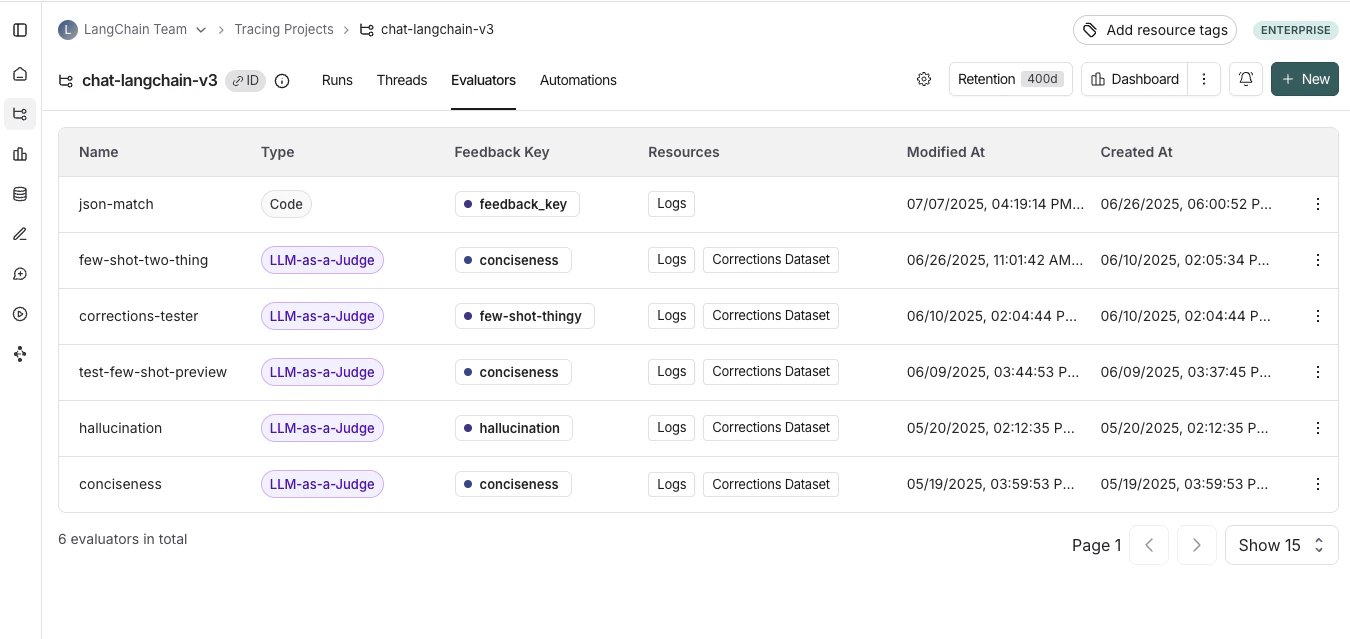
前往 **Tracing Projects** 标签页并选择一个追踪项目。要查看该项目的现有在线评估器,请点击 **Evaluators** 标签页。
 ## 配置复合在线评估器
您可以在[追踪项目](/langsmith/observability-concepts#projects)上为[在线评估](/langsmith/evaluation-concepts#online-evaluations)创建复合评估器。通过UI中的复合评估器,您可以计算多个评估器分数的加权平均值或加权总和,并配置权重。
### 1. 导航到追踪项目
要开始配置复合评估器,请导航到 **Tracing Projects** 标签页并选择一个项目。
在追踪项目内:**+ New** > **Evaluator** > **Composite score**
### 2. 配置复合评估器
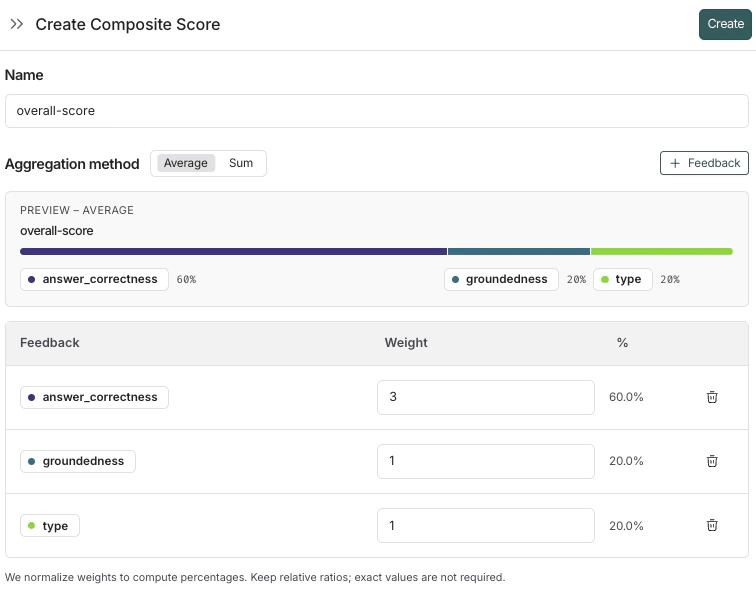
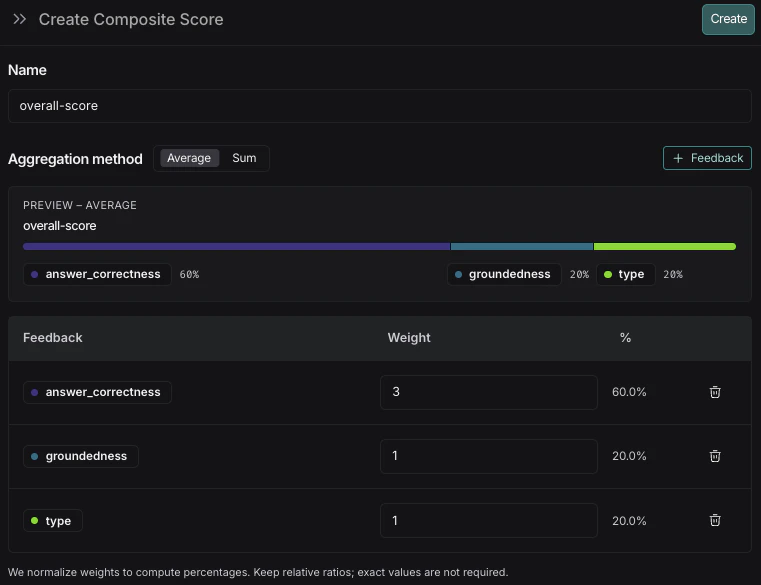
1. 为您的评估器命名。
2. 选择聚合方法,可以是 **Average** 或 **Sum**。
* **Average**:∑(权重\*分数) / ∑(权重)。
* **Sum**:∑(权重\*分数)。
3. 添加您希望包含在复合分数中的反馈键。
4. 为反馈键添加权重。默认情况下,每个反馈键的权重相等。调整权重以增加或减少特定反馈键在最终分数中的重要性。
5. 点击 **Create** 保存评估器。
如果您需要调整复合分数的权重,可以在评估器创建后进行更新。配置了该评估器的所有运行的分数结果都将相应更新。
### 3. 查看复合评估器结果
复合分数作为**反馈**附加到运行上,类似于单个评估器的反馈。
**在追踪项目中**:
* 复合分数显示为运行上的反馈。
* [筛选具有复合分数的运行](/langsmith/filter-traces-in-application),或筛选复合分数达到特定阈值的运行。
* [创建图表](/langsmith/dashboards#custom-dashboards)以可视化复合分数随时间的变化趋势。
如果任何组成评估器未在运行上配置,则该运行的复合分数将不会被计算。
***
## 配置复合在线评估器
您可以在[追踪项目](/langsmith/observability-concepts#projects)上为[在线评估](/langsmith/evaluation-concepts#online-evaluations)创建复合评估器。通过UI中的复合评估器,您可以计算多个评估器分数的加权平均值或加权总和,并配置权重。
### 1. 导航到追踪项目
要开始配置复合评估器,请导航到 **Tracing Projects** 标签页并选择一个项目。
在追踪项目内:**+ New** > **Evaluator** > **Composite score**
### 2. 配置复合评估器
1. 为您的评估器命名。
2. 选择聚合方法,可以是 **Average** 或 **Sum**。
* **Average**:∑(权重\*分数) / ∑(权重)。
* **Sum**:∑(权重\*分数)。
3. 添加您希望包含在复合分数中的反馈键。
4. 为反馈键添加权重。默认情况下,每个反馈键的权重相等。调整权重以增加或减少特定反馈键在最终分数中的重要性。
5. 点击 **Create** 保存评估器。
如果您需要调整复合分数的权重,可以在评估器创建后进行更新。配置了该评估器的所有运行的分数结果都将相应更新。
### 3. 查看复合评估器结果
复合分数作为**反馈**附加到运行上,类似于单个评估器的反馈。
**在追踪项目中**:
* 复合分数显示为运行上的反馈。
* [筛选具有复合分数的运行](/langsmith/filter-traces-in-application),或筛选复合分数达到特定阈值的运行。
* [创建图表](/langsmith/dashboards#custom-dashboards)以可视化复合分数随时间的变化趋势。
如果任何组成评估器未在运行上配置,则该运行的复合分数将不会被计算。
***
[Edit this page on GitHub](https://github.com/langchain-ai/docs/edit/main/src/i18n\zh-CN\langsmith\online-evaluations-composite.mdx) or [file an issue](https://github.com/langchain-ai/docs/issues/new/choose).
[Connect these docs](/use-these-docs) to Claude, VSCode, and more via MCP for real-time answers.