> ## Documentation Index
> Fetch the complete documentation index at: https://langchain-zh.cn/llms.txt
> Use this file to discover all available pages before exploring further.
# 如何使用预构建评估器
LangSmith 与开源 openevals 包集成,提供了一套预构建的评估器,可作为评估的起点。
本操作指南将演示如何设置和运行一种评估器(LLM 作为评判者)。如需查看包含使用示例的完整预构建评估器列表,请参考 [openevals](https://github.com/langchain-ai/openevals) 和 [agentevals](https://github.com/langchain-ai/agentevals) 代码库。
## 设置
您需要安装 `openevals` 包才能使用预构建的 LLM 作为评判者评估器。
```bash Python theme={"theme":{"light":"catppuccin-latte","dark":"catppuccin-mocha"}}
pip install -U openevals
```
```bash TypeScript theme={"theme":{"light":"catppuccin-latte","dark":"catppuccin-mocha"}}
yarn add openevals @langchain/core
```
您还需要将 OpenAI API 密钥设置为环境变量,不过您也可以选择其他提供商:
```bash theme={"theme":{"light":"catppuccin-latte","dark":"catppuccin-mocha"}}
export OPENAI_API_KEY="your_openai_api_key"
```
我们还将使用 LangSmith 的 Python [pytest](/langsmith/pytest) 集成和 TypeScript 的 [Vitest/Jest](/langsmith/vitest-jest) 来运行评估。`openevals` 也与 [`evaluate`](https://docs.smith.langchain.com/reference/python/evaluation/langsmith.evaluation._runner.evaluate) 方法无缝集成。请参阅[相应指南](/langsmith/pytest)了解设置说明。
## 运行评估器
一般流程很简单:从 `openevals` 导入评估器或工厂函数,然后在测试文件中使用输入、输出和参考输出来运行它。LangSmith 会自动将评估器的结果记录为反馈。
请注意,并非所有评估器都需要每个参数(例如,精确匹配评估器只需要输出和参考输出)。此外,如果您的 LLM 作为评判者的提示需要额外的变量,将它们作为 kwargs 传入会将其格式化到提示中。
按如下方式设置您的测试文件:
```python Python theme={"theme":{"light":"catppuccin-latte","dark":"catppuccin-mocha"}}
import pytest
from langsmith import testing as t
from openevals.llm import create_llm_as_judge
from openevals.prompts import CORRECTNESS_PROMPT
correctness_evaluator = create_llm_as_judge(
prompt=CORRECTNESS_PROMPT,
feedback_key="correctness",
model="openai:o3-mini",
)
# 模拟您的应用程序
def my_llm_app(inputs: dict) -> str:
return "Doodads have increased in price by 10% in the past year."
@pytest.mark.langsmith
def test_correctness():
inputs = "How much has the price of doodads changed in the past year?"
reference_outputs = "The price of doodads has decreased by 50% in the past year."
outputs = my_llm_app(inputs)
t.log_inputs({"question": inputs})
t.log_outputs({"answer": outputs})
t.log_reference_outputs({"answer": reference_outputs})
correctness_evaluator(
inputs=inputs,
outputs=outputs,
reference_outputs=reference_outputs
)
```
```typescript TypeScript theme={"theme":{"light":"catppuccin-latte","dark":"catppuccin-mocha"}}
import * as ls from "langsmith/vitest";
// import * as ls from "langsmith/jest";
import { createLLMAsJudge, CORRECTNESS_PROMPT } from "openevals";
const correctnessEvaluator = createLLMAsJudge({
prompt: CORRECTNESS_PROMPT,
feedbackKey: "correctness",
model: "openai:o3-mini",
});
// 模拟您的应用程序
const myLLMApp = async (_inputs: Record) => {
return "Doodads have increased in price by 10% in the past year.";
};
ls.describe("Correctness", () => {
ls.test("incorrect answer", {
inputs: {
question: "How much has the price of doodads changed in the past year?"
},
referenceOutputs: {
answer: "The price of doodads has decreased by 50% in the past year."
}
}, async ({ inputs, referenceOutputs }) => {
const outputs = await myLLMApp(inputs);
ls.logOutputs({ answer: outputs });
await correctnessEvaluator({
inputs,
outputs,
referenceOutputs,
});
});
});
```
`feedback_key`/`feedbackKey` 参数将用作您实验中反馈的名称。
在终端中运行评估将产生类似以下的结果:
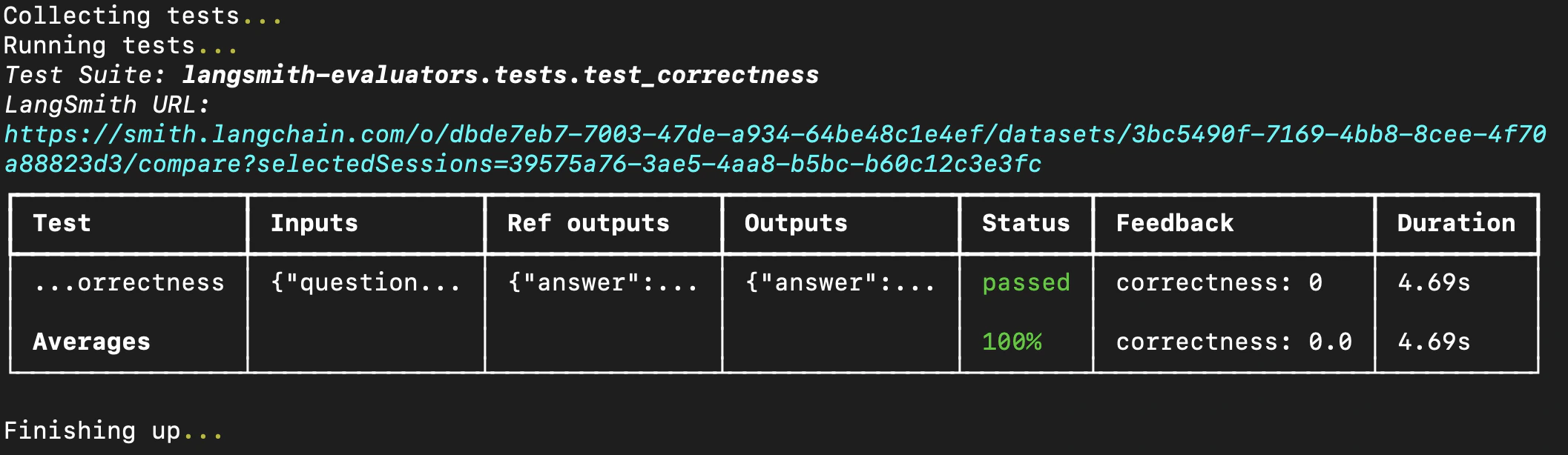 如果您已经在 LangSmith 中创建了数据集,也可以直接将预构建评估器传入 `evaluate` 方法。如果使用 Python,这需要 `langsmith>=0.3.11`:
```python Python theme={"theme":{"light":"catppuccin-latte","dark":"catppuccin-mocha"}}
from langsmith import Client
from openevals.llm import create_llm_as_judge
from openevals.prompts import CONCISENESS_PROMPT
client = Client()
conciseness_evaluator = create_llm_as_judge(
prompt=CONCISENESS_PROMPT,
feedback_key="conciseness",
model="openai:o3-mini",
)
experiment_results = client.evaluate(
# 这是一个虚拟目标函数,请替换为您的实际基于 LLM 的系统
lambda inputs: "What color is the sky?",
data="Sample dataset",
evaluators=[
conciseness_evaluator
]
)
```
```typescript TypeScript theme={"theme":{"light":"catppuccin-latte","dark":"catppuccin-mocha"}}
import { evaluate } from "langsmith/evaluation";
import { createLLMAsJudge, CONCISENESS_PROMPT } from "openevals";
const concisenessEvaluator = createLLMAsJudge({
prompt: CONCISENESS_PROMPT,
feedbackKey: "conciseness",
model: "openai:o3-mini",
});
await evaluate((inputs) => "What color is the sky?", {
data: datasetName,
evaluators: [concisenessEvaluator],
});
```
有关可用评估器的完整列表,请参阅 [openevals](https://github.com/langchain-ai/openevals) 和 [agentevals](https://github.com/langchain-ai/agentevals) 代码库。
***
如果您已经在 LangSmith 中创建了数据集,也可以直接将预构建评估器传入 `evaluate` 方法。如果使用 Python,这需要 `langsmith>=0.3.11`:
```python Python theme={"theme":{"light":"catppuccin-latte","dark":"catppuccin-mocha"}}
from langsmith import Client
from openevals.llm import create_llm_as_judge
from openevals.prompts import CONCISENESS_PROMPT
client = Client()
conciseness_evaluator = create_llm_as_judge(
prompt=CONCISENESS_PROMPT,
feedback_key="conciseness",
model="openai:o3-mini",
)
experiment_results = client.evaluate(
# 这是一个虚拟目标函数,请替换为您的实际基于 LLM 的系统
lambda inputs: "What color is the sky?",
data="Sample dataset",
evaluators=[
conciseness_evaluator
]
)
```
```typescript TypeScript theme={"theme":{"light":"catppuccin-latte","dark":"catppuccin-mocha"}}
import { evaluate } from "langsmith/evaluation";
import { createLLMAsJudge, CONCISENESS_PROMPT } from "openevals";
const concisenessEvaluator = createLLMAsJudge({
prompt: CONCISENESS_PROMPT,
feedbackKey: "conciseness",
model: "openai:o3-mini",
});
await evaluate((inputs) => "What color is the sky?", {
data: datasetName,
evaluators: [concisenessEvaluator],
});
```
有关可用评估器的完整列表,请参阅 [openevals](https://github.com/langchain-ai/openevals) 和 [agentevals](https://github.com/langchain-ai/agentevals) 代码库。
***
[Edit this page on GitHub](https://github.com/langchain-ai/docs/edit/main/src/i18n\zh-CN\langsmith\prebuilt-evaluators.mdx) or [file an issue](https://github.com/langchain-ai/docs/issues/new/choose).
[Connect these docs](/use-these-docs) to Claude, VSCode, and more via MCP for real-time answers.