> ## Documentation Index
> Fetch the complete documentation index at: https://langchain-zh.cn/llms.txt
> Use this file to discover all available pages before exploring further.
# 如何使用重复进行评估
运行多次重复可以更准确地估计系统的性能,因为大语言模型(LLM)的输出并非确定性的。每次重复的输出可能有所不同。重复是一种减少高可变性系统(例如智能体)中噪声的方法。
## 在实验中配置重复
在 `evaluate` / `aevaluate` 函数中添加可选的 `num_repetitions` 参数([Python](https://docs.smith.langchain.com/reference/python/evaluation/langsmith.evaluation._runner.evaluate), [TypeScript](https://docs.smith.langchain.com/reference/js/interfaces/evaluation.EvaluateOptions#numrepetitions)),以指定对数据集中每个示例进行评估的次数。例如,如果数据集中有 5 个示例,并设置 `num_repetitions=5`,则每个示例将运行 5 次,总共运行 25 次。
```python Python theme={"theme":{"light":"catppuccin-latte","dark":"catppuccin-mocha"}}
from langsmith import evaluate
results = evaluate(
lambda inputs: label_text(inputs["text"]),
data=dataset_name,
evaluators=[correct_label],
experiment_prefix="Toxic Queries",
num_repetitions=3,
)
```
```typescript TypeScript theme={"theme":{"light":"catppuccin-latte","dark":"catppuccin-mocha"}}
import { evaluate } from "langsmith/evaluation";
await evaluate((inputs) => labelText(inputs["input"]), {
data: datasetName,
evaluators: [correctLabel],
experimentPrefix: "Toxic Queries",
numRepetitions: 3,
});
```
## 查看使用重复运行的实验结果
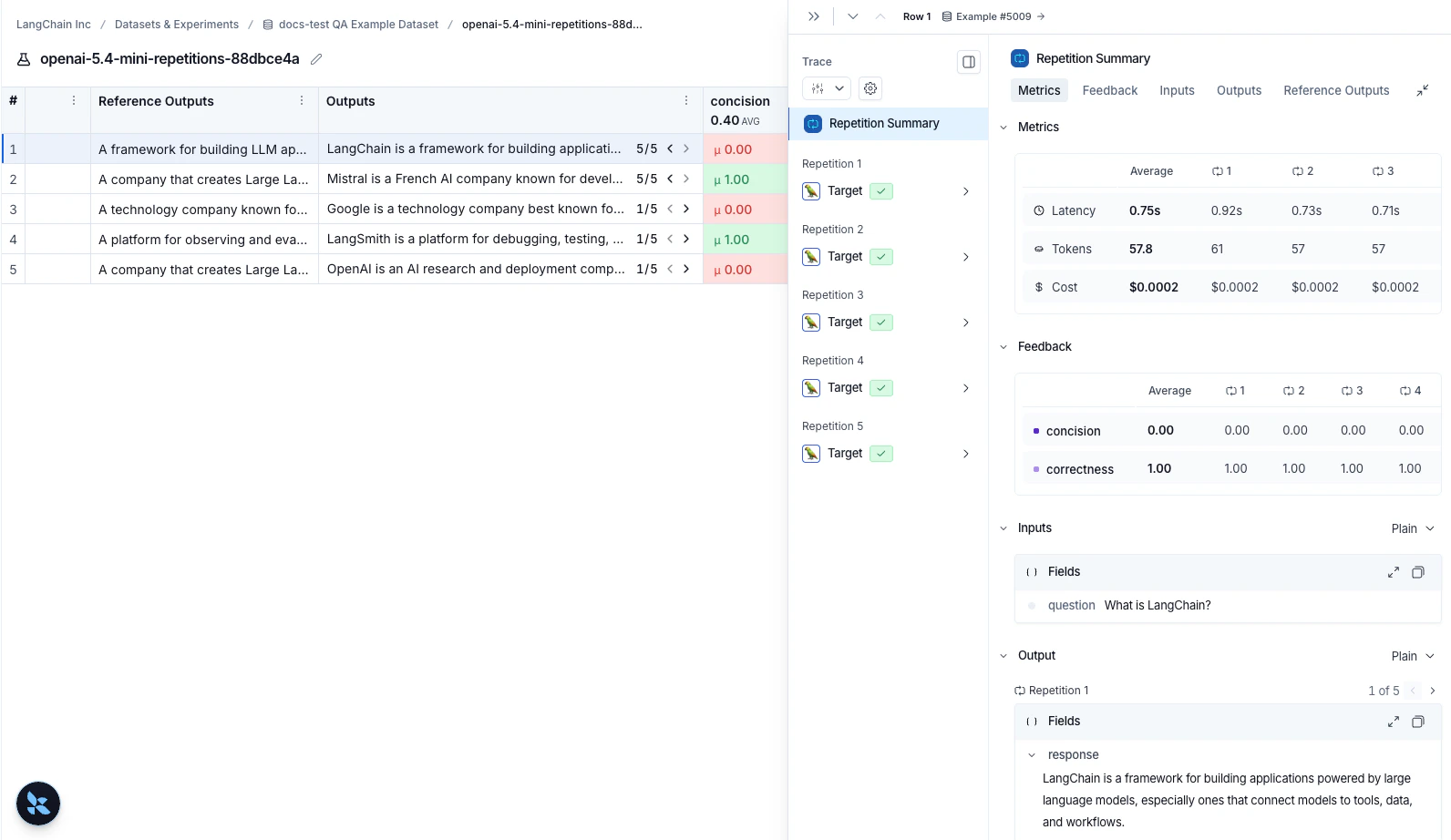
如果您使用[重复](/langsmith/repetition)运行了实验,输出结果列中会显示箭头,以便您在表格中查看输出。要查看每次重复的运行结果,请将鼠标悬停在输出单元格上,然后点击展开视图。当您使用重复运行实验时,LangSmith 会在表格中显示每个反馈分数的平均值。点击反馈分数可以查看单次运行的反馈分数,或查看重复之间的标准差。
 ***
***
[Edit this page on GitHub](https://github.com/langchain-ai/docs/edit/main/src/i18n\zh-CN\langsmith\repetition.mdx) or [file an issue](https://github.com/langchain-ai/docs/issues/new/choose).
[Connect these docs](/use-these-docs) to Claude, VSCode, and more via MCP for real-time answers.