> ## Documentation Index
> Fetch the complete documentation index at: https://langchain-zh.cn/llms.txt
> Use this file to discover all available pages before exploring further.
# 自定义用户管理
本指南假设您已阅读[管理员指南](/langsmith/administration-overview)和[组织设置指南](/langsmith/set-up-hierarchy#set-up-an-organization)。
LangSmith 提供使用功能标志进行用户管理的额外自定义功能。
## 功能
### 工作区层级邀请加入组织
LangSmith 的默认行为要求用户必须是组织管理员才能邀请新用户加入组织。对于希望将此职责委派给工作区管理员的私有化部署客户,可以设置一个功能标志,使工作区管理员也能**在工作区层级**邀请新用户加入组织及其特定工作区。
通过以下配置选项启用此功能后,工作区管理员可以在`设置` > `工作区`下的`工作区成员`选项卡中添加新用户。在工作区层级邀请时,以下两种情况均受支持,而组织层级的邀请功能与之前相同。
1. 邀请**尚未**在组织中激活的用户:这将把用户作为待定成员添加到组织和特定工作区
2. 邀请**已经**在组织中激活的用户:直接将用户作为活跃成员添加到工作区(无待定状态)。
管理员可以同时为这两种情况邀请用户。
#### 配置
```yaml Helm theme={"theme":{"light":"catppuccin-latte","dark":"catppuccin-mocha"}}
config:
workspaceScopeOrgInvitesEnabled: true
```
```bash Docker theme={"theme":{"light":"catppuccin-latte","dark":"catppuccin-mocha"}}
# 在您的 .env 文件中
WORKSPACE_SCOPE_ORG_INVITES_ENABLED="true"
```
### SSO 新成员登录流程
自 Helm **v0.11.10** 起,使用 OAuth SSO 的私有化部署将不再需要手动在 LangSmith 设置中添加成员即可让他们加入。部署将拥有一个默认组织,新用户首次登录 LangSmith 时将自动加入该组织。
对于您的**默认**组织,您可以设置新成员被分配的工作区(一个或多个)和工作区角色。对于**非默认**组织,邀请流程保持不变。
一旦用户加入组织,对其工作区或角色超出默认组织设置的任何更改,必须通过 LangSmith 设置(与之前相同)或通过 SCIM 进行管理。
默认情况下,所有新用户都将以**工作区编辑者**角色添加到组织最初配置的工作区(默认为**工作区 1**)。
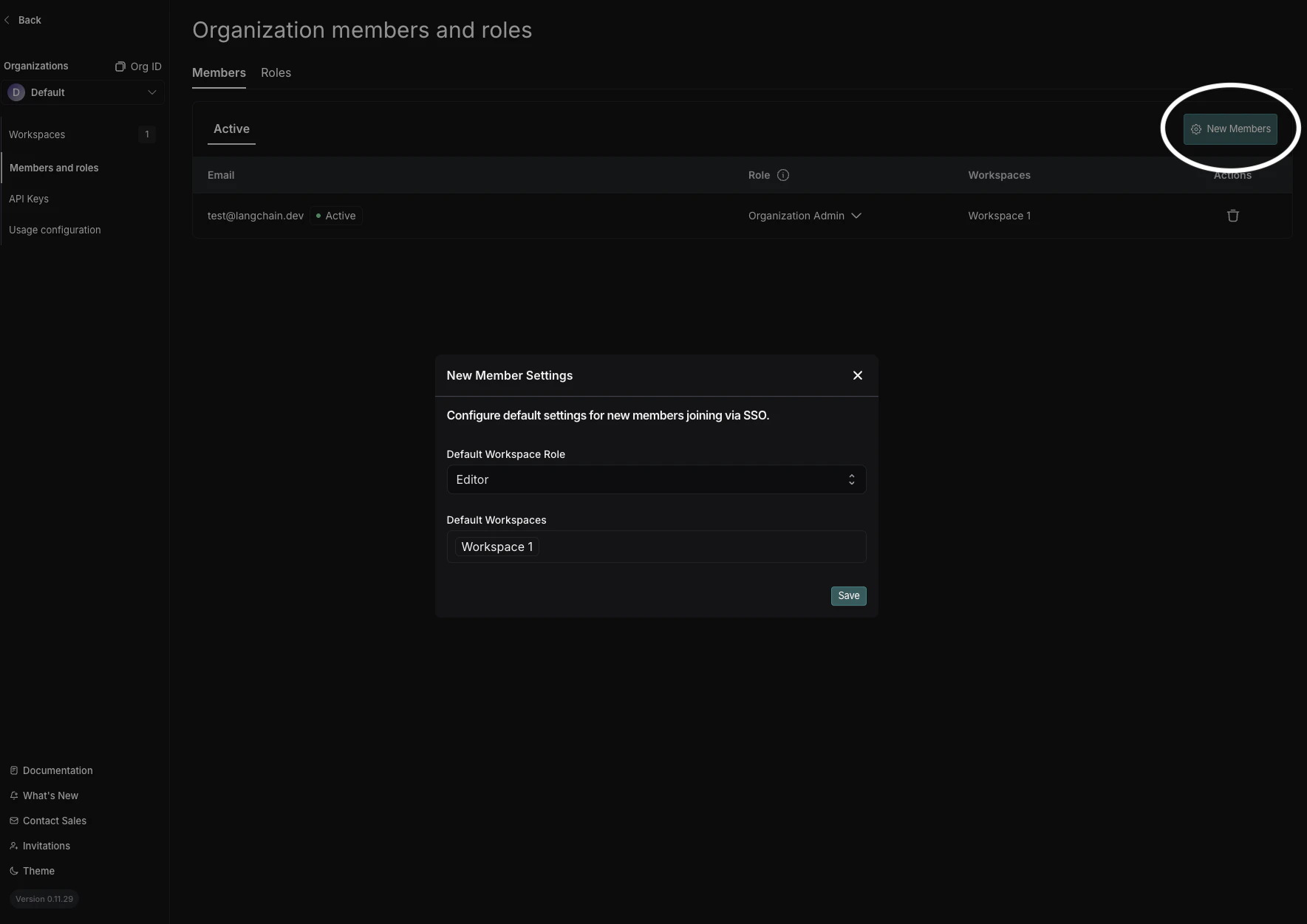 要更改您的默认组织,请在组织选择器下拉菜单中使用**设为默认组织**。(需要在源组织和目标组织中都拥有组织管理员权限。)
### 禁用组织创建
默认情况下,任何用户都可以在 LangSmith 中创建组织。对于私有化部署客户,管理员可能希望在设置初始组织后限制此能力。此功能标志允许管理员禁用用户创建新组织的能力。
#### 配置
对于使用[基础认证](/langsmith/self-host-basic-auth)或[SSO](/langsmith/self-host-sso)的组织,`userOrgCreationDisabled` 功能标志默认设置为 `true`。
```yaml Helm theme={"theme":{"light":"catppuccin-latte","dark":"catppuccin-mocha"}}
config:
userOrgCreationDisabled: true
```
```bash Docker theme={"theme":{"light":"catppuccin-latte","dark":"catppuccin-mocha"}}
# 在您的 .env 文件中
FF_ORG_CREATION_DISABLED="true"
```
### 禁用个人组织
默认情况下,任何登录 LangSmith 的用户都会自动创建一个个人组织。对于私有化部署客户,管理员可能希望限制此能力。此功能标志允许管理员禁用用户创建个人组织的能力。
#### 配置
对于使用[基础认证](/langsmith/self-host-basic-auth)或[SSO](/langsmith/self-host-sso)的组织,`personalOrgsDisabled` 功能标志默认设置为 `true`。
```yaml Helm theme={"theme":{"light":"catppuccin-latte","dark":"catppuccin-mocha"}}
config:
personalOrgsDisabled: true
```
```bash Docker theme={"theme":{"light":"catppuccin-latte","dark":"catppuccin-mocha"}}
# 在您的 .env 文件中
FF_PERSONAL_ORGS_DISABLED="true"
```
### 禁用个人访问令牌创建
此功能需要 Helm chart 版本 0.13.12(应用版本 0.13.12)或更高版本。
默认情况下,用户可以在任何组织中创建个人访问令牌(PAT)。对于私有化部署客户,管理员可能希望全局禁用所有组织的 PAT 创建。此环境变量允许管理员阻止用户在实例上的任何组织中创建新的 PAT。
若要在单个组织内禁用 PAT 创建,请参阅[按组织的 API 选项](/langsmith/manage-organization-by-api#security-settings)。
#### 配置
```yaml Helm theme={"theme":{"light":"catppuccin-latte","dark":"catppuccin-mocha"}}
commonEnv:
- name: PAT_CREATION_DISABLED
value: "true"
```
```bash Docker theme={"theme":{"light":"catppuccin-latte","dark":"catppuccin-mocha"}}
# 在您的 .env 文件中
PAT_CREATION_DISABLED="true"
```
***
要更改您的默认组织,请在组织选择器下拉菜单中使用**设为默认组织**。(需要在源组织和目标组织中都拥有组织管理员权限。)
### 禁用组织创建
默认情况下,任何用户都可以在 LangSmith 中创建组织。对于私有化部署客户,管理员可能希望在设置初始组织后限制此能力。此功能标志允许管理员禁用用户创建新组织的能力。
#### 配置
对于使用[基础认证](/langsmith/self-host-basic-auth)或[SSO](/langsmith/self-host-sso)的组织,`userOrgCreationDisabled` 功能标志默认设置为 `true`。
```yaml Helm theme={"theme":{"light":"catppuccin-latte","dark":"catppuccin-mocha"}}
config:
userOrgCreationDisabled: true
```
```bash Docker theme={"theme":{"light":"catppuccin-latte","dark":"catppuccin-mocha"}}
# 在您的 .env 文件中
FF_ORG_CREATION_DISABLED="true"
```
### 禁用个人组织
默认情况下,任何登录 LangSmith 的用户都会自动创建一个个人组织。对于私有化部署客户,管理员可能希望限制此能力。此功能标志允许管理员禁用用户创建个人组织的能力。
#### 配置
对于使用[基础认证](/langsmith/self-host-basic-auth)或[SSO](/langsmith/self-host-sso)的组织,`personalOrgsDisabled` 功能标志默认设置为 `true`。
```yaml Helm theme={"theme":{"light":"catppuccin-latte","dark":"catppuccin-mocha"}}
config:
personalOrgsDisabled: true
```
```bash Docker theme={"theme":{"light":"catppuccin-latte","dark":"catppuccin-mocha"}}
# 在您的 .env 文件中
FF_PERSONAL_ORGS_DISABLED="true"
```
### 禁用个人访问令牌创建
此功能需要 Helm chart 版本 0.13.12(应用版本 0.13.12)或更高版本。
默认情况下,用户可以在任何组织中创建个人访问令牌(PAT)。对于私有化部署客户,管理员可能希望全局禁用所有组织的 PAT 创建。此环境变量允许管理员阻止用户在实例上的任何组织中创建新的 PAT。
若要在单个组织内禁用 PAT 创建,请参阅[按组织的 API 选项](/langsmith/manage-organization-by-api#security-settings)。
#### 配置
```yaml Helm theme={"theme":{"light":"catppuccin-latte","dark":"catppuccin-mocha"}}
commonEnv:
- name: PAT_CREATION_DISABLED
value: "true"
```
```bash Docker theme={"theme":{"light":"catppuccin-latte","dark":"catppuccin-mocha"}}
# 在您的 .env 文件中
PAT_CREATION_DISABLED="true"
```
***
[Edit this page on GitHub](https://github.com/langchain-ai/docs/edit/main/src/i18n\zh-CN\langsmith\self-host-user-management.mdx) or [file an issue](https://github.com/langchain-ai/docs/issues/new/choose).
[Connect these docs](/use-these-docs) to Claude, VSCode, and more via MCP for real-time answers.