> ## Documentation Index
> Fetch the complete documentation index at: https://langchain-zh.cn/llms.txt
> Use this file to discover all available pages before exploring further.
# 设置反馈标准
**推荐阅读**
在深入了解本内容之前,建议先阅读以下内容:
* [关于追踪与反馈的概念指南](/langsmith/observability-concepts)
* [反馈数据格式参考指南](/langsmith/feedback-data-format)
反馈标准在应用中体现为反馈标签。对于人工反馈,您可以将新的反馈标准设置为连续反馈或分类反馈。
您也可以通过 SDK 以编程方式管理反馈配置。请参阅[以编程方式管理反馈与标注队列](/langsmith/annotation-queues-sdk)。
要设置新的反馈标准,请点击[此链接](https://smith.langchain.com/settings/workspaces/feedbacks)查看您工作空间的所有现有标签,然后点击**新建标签**。
## 连续反馈
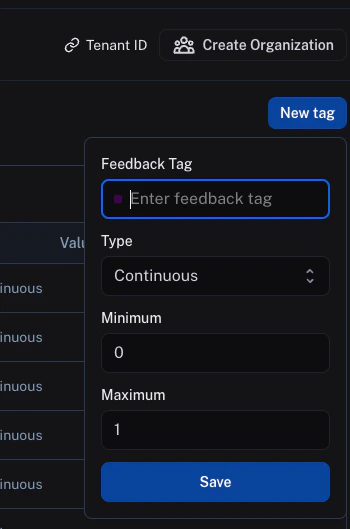
对于连续反馈,您可以输入反馈标签名称,然后选择最小值和最大值。在此范围内的所有值,包括浮点数,都将被接受为反馈分数。
 ## 分类反馈
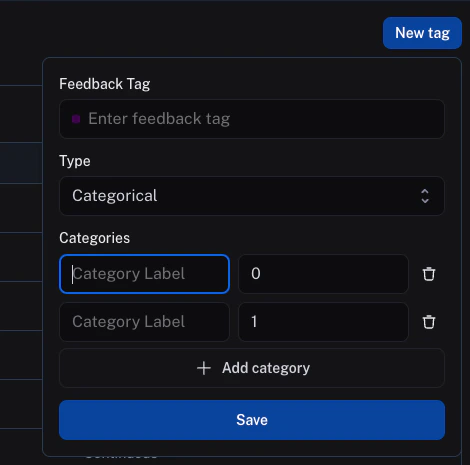
对于分类反馈,您可以输入反馈标签名称,然后添加一个类别列表,每个类别对应一个分数。当您提供反馈时,可以选择其中一个类别作为反馈分数。
类别标签和分数将分别作为反馈记录在 `value` 和 `score` 字段中。
## 分类反馈
对于分类反馈,您可以输入反馈标签名称,然后添加一个类别列表,每个类别对应一个分数。当您提供反馈时,可以选择其中一个类别作为反馈分数。
类别标签和分数将分别作为反馈记录在 `value` 和 `score` 字段中。
 ***
***
[Edit this page on GitHub](https://github.com/langchain-ai/docs/edit/main/src/i18n\zh-CN\langsmith\set-up-feedback-criteria.mdx) or [file an issue](https://github.com/langchain-ai/docs/issues/new/choose).
[Connect these docs](/use-these-docs) to Claude, VSCode, and more via MCP for real-time answers.