> ## Documentation Index
> Fetch the complete documentation index at: https://langchain-zh.cn/llms.txt
> Use this file to discover all available pages before exploring further.
# 追踪 Google ADK 应用
本指南将展示如何在 LangSmith 中追踪 [Google Agent Development Kit (ADK)](https://github.com/google/adk-python) 智能体。您将为 ADK 应用配置自动追踪功能,以捕获智能体调用、工具调用和 LLM 交互。
## 安装
使用您偏好的包管理器安装所需包:
{/* 来源:https://github.com/langchain-ai/ls-integration-examples/tree/main/integrations/google-adk/ */}
```bash uv theme={"theme":{"light":"catppuccin-latte","dark":"catppuccin-mocha"}}
uv add langsmith[google-adk]
```
```bash pip theme={"theme":{"light":"catppuccin-latte","dark":"catppuccin-mocha"}}
pip install langsmith[google-adk]
```
## 设置
设置您的 [API 密钥](/langsmith/create-account-api-key):
{/* Source: https://github.com/langchain-ai/ls-integration-examples/tree/main/integrations/google-adk/ */}
```bash shell theme={"theme":{"light":"catppuccin-latte","dark":"catppuccin-mocha"}}
export LANGSMITH_TRACING=true
export LANGSMITH_ENDPOINT=https://api.smith.langchain.com
export LANGSMITH_API_KEY=
export LANGSMITH_PROJECT=
export GOOGLE_API_KEY=
```
```dotenv .env theme={"theme":{"light":"catppuccin-latte","dark":"catppuccin-mocha"}}
LANGSMITH_TRACING=true
LANGSMITH_ENDPOINT=https://api.smith.langchain.com
LANGSMITH_API_KEY=
LANGSMITH_PROJECT=
GOOGLE_API_KEY=
```
要创建 Google API 密钥,请参考 [Google AI Studio](https://aistudio.google.com/api-keys)。
## 配置追踪
要追踪 ADK 智能体,请使用 LangSmith SDK 中的 `configure_google_adk()` 函数。在创建任何 ADK 智能体之前,在应用启动时调用此函数一次:
```python theme={"theme":{"light":"catppuccin-latte","dark":"catppuccin-mocha"}}
from langsmith.integrations.google_adk import configure_google_adk
configure_google_adk(
project_name="my-adk-project", # 可选:默认为 LANGSMITH_PROJECT 环境变量
)
```
该函数接受以下可选参数:
* `project_name`:发送追踪数据的 LangSmith 项目。默认为 `LANGSMITH_PROJECT` 环境变量。
* `name`:根追踪的名称。默认为 `"google_adk.session"`。
* `metadata`:用于附加上下文的键值对字典。
* `tags`:用于分类追踪的字符串列表。
## 示例
此示例创建一个带有工具的天气智能体,然后在启用追踪的情况下运行它:
{/* 来源:https://github.com/langchain-ai/ls-integration-examples/tree/main/integrations/google-adk/ */}
```python theme={"theme":{"light":"catppuccin-latte","dark":"catppuccin-mocha"}}
import asyncio
from dotenv import load_dotenv # Optional
from google.adk.agents import Agent
from google.adk.runners import Runner
from google.adk.sessions import InMemorySessionService
from google.genai import types
from langsmith.integrations.google_adk import configure_google_adk
load_dotenv() # Optional
async def main():
# Configure LangSmith tracing
configure_google_adk()
# Define a tool
def get_weather(city: str) -> dict:
"""Get weather for a city."""
return {"city": city, "temperature": "72°F", "conditions": "Sunny"}
# Create the agent
agent = Agent(
name="weather_agent",
model="gemini-2.0-flash",
description="Provides weather information.",
instruction="Use the get_weather tool to answer weather questions.",
tools=[get_weather],
)
# Set up session and runner
session_service = InMemorySessionService()
session = await session_service.create_session(
app_name="weather_app",
user_id="user_123",
session_id="session_456",
)
runner = Runner(
agent=agent,
app_name="weather_app",
session_service=session_service,
)
# Run the agent
async for event in runner.run_async(
user_id="user_123",
session_id=session.id,
new_message=types.Content(
role="user",
parts=[types.Part(text="What's the weather in San Francisco?")],
),
):
if event.is_final_response():
print(event.content.parts[0].text)
if __name__ == "__main__":
asyncio.run(main())
```
## 在 LangSmith 中查看追踪
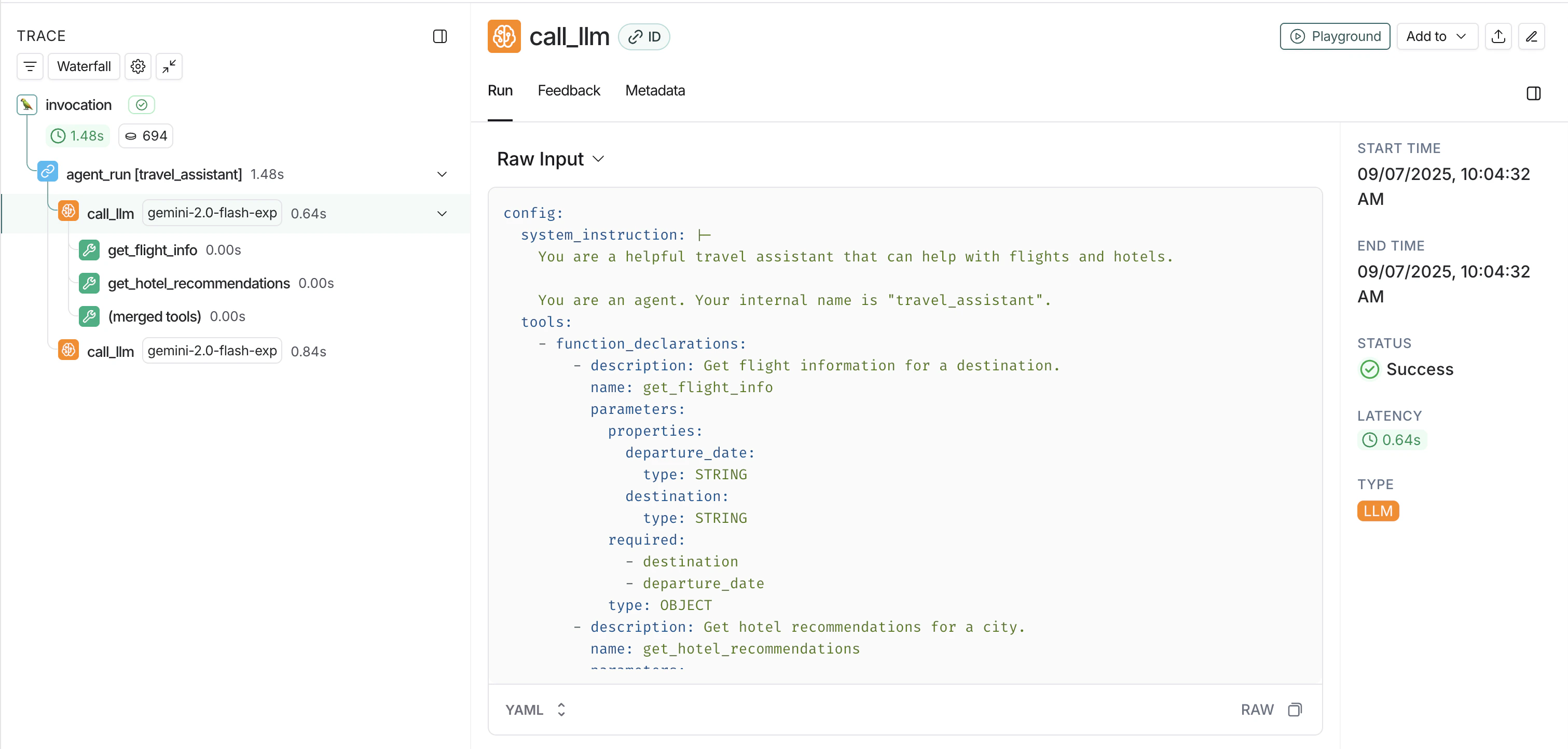
运行应用后,您可以在 [LangSmith UI](https://smith.langchain.com) 中查看追踪数据,包括:
* **智能体调用**:通过 ADK 智能体的完整流程
* **工具调用**:智能体进行的单个函数调用
* **LLM 交互**:与 Gemini 模型的请求和响应
* **多智能体工作流**:来自顺序和并行智能体组合的追踪
 ## 自定义元数据和标签
在配置追踪时添加元数据和标签,以分类和筛选追踪:
```python theme={"theme":{"light":"catppuccin-latte","dark":"catppuccin-mocha"}}
from langsmith.integrations.google_adk import configure_google_adk
configure_google_adk(
project_name="production-agents",
metadata={
"environment": "production",
"team": "ml-platform",
},
tags=["adk", "weather", "v2"],
)
```
## 多智能体工作流
该集成会自动追踪多智能体工作流,包括顺序和并行智能体组合:
{/* Source: https://github.com/langchain-ai/ls-integration-examples/tree/main/integrations/google-adk/ */}
```python theme={"theme":{"light":"catppuccin-latte","dark":"catppuccin-mocha"}}
import asyncio
from dotenv import load_dotenv # 可选
from google.adk.agents import Agent, SequentialAgent
from google.adk.runners import Runner
from google.adk.sessions import InMemorySessionService
from google.genai import types
from langsmith.integrations.google_adk import configure_google_adk
load_dotenv() # 可选
async def main():
# 配置 LangSmith 追踪
# 追踪默认发送到 LANGSMITH_PROJECT 环境变量。
# 传递 project_name="my-project" 以覆盖。
configure_google_adk()
# 创建子代理
translator = Agent(
name="translator",
model="gemini-2.0-flash",
description="Translates text to English.",
)
summarizer = Agent(
name="summarizer",
model="gemini-2.0-flash",
description="Summarizes text concisely.",
)
# 创建一个按顺序运行子代理的序列代理
pipeline = SequentialAgent(
name="translate_and_summarize",
sub_agents=[translator, summarizer],
description="Translates text then summarizes it.",
)
# 设置并运行
session_service = InMemorySessionService()
session = await session_service.create_session(
app_name="pipeline_app",
user_id="user_123",
session_id="session_456",
)
runner = Runner(
agent=pipeline,
app_name="pipeline_app",
session_service=session_service,
)
events = runner.run_async(
user_id="user_123",
session_id=session.id,
new_message=types.Content(
role="user",
parts=[types.Part(text="Quelle est la plus haute tour de Paris?")],
),
)
async for event in events:
if event.is_final_response():
print(event.content.parts[0].text)
if __name__ == "__main__":
asyncio.run(main())
```
***
## 自定义元数据和标签
在配置追踪时添加元数据和标签,以分类和筛选追踪:
```python theme={"theme":{"light":"catppuccin-latte","dark":"catppuccin-mocha"}}
from langsmith.integrations.google_adk import configure_google_adk
configure_google_adk(
project_name="production-agents",
metadata={
"environment": "production",
"team": "ml-platform",
},
tags=["adk", "weather", "v2"],
)
```
## 多智能体工作流
该集成会自动追踪多智能体工作流,包括顺序和并行智能体组合:
{/* Source: https://github.com/langchain-ai/ls-integration-examples/tree/main/integrations/google-adk/ */}
```python theme={"theme":{"light":"catppuccin-latte","dark":"catppuccin-mocha"}}
import asyncio
from dotenv import load_dotenv # 可选
from google.adk.agents import Agent, SequentialAgent
from google.adk.runners import Runner
from google.adk.sessions import InMemorySessionService
from google.genai import types
from langsmith.integrations.google_adk import configure_google_adk
load_dotenv() # 可选
async def main():
# 配置 LangSmith 追踪
# 追踪默认发送到 LANGSMITH_PROJECT 环境变量。
# 传递 project_name="my-project" 以覆盖。
configure_google_adk()
# 创建子代理
translator = Agent(
name="translator",
model="gemini-2.0-flash",
description="Translates text to English.",
)
summarizer = Agent(
name="summarizer",
model="gemini-2.0-flash",
description="Summarizes text concisely.",
)
# 创建一个按顺序运行子代理的序列代理
pipeline = SequentialAgent(
name="translate_and_summarize",
sub_agents=[translator, summarizer],
description="Translates text then summarizes it.",
)
# 设置并运行
session_service = InMemorySessionService()
session = await session_service.create_session(
app_name="pipeline_app",
user_id="user_123",
session_id="session_456",
)
runner = Runner(
agent=pipeline,
app_name="pipeline_app",
session_service=session_service,
)
events = runner.run_async(
user_id="user_123",
session_id=session.id,
new_message=types.Content(
role="user",
parts=[types.Part(text="Quelle est la plus haute tour de Paris?")],
),
)
async for event in events:
if event.is_final_response():
print(event.content.parts[0].text)
if __name__ == "__main__":
asyncio.run(main())
```
***
[Edit this page on GitHub](https://github.com/langchain-ai/docs/edit/main/src/i18n\zh-CN\langsmith\trace-with-google-adk.mdx) or [file an issue](https://github.com/langchain-ai/docs/issues/new/choose).
[Connect these docs](/use-these-docs) to Claude, VSCode, and more via MCP for real-time answers.