> ## Documentation Index
> Fetch the complete documentation index at: https://langchain-zh.cn/llms.txt
> Use this file to discover all available pages before exploring further.
# 追踪 OpenAI Agents SDK 应用
OpenAI Agents SDK 允许您构建由 OpenAI 模型驱动的智能体应用。
了解如何使用 LangSmith 追踪基于 OpenAI Agents SDK 的 LLM 应用。
## 安装
需要 Python SDK 版本 `langsmith>=0.3.15`。
安装支持 OpenAI Agents 的 LangSmith:
```bash pip theme={"theme":{"light":"catppuccin-latte","dark":"catppuccin-mocha"}}
pip install "langsmith[openai-agents]"
```
```bash uv theme={"theme":{"light":"catppuccin-latte","dark":"catppuccin-mocha"}}
uv add "langsmith[openai-agents]"
```
这将同时安装 LangSmith 库和 OpenAI Agents SDK。
## 快速开始
您可以通过使用 `OpenAIAgentsTracingProcessor` 类,将 LangSmith 追踪功能集成到 OpenAI Agents SDK 中。
```python theme={"theme":{"light":"catppuccin-latte","dark":"catppuccin-mocha"}}
import asyncio
from agents import Agent, Runner, set_trace_processors
from langsmith.integrations.openai_agents_sdk import OpenAIAgentsTracingProcessor
async def main():
agent = Agent(
name="Captain Obvious",
instructions="You are Captain Obvious, the world's most literal technical support agent.",
)
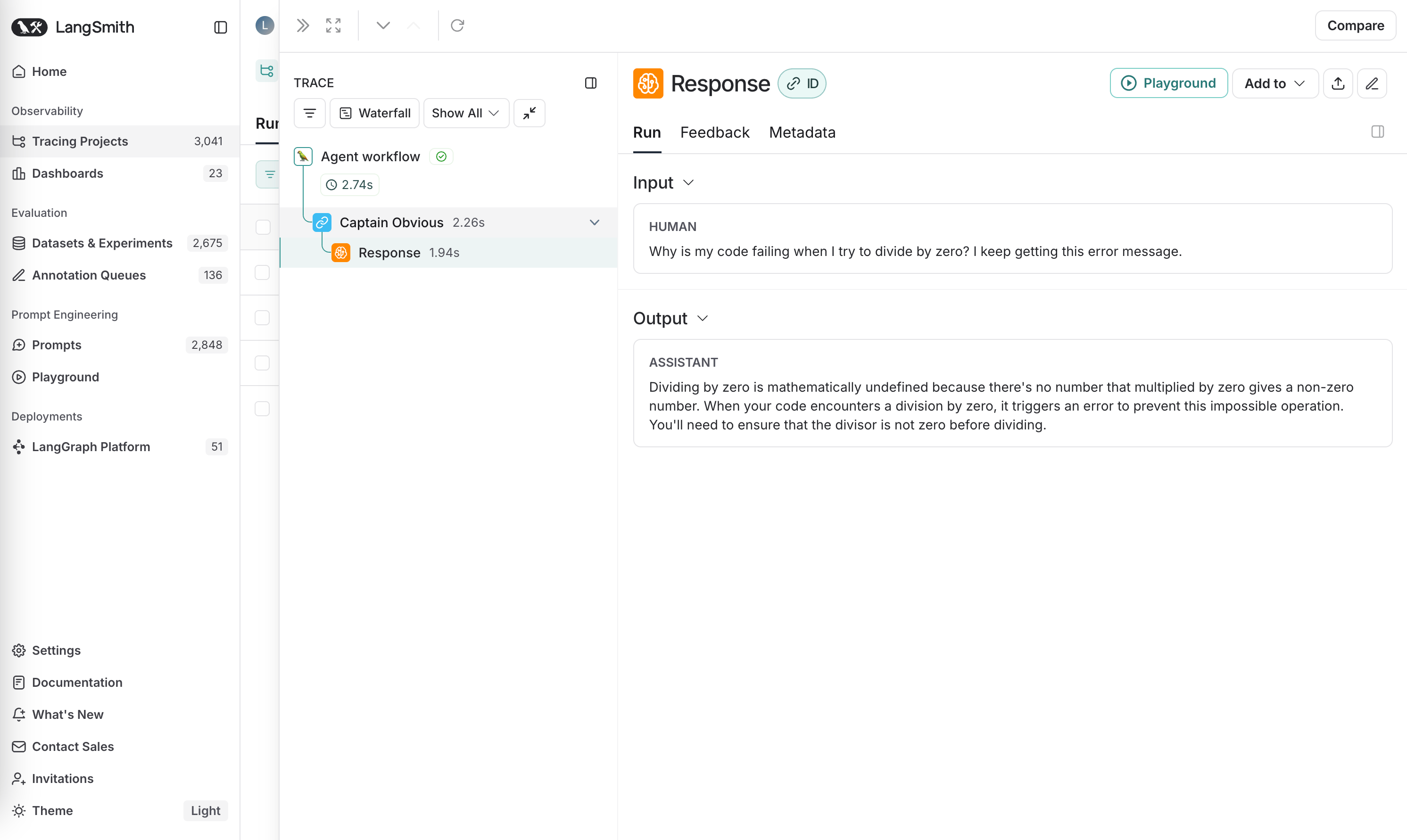
question = "Why is my code failing when I try to divide by zero? I keep getting this error message."
result = await Runner.run(agent, question)
print(result.final_output)
if __name__ == "__main__":
set_trace_processors([OpenAIAgentsTracingProcessor()])
asyncio.run(main())
```
智能体的执行流程,包括所有跨度及其详细信息,都将被记录到 LangSmith 中。
 ***
***
[Edit this page on GitHub](https://github.com/langchain-ai/docs/edit/main/src/i18n\zh-CN\langsmith\trace-with-openai-agents-sdk.mdx) or [file an issue](https://github.com/langchain-ai/docs/issues/new/choose).
[Connect these docs](/use-these-docs) to Claude, VSCode, and more via MCP for real-time answers.