> ## Documentation Index
> Fetch the complete documentation index at: https://langchain-zh.cn/llms.txt
> Use this file to discover all available pages before exploring further.
# 短期记忆
## 概述
记忆是一个记住先前交互信息的系统。对于 AI 代理而言,记忆至关重要,因为它使它们能够记住先前的交互、从反馈中学习并适应用户偏好。随着代理处理具有众多用户交互的更复杂任务,这种能力对于效率和用户满意度都变得至关重要。
短期记忆让您的应用程序能够在单个线程或对话中记住先前的交互。
线程在会话中组织多个交互,类似于电子邮件在单个对话中分组消息的方式。
对话历史是短期记忆最常见的形式。长对话对当今的大语言模型(LLM)构成了挑战;完整的历史记录可能无法放入 LLM 的上下文窗口中,导致上下文丢失或错误。
即使您的模型支持完整的上下文长度,大多数 LLM 在长上下文下表现仍然不佳。它们会被过时或不相关的内容“分心”,同时伴随着响应时间变慢和成本增加。
聊天模型使用 [messages](/oss/python/langchain/messages) 接受上下文,其中包括指令(系统消息)和输入(人类消息)。在聊天应用中,消息在人类输入和模型响应之间交替,导致消息列表随时间增长。由于上下文窗口有限,许多应用程序可以通过使用技术来移除或“遗忘”过时信息而受益。
需要在**跨**对话中记住信息?使用 [长期记忆](/oss/python/langchain/long-term-memory) 在不同线程和会话中存储和回忆特定于用户或应用程序级别的数据。
## 用法
要向代理添加短期记忆(线程级持久性),您需要在创建代理时指定一个 `checkpointer`。
LangChain 的代理将短期记忆作为其代理状态的一部分进行管理。
通过将这些存储在图的状态中,代理可以访问给定对话的完整上下文,同时保持不同线程之间的分离。
状态使用 checkpointer 持久化到数据库(或内存),以便可以随时恢复线程。
当代理被调用或步骤(如工具调用)完成时,短期记忆会更新,并且状态在每个步骤开始时读取。
```python theme={"theme":{"light":"catppuccin-latte","dark":"catppuccin-mocha"}}
from langchain.agents import create_agent
from langgraph.checkpoint.memory import InMemorySaver # [!code highlight]
agent = create_agent(
"gpt-5",
tools=[get_user_info],
checkpointer=InMemorySaver(), # [!code highlight]
)
agent.invoke(
{"messages": [{"role": "user", "content": "Hi! My name is Bob."}]},
{"configurable": {"thread_id": "1"}}, # [!code highlight]
)
```
### 生产环境
在生产环境中,使用由数据库支持的 checkpointer:
```shell theme={"theme":{"light":"catppuccin-latte","dark":"catppuccin-mocha"}}
pip install langgraph-checkpoint-postgres
```
```python theme={"theme":{"light":"catppuccin-latte","dark":"catppuccin-mocha"}}
from langchain.agents import create_agent
from langgraph.checkpoint.postgres import PostgresSaver # [!code highlight]
DB_URI = "postgresql://postgres:postgres@localhost:5442/postgres?sslmode=disable"
with PostgresSaver.from_conn_string(DB_URI) as checkpointer:
checkpointer.setup() # auto create tables in PostgreSQL
agent = create_agent(
"gpt-5",
tools=[get_user_info],
checkpointer=checkpointer, # [!code highlight]
)
```
有关更多 checkpointer 选项,包括 SQLite、Postgres 和 Azure Cosmos DB,请参阅 Persistence 文档中的 [checkpointer 库列表](/oss/python/langgraph/persistence#checkpointer-libraries)。
## 自定义代理记忆
默认情况下,代理使用 [`AgentState`](https://reference.langchain.com/python/langchain/agents/middleware/types/AgentState) 管理短期记忆,特别是通过 `messages` 键进行对话历史。
您可以扩展 [`AgentState`](https://reference.langchain.com/python/langchain/agents/middleware/types/AgentState) 以添加其他字段。自定义状态架构使用 [`state_schema`](https://reference.langchain.com/python/langchain/middleware/#langchain.agents.middleware.AgentMiddleware.state_schema) 参数传递给 [`create_agent`](https://reference.langchain.com/python/langchain/agents/factory/create_agent)。
```python theme={"theme":{"light":"catppuccin-latte","dark":"catppuccin-mocha"}}
from langchain.agents import create_agent, AgentState
from langgraph.checkpoint.memory import InMemorySaver
class CustomAgentState(AgentState): # [!code highlight]
user_id: str # [!code highlight]
preferences: dict # [!code highlight]
agent = create_agent(
"gpt-5",
tools=[get_user_info],
state_schema=CustomAgentState, # [!code highlight]
checkpointer=InMemorySaver(),
)
# Custom state can be passed in invoke
result = agent.invoke(
{
"messages": [{"role": "user", "content": "Hello"}],
"user_id": "user_123", # [!code highlight]
"preferences": {"theme": "dark"} # [!code highlight]
},
{"configurable": {"thread_id": "1"}})
```
## 常见模式
启用 [短期记忆](#usage) 后,长对话可能会超过 LLM 的上下文窗口。常见的解决方案有:
移除前 N 条或后 N 条消息(在调用 LLM 之前)
永久从 LangGraph 状态中删除消息
总结历史记录中的早期消息并用摘要替换它们
自定义策略(例如,消息过滤等)
这允许代理跟踪对话而不会超过 LLM 的上下文窗口。
### 修剪消息
大多数 LLM 都有最大支持的上下文窗口(以令牌为单位表示)。
决定何时截断消息的一种方法是计算消息历史中的令牌数,并在接近该限制时截断。如果您正在使用 LangChain,可以使用修剪消息实用程序并指定要从列表中保留的令牌数量,以及用于处理边界的 `strategy`(例如,保留最后 `max_tokens`)。
要在代理中修剪消息历史,请使用 [`@before_model`](https://reference.langchain.com/python/langchain/agents/middleware/types/before_model) 中间件装饰器:
```python theme={"theme":{"light":"catppuccin-latte","dark":"catppuccin-mocha"}}
from langchain.messages import RemoveMessage
from langgraph.graph.message import REMOVE_ALL_MESSAGES
from langgraph.checkpoint.memory import InMemorySaver
from langchain.agents import create_agent, AgentState
from langchain.agents.middleware import before_model
from langgraph.runtime import Runtime
from langchain_core.runnables import RunnableConfig
from typing import Any
@before_model
def trim_messages(state: AgentState, runtime: Runtime) -> dict[str, Any] | None:
"""Keep only the last few messages to fit context window."""
messages = state["messages"]
if len(messages) <= 3:
return None # No changes needed
first_msg = messages[0]
recent_messages = messages[-3:] if len(messages) % 2 == 0 else messages[-4:]
new_messages = [first_msg] + recent_messages
return {
"messages": [
RemoveMessage(id=REMOVE_ALL_MESSAGES),
*new_messages
]
}
agent = create_agent(
your_model_here,
tools=your_tools_here,
middleware=[trim_messages],
checkpointer=InMemorySaver(),
)
config: RunnableConfig = {"configurable": {"thread_id": "1"}}
agent.invoke({"messages": "hi, my name is bob"}, config)
agent.invoke({"messages": "write a short poem about cats"}, config)
agent.invoke({"messages": "now do the same but for dogs"}, config)
final_response = agent.invoke({"messages": "what's my name?"}, config)
final_response["messages"][-1].pretty_print()
"""
================================== Ai Message ==================================
Your name is Bob. You told me that earlier.
If you'd like me to call you a nickname or use a different name, just say the word.
"""
```
### 删除消息
您可以从图状态中删除消息以管理消息历史。
当您想要删除特定消息或清除整个消息历史时,这很有用。
要从图状态中删除消息,您可以使用 `RemoveMessage`。
要使 `RemoveMessage` 正常工作,您需要使用带有 [`add_messages`](https://reference.langchain.com/python/langgraph/graph/message/add_messages) [reducer](/oss/python/langgraph/graph-api#reducers) 的状态键。
默认的 [`AgentState`](https://reference.langchain.com/python/langchain/agents/middleware/types/AgentState) 提供了此功能。
要删除特定消息:
```python theme={"theme":{"light":"catppuccin-latte","dark":"catppuccin-mocha"}}
from langchain.messages import RemoveMessage # [!code highlight]
def delete_messages(state):
messages = state["messages"]
if len(messages) > 2:
# remove the earliest two messages
return {"messages": [RemoveMessage(id=m.id) for m in messages[:2]]} # [!code highlight]
```
要删除**所有**消息:
```python theme={"theme":{"light":"catppuccin-latte","dark":"catppuccin-mocha"}}
from langgraph.graph.message import REMOVE_ALL_MESSAGES # [!code highlight]
def delete_messages(state):
return {"messages": [RemoveMessage(id=REMOVE_ALL_MESSAGES)]} # [!code highlight]
```
删除消息时,**确保**生成的消息历史是有效的。检查您使用的 LLM 提供程序的局限性。例如:
* 某些提供程序期望消息历史以 `user` 消息开头
* 大多数提供程序要求带有工具调用的 `assistant` 消息后跟相应的 `tool` 结果消息。
```python theme={"theme":{"light":"catppuccin-latte","dark":"catppuccin-mocha"}}
from langchain.messages import RemoveMessage
from langchain.agents import create_agent, AgentState
from langchain.agents.middleware import after_model
from langgraph.checkpoint.memory import InMemorySaver
from langgraph.runtime import Runtime
from langchain_core.runnables import RunnableConfig
@after_model
def delete_old_messages(state: AgentState, runtime: Runtime) -> dict | None:
"""Remove old messages to keep conversation manageable."""
messages = state["messages"]
if len(messages) > 2:
# remove the earliest two messages
return {"messages": [RemoveMessage(id=m.id) for m in messages[:2]]}
return None
agent = create_agent(
"gpt-5-nano",
tools=[],
system_prompt="Please be concise and to the point.",
middleware=[delete_old_messages],
checkpointer=InMemorySaver(),
)
config: RunnableConfig = {"configurable": {"thread_id": "1"}}
for event in agent.stream(
{"messages": [{"role": "user", "content": "hi! I'm bob"}]},
config,
stream_mode="values",
):
print([(message.type, message.content) for message in event["messages"]])
for event in agent.stream(
{"messages": [{"role": "user", "content": "what's my name?"}]},
config,
stream_mode="values",
):
print([(message.type, message.content) for message in event["messages"]])
```
```
[('human', "hi! I'm bob")]
[('human', "hi! I'm bob"), ('ai', 'Hi Bob! Nice to meet you. How can I help you today? I can answer questions, brainstorm ideas, draft text, explain things, or help with code.')]
[('human', "hi! I'm bob"), ('ai', 'Hi Bob! Nice to meet you. How can I help you today? I can answer questions, brainstorm ideas, draft text, explain things, or help with code.'), ('human', "what's my name?")]
[('human', "hi! I'm bob"), ('ai', 'Hi Bob! Nice to meet you. How can I help you today? I can answer questions, brainstorm ideas, draft text, explain things, or help with code.'), ('human', "what's my name?"), ('ai', 'Your name is Bob. How can I help you today, Bob?')]
[('human', "what's my name?"), ('ai', 'Your name is Bob. How can I help you today, Bob?')]
```
### 总结消息
如上所示,修剪或删除消息的问题在于,您可能会因清理消息队列而丢失信息。
因此,一些应用程序受益于使用聊天模型总结消息历史的更复杂方法。
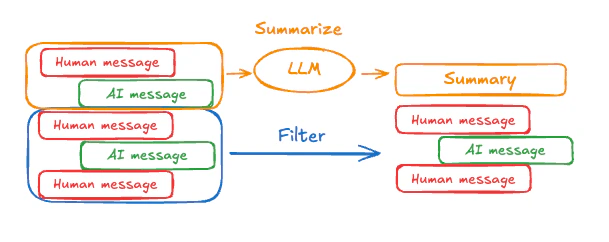 要在代理中总结消息历史,请使用内置的 [`SummarizationMiddleware`](/oss/python/langchain/middleware#summarization):
```python theme={"theme":{"light":"catppuccin-latte","dark":"catppuccin-mocha"}}
from langchain.agents import create_agent
from langchain.agents.middleware import SummarizationMiddleware
from langgraph.checkpoint.memory import InMemorySaver
from langchain_core.runnables import RunnableConfig
checkpointer = InMemorySaver()
agent = create_agent(
model="gpt-4.1",
tools=[],
middleware=[
SummarizationMiddleware(
model="gpt-4.1-mini",
trigger=("tokens", 4000),
keep=("messages", 20)
)
],
checkpointer=checkpointer,
)
config: RunnableConfig = {"configurable": {"thread_id": "1"}}
agent.invoke({"messages": "hi, my name is bob"}, config)
agent.invoke({"messages": "write a short poem about cats"}, config)
agent.invoke({"messages": "now do the same but for dogs"}, config)
final_response = agent.invoke({"messages": "what's my name?"}, config)
final_response["messages"][-1].pretty_print()
"""
================================== Ai Message ==================================
Your name is Bob!
"""
```
有关更多配置选项,请参见 [`SummarizationMiddleware`](/oss/python/langchain/middleware#summarization)。
## 访问记忆
您可以通过多种方式访问和修改代理的短期记忆(状态):
### 工具
#### 在工具中读取短期记忆
使用 `runtime` 参数(类型为 `ToolRuntime`)在工具中访问短期记忆(状态)。
`runtime` 参数对工具签名隐藏(因此模型看不到它),但工具可以通过它访问状态。
```python theme={"theme":{"light":"catppuccin-latte","dark":"catppuccin-mocha"}}
from langchain.agents import create_agent, AgentState
from langchain.tools import tool, ToolRuntime
class CustomState(AgentState):
user_id: str
@tool
def get_user_info(
runtime: ToolRuntime
) -> str:
"""Look up user info."""
user_id = runtime.state["user_id"]
return "User is John Smith" if user_id == "user_123" else "Unknown user"
agent = create_agent(
model="gpt-5-nano",
tools=[get_user_info],
state_schema=CustomState,
)
result = agent.invoke({
"messages": "look up user information",
"user_id": "user_123"
})
print(result["messages"][-1].content)
# > User is John Smith.
```
#### 从工具写入短期记忆
为了在执行期间修改代理的短期记忆(状态),您可以直接从工具返回状态更新。
这对于持久化中间结果或使信息可供后续工具或提示使用非常有用。
```python theme={"theme":{"light":"catppuccin-latte","dark":"catppuccin-mocha"}}
from langchain.tools import tool, ToolRuntime
from langchain_core.runnables import RunnableConfig
from langchain.messages import ToolMessage
from langchain.agents import create_agent, AgentState
from langgraph.types import Command
from pydantic import BaseModel
class CustomState(AgentState): # [!code highlight]
user_name: str
class CustomContext(BaseModel):
user_id: str
@tool
def update_user_info(
runtime: ToolRuntime[CustomContext, CustomState],
) -> Command:
"""Look up and update user info."""
user_id = runtime.context.user_id
name = "John Smith" if user_id == "user_123" else "Unknown user"
return Command(update={ # [!code highlight]
"user_name": name,
# update the message history
"messages": [
ToolMessage(
"Successfully looked up user information",
tool_call_id=runtime.tool_call_id
)
]
})
@tool
def greet(
runtime: ToolRuntime[CustomContext, CustomState]
) -> str | Command:
"""Use this to greet the user once you found their info."""
user_name = runtime.state.get("user_name", None)
if user_name is None:
return Command(update={
"messages": [
ToolMessage(
"Please call the 'update_user_info' tool it will get and update the user's name.",
tool_call_id=runtime.tool_call_id
)
]
})
return f"Hello {user_name}!"
agent = create_agent(
model="gpt-5-nano",
tools=[update_user_info, greet],
state_schema=CustomState, # [!code highlight]
context_schema=CustomContext,
)
agent.invoke(
{"messages": [{"role": "user", "content": "greet the user"}]},
context=CustomContext(user_id="user_123"),
)
```
### 提示词
在中间件中访问短期记忆(状态),以根据对话历史或自定义状态字段创建动态提示词。
```python theme={"theme":{"light":"catppuccin-latte","dark":"catppuccin-mocha"}}
from langchain.agents import create_agent
from typing import TypedDict
from langchain.agents.middleware import dynamic_prompt, ModelRequest
class CustomContext(TypedDict):
user_name: str
def get_weather(city: str) -> str:
"""Get the weather in a city."""
return f"The weather in {city} is always sunny!"
@dynamic_prompt
def dynamic_system_prompt(request: ModelRequest) -> str:
user_name = request.runtime.context["user_name"]
system_prompt = f"You are a helpful assistant. Address the user as {user_name}."
return system_prompt
agent = create_agent(
model="gpt-5-nano",
tools=[get_weather],
middleware=[dynamic_system_prompt],
context_schema=CustomContext,
)
result = agent.invoke(
{"messages": [{"role": "user", "content": "What is the weather in SF?"}]},
context=CustomContext(user_name="John Smith"),
)
for msg in result["messages"]:
msg.pretty_print()
```
```shell title="Output" theme={"theme":{"light":"catppuccin-latte","dark":"catppuccin-mocha"}}
================================ Human Message =================================
What is the weather in SF?
================================== Ai Message ==================================
Tool Calls:
get_weather (call_WFQlOGn4b2yoJrv7cih342FG)
Call ID: call_WFQlOGn4b2yoJrv7cih342FG
Args:
city: San Francisco
================================= Tool Message =================================
Name: get_weather
The weather in San Francisco is always sunny!
================================== Ai Message ==================================
Hi John Smith, the weather in San Francisco is always sunny!
```
### 模型之前
在 [`@before_model`](https://reference.langchain.com/python/langchain/agents/middleware/types/before_model) 中间件中访问短期记忆(状态),以便在模型调用之前处理消息。
```mermaid theme={"theme":{"light":"catppuccin-latte","dark":"catppuccin-mocha"}}
%%{
init: {
"fontFamily": "monospace",
"flowchart": {
"curve": "basis"
}
}
}%%
graph TD
S(["\_\_start\_\_"])
PRE(before_model)
MODEL(model)
TOOLS(tools)
END(["\_\_end\_\_"])
S --> PRE
PRE --> MODEL
MODEL -.-> TOOLS
MODEL -.-> END
TOOLS --> PRE
classDef blueHighlight fill:#DBEAFE,stroke:#2563EB,color:#1E3A8A;
classDef neutral fill:#F3F4F6,stroke:#9CA3AF,stroke-width:2px,color:#374151;
class S blueHighlight;
class END blueHighlight;
class PRE,MODEL,TOOLS neutral;
```
```python theme={"theme":{"light":"catppuccin-latte","dark":"catppuccin-mocha"}}
from langchain.messages import RemoveMessage
from langgraph.graph.message import REMOVE_ALL_MESSAGES
from langgraph.checkpoint.memory import InMemorySaver
from langchain.agents import create_agent, AgentState
from langchain.agents.middleware import before_model
from langchain_core.runnables import RunnableConfig
from langgraph.runtime import Runtime
from typing import Any
@before_model
def trim_messages(state: AgentState, runtime: Runtime) -> dict[str, Any] | None:
"""Keep only the last few messages to fit context window."""
messages = state["messages"]
if len(messages) <= 3:
return None # No changes needed
first_msg = messages[0]
recent_messages = messages[-3:] if len(messages) % 2 == 0 else messages[-4:]
new_messages = [first_msg] + recent_messages
return {
"messages": [
RemoveMessage(id=REMOVE_ALL_MESSAGES),
*new_messages
]
}
agent = create_agent(
"gpt-5-nano",
tools=[],
middleware=[trim_messages],
checkpointer=InMemorySaver()
)
config: RunnableConfig = {"configurable": {"thread_id": "1"}}
agent.invoke({"messages": "hi, my name is bob"}, config)
agent.invoke({"messages": "write a short poem about cats"}, config)
agent.invoke({"messages": "now do the same but for dogs"}, config)
final_response = agent.invoke({"messages": "what's my name?"}, config)
final_response["messages"][-1].pretty_print()
"""
================================== Ai Message ==================================
Your name is Bob. You told me that earlier.
If you'd like me to call you a nickname or use a different name, just say the word.
"""
```
### 模型之后
在 [`@after_model`](https://reference.langchain.com/python/langchain/agents/middleware/types/after_model) 中间件中访问短期记忆(状态),以便在模型调用之后处理消息。
```mermaid theme={"theme":{"light":"catppuccin-latte","dark":"catppuccin-mocha"}}
%%{
init: {
"fontFamily": "monospace",
"flowchart": {
"curve": "basis"
}
}
}%%
graph TD
S(["\_\_start\_\_"])
MODEL(model)
POST(after_model)
TOOLS(tools)
END(["\_\_end\_\_"])
S --> MODEL
MODEL --> POST
POST -.-> END
POST -.-> TOOLS
TOOLS --> MODEL
classDef blueHighlight fill:#DBEAFE,stroke:#2563EB,color:#1E3A8A;
classDef greenHighlight fill:#DCFCE7,stroke:#16A34A,color:#14532D;
classDef neutral fill:#F3F4F6,stroke:#9CA3AF,stroke-width:2px,color:#374151;
class S blueHighlight;
class END blueHighlight;
class POST greenHighlight;
class MODEL,TOOLS neutral;
```
```python theme={"theme":{"light":"catppuccin-latte","dark":"catppuccin-mocha"}}
from langchain.messages import RemoveMessage
from langgraph.checkpoint.memory import InMemorySaver
from langchain.agents import create_agent, AgentState
from langchain.agents.middleware import after_model
from langgraph.runtime import Runtime
@after_model
def validate_response(state: AgentState, runtime: Runtime) -> dict | None:
"""Remove messages containing sensitive words."""
STOP_WORDS = ["password", "secret"]
last_message = state["messages"][-1]
if any(word in last_message.content for word in STOP_WORDS):
return {"messages": [RemoveMessage(id=last_message.id)]}
return None
agent = create_agent(
model="gpt-5-nano",
tools=[],
middleware=[validate_response],
checkpointer=InMemorySaver(),
)
```
***
要在代理中总结消息历史,请使用内置的 [`SummarizationMiddleware`](/oss/python/langchain/middleware#summarization):
```python theme={"theme":{"light":"catppuccin-latte","dark":"catppuccin-mocha"}}
from langchain.agents import create_agent
from langchain.agents.middleware import SummarizationMiddleware
from langgraph.checkpoint.memory import InMemorySaver
from langchain_core.runnables import RunnableConfig
checkpointer = InMemorySaver()
agent = create_agent(
model="gpt-4.1",
tools=[],
middleware=[
SummarizationMiddleware(
model="gpt-4.1-mini",
trigger=("tokens", 4000),
keep=("messages", 20)
)
],
checkpointer=checkpointer,
)
config: RunnableConfig = {"configurable": {"thread_id": "1"}}
agent.invoke({"messages": "hi, my name is bob"}, config)
agent.invoke({"messages": "write a short poem about cats"}, config)
agent.invoke({"messages": "now do the same but for dogs"}, config)
final_response = agent.invoke({"messages": "what's my name?"}, config)
final_response["messages"][-1].pretty_print()
"""
================================== Ai Message ==================================
Your name is Bob!
"""
```
有关更多配置选项,请参见 [`SummarizationMiddleware`](/oss/python/langchain/middleware#summarization)。
## 访问记忆
您可以通过多种方式访问和修改代理的短期记忆(状态):
### 工具
#### 在工具中读取短期记忆
使用 `runtime` 参数(类型为 `ToolRuntime`)在工具中访问短期记忆(状态)。
`runtime` 参数对工具签名隐藏(因此模型看不到它),但工具可以通过它访问状态。
```python theme={"theme":{"light":"catppuccin-latte","dark":"catppuccin-mocha"}}
from langchain.agents import create_agent, AgentState
from langchain.tools import tool, ToolRuntime
class CustomState(AgentState):
user_id: str
@tool
def get_user_info(
runtime: ToolRuntime
) -> str:
"""Look up user info."""
user_id = runtime.state["user_id"]
return "User is John Smith" if user_id == "user_123" else "Unknown user"
agent = create_agent(
model="gpt-5-nano",
tools=[get_user_info],
state_schema=CustomState,
)
result = agent.invoke({
"messages": "look up user information",
"user_id": "user_123"
})
print(result["messages"][-1].content)
# > User is John Smith.
```
#### 从工具写入短期记忆
为了在执行期间修改代理的短期记忆(状态),您可以直接从工具返回状态更新。
这对于持久化中间结果或使信息可供后续工具或提示使用非常有用。
```python theme={"theme":{"light":"catppuccin-latte","dark":"catppuccin-mocha"}}
from langchain.tools import tool, ToolRuntime
from langchain_core.runnables import RunnableConfig
from langchain.messages import ToolMessage
from langchain.agents import create_agent, AgentState
from langgraph.types import Command
from pydantic import BaseModel
class CustomState(AgentState): # [!code highlight]
user_name: str
class CustomContext(BaseModel):
user_id: str
@tool
def update_user_info(
runtime: ToolRuntime[CustomContext, CustomState],
) -> Command:
"""Look up and update user info."""
user_id = runtime.context.user_id
name = "John Smith" if user_id == "user_123" else "Unknown user"
return Command(update={ # [!code highlight]
"user_name": name,
# update the message history
"messages": [
ToolMessage(
"Successfully looked up user information",
tool_call_id=runtime.tool_call_id
)
]
})
@tool
def greet(
runtime: ToolRuntime[CustomContext, CustomState]
) -> str | Command:
"""Use this to greet the user once you found their info."""
user_name = runtime.state.get("user_name", None)
if user_name is None:
return Command(update={
"messages": [
ToolMessage(
"Please call the 'update_user_info' tool it will get and update the user's name.",
tool_call_id=runtime.tool_call_id
)
]
})
return f"Hello {user_name}!"
agent = create_agent(
model="gpt-5-nano",
tools=[update_user_info, greet],
state_schema=CustomState, # [!code highlight]
context_schema=CustomContext,
)
agent.invoke(
{"messages": [{"role": "user", "content": "greet the user"}]},
context=CustomContext(user_id="user_123"),
)
```
### 提示词
在中间件中访问短期记忆(状态),以根据对话历史或自定义状态字段创建动态提示词。
```python theme={"theme":{"light":"catppuccin-latte","dark":"catppuccin-mocha"}}
from langchain.agents import create_agent
from typing import TypedDict
from langchain.agents.middleware import dynamic_prompt, ModelRequest
class CustomContext(TypedDict):
user_name: str
def get_weather(city: str) -> str:
"""Get the weather in a city."""
return f"The weather in {city} is always sunny!"
@dynamic_prompt
def dynamic_system_prompt(request: ModelRequest) -> str:
user_name = request.runtime.context["user_name"]
system_prompt = f"You are a helpful assistant. Address the user as {user_name}."
return system_prompt
agent = create_agent(
model="gpt-5-nano",
tools=[get_weather],
middleware=[dynamic_system_prompt],
context_schema=CustomContext,
)
result = agent.invoke(
{"messages": [{"role": "user", "content": "What is the weather in SF?"}]},
context=CustomContext(user_name="John Smith"),
)
for msg in result["messages"]:
msg.pretty_print()
```
```shell title="Output" theme={"theme":{"light":"catppuccin-latte","dark":"catppuccin-mocha"}}
================================ Human Message =================================
What is the weather in SF?
================================== Ai Message ==================================
Tool Calls:
get_weather (call_WFQlOGn4b2yoJrv7cih342FG)
Call ID: call_WFQlOGn4b2yoJrv7cih342FG
Args:
city: San Francisco
================================= Tool Message =================================
Name: get_weather
The weather in San Francisco is always sunny!
================================== Ai Message ==================================
Hi John Smith, the weather in San Francisco is always sunny!
```
### 模型之前
在 [`@before_model`](https://reference.langchain.com/python/langchain/agents/middleware/types/before_model) 中间件中访问短期记忆(状态),以便在模型调用之前处理消息。
```mermaid theme={"theme":{"light":"catppuccin-latte","dark":"catppuccin-mocha"}}
%%{
init: {
"fontFamily": "monospace",
"flowchart": {
"curve": "basis"
}
}
}%%
graph TD
S(["\_\_start\_\_"])
PRE(before_model)
MODEL(model)
TOOLS(tools)
END(["\_\_end\_\_"])
S --> PRE
PRE --> MODEL
MODEL -.-> TOOLS
MODEL -.-> END
TOOLS --> PRE
classDef blueHighlight fill:#DBEAFE,stroke:#2563EB,color:#1E3A8A;
classDef neutral fill:#F3F4F6,stroke:#9CA3AF,stroke-width:2px,color:#374151;
class S blueHighlight;
class END blueHighlight;
class PRE,MODEL,TOOLS neutral;
```
```python theme={"theme":{"light":"catppuccin-latte","dark":"catppuccin-mocha"}}
from langchain.messages import RemoveMessage
from langgraph.graph.message import REMOVE_ALL_MESSAGES
from langgraph.checkpoint.memory import InMemorySaver
from langchain.agents import create_agent, AgentState
from langchain.agents.middleware import before_model
from langchain_core.runnables import RunnableConfig
from langgraph.runtime import Runtime
from typing import Any
@before_model
def trim_messages(state: AgentState, runtime: Runtime) -> dict[str, Any] | None:
"""Keep only the last few messages to fit context window."""
messages = state["messages"]
if len(messages) <= 3:
return None # No changes needed
first_msg = messages[0]
recent_messages = messages[-3:] if len(messages) % 2 == 0 else messages[-4:]
new_messages = [first_msg] + recent_messages
return {
"messages": [
RemoveMessage(id=REMOVE_ALL_MESSAGES),
*new_messages
]
}
agent = create_agent(
"gpt-5-nano",
tools=[],
middleware=[trim_messages],
checkpointer=InMemorySaver()
)
config: RunnableConfig = {"configurable": {"thread_id": "1"}}
agent.invoke({"messages": "hi, my name is bob"}, config)
agent.invoke({"messages": "write a short poem about cats"}, config)
agent.invoke({"messages": "now do the same but for dogs"}, config)
final_response = agent.invoke({"messages": "what's my name?"}, config)
final_response["messages"][-1].pretty_print()
"""
================================== Ai Message ==================================
Your name is Bob. You told me that earlier.
If you'd like me to call you a nickname or use a different name, just say the word.
"""
```
### 模型之后
在 [`@after_model`](https://reference.langchain.com/python/langchain/agents/middleware/types/after_model) 中间件中访问短期记忆(状态),以便在模型调用之后处理消息。
```mermaid theme={"theme":{"light":"catppuccin-latte","dark":"catppuccin-mocha"}}
%%{
init: {
"fontFamily": "monospace",
"flowchart": {
"curve": "basis"
}
}
}%%
graph TD
S(["\_\_start\_\_"])
MODEL(model)
POST(after_model)
TOOLS(tools)
END(["\_\_end\_\_"])
S --> MODEL
MODEL --> POST
POST -.-> END
POST -.-> TOOLS
TOOLS --> MODEL
classDef blueHighlight fill:#DBEAFE,stroke:#2563EB,color:#1E3A8A;
classDef greenHighlight fill:#DCFCE7,stroke:#16A34A,color:#14532D;
classDef neutral fill:#F3F4F6,stroke:#9CA3AF,stroke-width:2px,color:#374151;
class S blueHighlight;
class END blueHighlight;
class POST greenHighlight;
class MODEL,TOOLS neutral;
```
```python theme={"theme":{"light":"catppuccin-latte","dark":"catppuccin-mocha"}}
from langchain.messages import RemoveMessage
from langgraph.checkpoint.memory import InMemorySaver
from langchain.agents import create_agent, AgentState
from langchain.agents.middleware import after_model
from langgraph.runtime import Runtime
@after_model
def validate_response(state: AgentState, runtime: Runtime) -> dict | None:
"""Remove messages containing sensitive words."""
STOP_WORDS = ["password", "secret"]
last_message = state["messages"][-1]
if any(word in last_message.content for word in STOP_WORDS):
return {"messages": [RemoveMessage(id=last_message.id)]}
return None
agent = create_agent(
model="gpt-5-nano",
tools=[],
middleware=[validate_response],
checkpointer=InMemorySaver(),
)
```
***
[Edit this page on GitHub](https://github.com/langchain-ai/docs/edit/main/src/i18n\zh-CN\oss\langchain\short-term-memory.mdx) or [file an issue](https://github.com/langchain-ai/docs/issues/new/choose).
[Connect these docs](/use-these-docs) to Claude, VSCode, and more via MCP for real-time answers.