> ## Documentation Index
> Fetch the complete documentation index at: https://langchain-zh.cn/llms.txt
> Use this file to discover all available pages before exploring further.
# 中断
中断允许您在特定位置暂停图的执行,并在继续之前等待外部输入。这实现了人机回环模式,其中您需要外部输入才能继续。当中断被触发时,LangGraph 使用其 [持久化](/oss/python/langgraph/persistence) 层保存图状态,并无限期等待直到您恢复执行。
中断通过在图的任意节点中调用 `interrupt()` 函数来工作。该函数接受任何可 JSON 序列化的值并将其呈现给调用者。当您准备好继续时,您可以通过使用 `Command` 重新调用图来恢复执行,然后它将成为节点内部 `interrupt()` 调用的返回值。
与在特定节点之前或之后暂停的静态断点不同,中断是**动态**的:它们可以放置在代码的任何位置,并且可以根据您的应用程序逻辑进行条件判断。
* **检查点保持您的位置:** 检查点器写入确切的图状态,以便您可以在稍后恢复,即使在错误状态下也是如此。
* **`thread_id` 是指针:** 设置 `config={"configurable": {"thread_id": ...}}` 以告诉检查点器加载哪个状态。
* **中断负载通过 `chunk["interrupts"]` 呈现:** 当使用 `version="v2"` 流式传输时,您传递给 `interrupt()` 的值出现在 `values` 流部分的 `interrupts` 字段中,这样您就知道图在等待什么。
您选择的 `thread_id` 实际上是您的持久化游标。重用它会恢复相同的检查点;使用新值会启动一个具有空状态的全新线程。
## 使用 `interrupt` 暂停
[`interrupt`](https://reference.langchain.com/python/langgraph/types/interrupt) 函数暂停图的执行并向调用者返回值。当您在节点内调用 [`interrupt`](https://reference.langchain.com/python/langgraph/types/interrupt) 时,LangGraph 保存当前图状态并等待您使用输入恢复执行。
要使用 [`interrupt`](https://reference.langchain.com/python/langgraph/types/interrupt),您需要:
1. 用于持久化图状态的 **检查点器**(在生产环境中使用耐久的检查点器)
2. 配置中的 **线程 ID**,以便运行时知道从哪个状态恢复
3. 在您想要暂停的位置调用 `interrupt()`(负载必须是可 JSON 序列化的)
```python theme={"theme":{"light":"catppuccin-latte","dark":"catppuccin-mocha"}}
from langgraph.types import interrupt
def approval_node(state: State):
# Pause and ask for approval
approved = interrupt("Do you approve this action?")
# When you resume, Command(resume=...) returns that value here
return {"approved": approved}
```
当您调用 [`interrupt`](https://reference.langchain.com/python/langgraph/types/interrupt) 时,会发生以下情况:
1. **图执行被挂起** 在调用 [`interrupt`](https://reference.langchain.com/python/langgraph/types/interrupt) 的确切位置
2. **状态被保存** 使用检查点器,以便以后可以恢复执行,在生产环境中,这应该是持久化检查点器(例如,由数据库支持)
3. **返回值** 返回给调用者,位于 `__interrupt__` 下;它可以是任何可 JSON 序列化的值(字符串、对象、数组等)
4. **图无限期等待** 直到您使用响应恢复执行
5. **响应被传回** 当您恢复时进入节点,成为 `interrupt()` 调用的返回值
## 恢复中断
在中断暂停执行后,您通过使用包含恢复值的 `Command` 再次调用图来恢复图。恢复值被传回给 `interrupt` 调用,允许节点使用外部输入继续执行。
```python theme={"theme":{"light":"catppuccin-latte","dark":"catppuccin-mocha"}}
from langgraph.types import Command
# Initial run - hits the interrupt and pauses
# thread_id is the persistent pointer (stores a stable ID in production)
config = {"configurable": {"thread_id": "thread-1"}}
result = graph.invoke({"input": "data"}, config=config, version="v2")
# result is a GraphOutput with .value and .interrupts
# .interrupts contains the payloads passed to interrupt()
print(result.interrupts)
# > (Interrupt(value='Do you approve this action?'),)
# Resume with the human's response
# The resume payload becomes the return value of interrupt() inside the node
graph.invoke(Command(resume=True), config=config, version="v2")
```
```python theme={"theme":{"light":"catppuccin-latte","dark":"catppuccin-mocha"}}
from langgraph.types import Command
config = {"configurable": {"thread_id": "thread-1"}}
result = graph.invoke({"input": "data"}, config=config)
# __interrupt__ contains the payload that was passed to interrupt()
print(result["__interrupt__"])
# > [Interrupt(value='Do you approve this action?')]
# Resume with the human's response
graph.invoke(Command(resume=True), config=config)
```
**关于恢复的关键点:**
* 恢复时必须使用与中断发生时相同的 **线程 ID**
* 传递给 `Command(resume=...)` 的值成为 [`interrupt`](https://reference.langchain.com/python/langgraph/types/interrupt) 调用的返回值
* 恢复时,节点从调用 [`interrupt`](https://reference.langchain.com/python/langgraph/types/interrupt) 的节点的开头重新开始,因此 [`interrupt`](https://reference.langchain.com/python/langgraph/types/interrupt) 之前的任何代码都会再次运行
* 您可以传递任何可 JSON 序列化的值作为恢复值
`Command(resume=...)` 是 **唯一** 设计为 `invoke()`/`stream()` 输入的 `Command` 模式。其他 `Command` 参数(`update`, `goto`, `graph`)旨在用于 [从节点函数返回](/oss/python/langgraph/graph-api#command)。不要将 `Command(update=...)` 作为输入来继续多轮对话——请传递普通输入字典。
## 常见模式
中断解锁的关键功能是暂停执行并等待外部输入的能力。这对于各种用例很有用,包括:
* [审批工作流](#approve-or-reject):在执行关键操作(API 调用、数据库更改、金融交易)之前暂停
* [处理多个中断](#handling-multiple-interrupts):在单次调用中恢复多个中断时,将中断 ID 与恢复值配对
* [审查和编辑](#review-and-edit-state):让人类在继续之前审查和修改 LLM 输出或工具调用
* [中断工具调用](#interrupts-in-tools):在执行工具调用之前暂停,以便在执行前审查和编辑工具调用
* [验证人类输入](#validating-human-input):在进行下一步之前暂停以验证人类输入
### 使用人机回环 (HITL) 中断进行流式传输
在构建具有人机回环工作流的交互式代理时,您可以同时流式传输消息块和节点更新,以便在处理中断的同时提供实时反馈。
使用多种流模式(`"messages"` 和 `"updates"`)以及 `subgraphs=True`(如果存在子图)来:
* 实时流式传输生成的 AI 响应
* 检测图何时遇到中断
* 无缝处理用户输入并恢复执行
```python theme={"theme":{"light":"catppuccin-latte","dark":"catppuccin-mocha"}}
async for chunk in graph.astream(
initial_input,
stream_mode=["messages", "updates"],
subgraphs=True,
config=config,
version="v2",
):
if chunk["type"] == "messages":
# Handle streaming message content
msg, _ = chunk["data"]
if isinstance(msg, AIMessageChunk) and msg.content:
display_streaming_content(msg.content)
elif chunk["type"] == "updates":
# Check for interrupts in the updates data
if "__interrupt__" in chunk["data"]:
interrupt_info = chunk["data"]["__interrupt__"][0].value
user_response = get_user_input(interrupt_info)
initial_input = Command(resume=user_response)
break
else:
current_node = list(chunk["data"].keys())[0]
```
* **`version="v2"`**:所有块都是带有 `type`, `ns` 和 `data` 键的 `StreamPart` 字典
* **`chunk["type"]`**:缩小流模式(`"messages"`, `"updates"` 等)的范围以进行类型推断
* **`chunk["ns"]`**:标识源图(根图为空元组,子图已填充)
* **`subgraphs=True`**:嵌套图中检测中断所必需
* **`Command(resume=...)`**:使用用户提供的数据恢复图执行
### 处理多个中断
当并行分支同时中断时(例如,扇出到多个每个都调用 `interrupt()` 的节点),您可能需要在单次调用中恢复多个中断。
当使用单次调用恢复多个中断时,将每个中断 ID 映射到其恢复值。
这确保每个响应在运行时都与正确的中断配对。
```python theme={"theme":{"light":"catppuccin-latte","dark":"catppuccin-mocha"}}
from typing import Annotated, TypedDict
import operator
from langgraph.checkpoint.memory import InMemorySaver
from langgraph.graph import START, END, StateGraph
from langgraph.types import Command, interrupt
class State(TypedDict):
vals: Annotated[list[str], operator.add]
def node_a(state):
answer = interrupt("question_a")
return {"vals": [f"a:{answer}"]}
def node_b(state):
answer = interrupt("question_b")
return {"vals": [f"b:{answer}"]}
graph = (
StateGraph(State)
.add_node("a", node_a)
.add_node("b", node_b)
.add_edge(START, "a")
.add_edge(START, "b")
.add_edge("a", END)
.add_edge("b", END)
.compile(checkpointer=InMemorySaver())
)
config = {"configurable": {"thread_id": "1"}}
# Step 1: invoke - both parallel nodes hit interrupt() and pause
interrupted_result = graph.invoke({"vals": []}, config)
print(interrupted_result)
"""
{
'vals': [],
'__interrupt__': [
Interrupt(value='question_a', id='bd4f3183600f2c41dddafbf8f0f7be7b'),
Interrupt(value='question_b', id='29963e3d3585f0cef025dd0f14323f55')
]
}
"""
# Step 2: resume all pending interrupts at once
resume_map = {
i.id: f"answer for {i.value}"
for i in interrupted_result["__interrupt__"]
}
result = graph.invoke(Command(resume=resume_map), config)
print("Final state:", result)
#> Final state: {'vals': ['a:answer for question_a', 'b:answer for question_b']}
```
### 批准或拒绝
中断最常见的用途之一是在关键操作之前暂停并请求批准。例如,您可能希望要求人类批准 API 调用、数据库更改或任何其他重要决定。
```python theme={"theme":{"light":"catppuccin-latte","dark":"catppuccin-mocha"}}
from typing import Literal
from langgraph.types import interrupt, Command
def approval_node(state: State) -> Command[Literal["proceed", "cancel"]]:
# Pause execution; payload shows up under result["__interrupt__"]
is_approved = interrupt({
"question": "Do you want to proceed with this action?",
"details": state["action_details"]
})
# Route based on the response
if is_approved:
return Command(goto="proceed") # Runs after the resume payload is provided
else:
return Command(goto="cancel")
```
当您恢复图时,传递 `True` 表示批准或 `False` 表示拒绝:
```python theme={"theme":{"light":"catppuccin-latte","dark":"catppuccin-mocha"}}
# To approve
graph.invoke(Command(resume=True), config=config)
# To reject
graph.invoke(Command(resume=False), config=config)
```
```python theme={"theme":{"light":"catppuccin-latte","dark":"catppuccin-mocha"}}
from typing import Literal, Optional, TypedDict
from langgraph.checkpoint.memory import MemorySaver
from langgraph.graph import StateGraph, START, END
from langgraph.types import Command, interrupt
class ApprovalState(TypedDict):
action_details: str
status: Optional[Literal["pending", "approved", "rejected"]]
def approval_node(state: ApprovalState) -> Command[Literal["proceed", "cancel"]]:
# Expose details so the caller can render them in a UI
decision = interrupt({
"question": "Approve this action?",
"details": state["action_details"],
})
# Route to the appropriate node after resume
return Command(goto="proceed" if decision else "cancel")
def proceed_node(state: ApprovalState):
return {"status": "approved"}
def cancel_node(state: ApprovalState):
return {"status": "rejected"}
builder = StateGraph(ApprovalState)
builder.add_node("approval", approval_node)
builder.add_node("proceed", proceed_node)
builder.add_node("cancel", cancel_node)
builder.add_edge(START, "approval")
builder.add_edge("proceed", END)
builder.add_edge("cancel", END)
# Use a more durable checkpointer in production
checkpointer = MemorySaver()
graph = builder.compile(checkpointer=checkpointer)
config = {"configurable": {"thread_id": "approval-123"}}
initial = graph.invoke(
{"action_details": "Transfer $500", "status": "pending"},
config=config,
)
print(initial["__interrupt__"]) # -> [Interrupt(value={'question': ..., 'details': ...})]
# Resume with the decision; True routes to proceed, False to cancel
resumed = graph.invoke(Command(resume=True), config=config)
print(resumed["status"]) # -> "approved"
```
### 审查和编辑状态
有时您希望让人类在继续之前审查和编辑图的一部分状态。这对于纠正 LLM、添加缺失信息或进行调整很有用。
```python theme={"theme":{"light":"catppuccin-latte","dark":"catppuccin-mocha"}}
from langgraph.types import interrupt
def review_node(state: State):
# Pause and show the current content for review (surfaces in result["__interrupt__"])
edited_content = interrupt({
"instruction": "Review and edit this content",
"content": state["generated_text"]
})
# Update the state with the edited version
return {"generated_text": edited_content}
```
恢复时,提供编辑后的内容:
```python theme={"theme":{"light":"catppuccin-latte","dark":"catppuccin-mocha"}}
graph.invoke(
Command(resume="The edited and improved text"), # Value becomes the return from interrupt()
config=config
)
```
```python theme={"theme":{"light":"catppuccin-latte","dark":"catppuccin-mocha"}}
import sqlite3
from typing import TypedDict
from langgraph.checkpoint.memory import MemorySaver
from langgraph.graph import StateGraph, START, END
from langgraph.types import Command, interrupt
class ReviewState(TypedDict):
generated_text: str
def review_node(state: ReviewState):
# Ask a reviewer to edit the generated content
updated = interrupt({
"instruction": "Review and edit this content",
"content": state["generated_text"],
})
return {"generated_text": updated}
builder = StateGraph(ReviewState)
builder.add_node("review", review_node)
builder.add_edge(START, "review")
builder.add_edge("review", END)
checkpointer = MemorySaver()
graph = builder.compile(checkpointer=checkpointer)
config = {"configurable": {"thread_id": "review-42"}}
initial = graph.invoke({"generated_text": "Initial draft"}, config=config)
print(initial["__interrupt__"]) # -> [Interrupt(value={'instruction': ..., 'content': ...})]
# Resume with the edited text from the reviewer
final_state = graph.invoke(
Command(resume="Improved draft after review"),
config=config,
)
print(final_state["generated_text"]) # -> "Improved draft after review"
```
### 工具中的中断
您还可以直接将中断放在工具函数内部。这使得工具本身在被调用时暂停以获取批准,并允许在执行前对人类审查和编辑工具调用。
首先,定义一个使用 [`interrupt`](https://reference.langchain.com/python/langgraph/types/interrupt) 的工具:
```python theme={"theme":{"light":"catppuccin-latte","dark":"catppuccin-mocha"}}
from langchain.tools import tool
from langgraph.types import interrupt
@tool
def send_email(to: str, subject: str, body: str):
"""Send an email to a recipient."""
# Pause before sending; payload surfaces in result["__interrupt__"]
response = interrupt({
"action": "send_email",
"to": to,
"subject": subject,
"body": body,
"message": "Approve sending this email?"
})
if response.get("action") == "approve":
# Resume value can override inputs before executing
final_to = response.get("to", to)
final_subject = response.get("subject", subject)
final_body = response.get("body", body)
return f"Email sent to {final_to} with subject '{final_subject}'"
return "Email cancelled by user"
```
这种方法在您希望批准逻辑存在于工具本身中时非常有用,使其可以在图的不同部分重复使用。LLM 可以自然地调用工具,并且每当调用工具时,中断将暂停执行,允许您批准、编辑或取消操作。
```python theme={"theme":{"light":"catppuccin-latte","dark":"catppuccin-mocha"}}
import sqlite3
from typing import TypedDict
from langchain.tools import tool
from langchain_anthropic import ChatAnthropic
from langgraph.checkpoint.sqlite import SqliteSaver
from langgraph.graph import StateGraph, START, END
from langgraph.types import Command, interrupt
class AgentState(TypedDict):
messages: list[dict]
@tool
def send_email(to: str, subject: str, body: str):
"""Send an email to a recipient."""
# Pause before sending; payload surfaces in result["__interrupt__"]
response = interrupt({
"action": "send_email",
"to": to,
"subject": subject,
"body": body,
"message": "Approve sending this email?",
})
if response.get("action") == "approve":
final_to = response.get("to", to)
final_subject = response.get("subject", subject)
final_body = response.get("body", body)
# Actually send the email (your implementation here)
print(f"[send_email] to={final_to} subject={final_subject} body={final_body}")
return f"Email sent to {final_to}"
return "Email cancelled by user"
model = ChatAnthropic(model="claude-sonnet-4-6").bind_tools([send_email])
def agent_node(state: AgentState):
# LLM may decide to call the tool; interrupt pauses before sending
result = model.invoke(state["messages"])
return {"messages": state["messages"] + [result]}
builder = StateGraph(AgentState)
builder.add_node("agent", agent_node)
builder.add_edge(START, "agent")
builder.add_edge("agent", END)
checkpointer = SqliteSaver(sqlite3.connect("tool-approval.db"))
graph = builder.compile(checkpointer=checkpointer)
config = {"configurable": {"thread_id": "email-workflow"}}
initial = graph.invoke(
{
"messages": [
{"role": "user", "content": "Send an email to alice@example.com about the meeting"}
]
},
config=config,
)
print(initial["__interrupt__"]) # -> [Interrupt(value={'action': 'send_email', ...})]
# Resume with approval and optionally edited arguments
resumed = graph.invoke(
Command(resume={"action": "approve", "subject": "Updated subject"}),
config=config,
)
print(resumed["messages"][-1]) # -> Tool result returned by send_email
```
### 验证人类输入
有时您需要验证来自人类的输入,如果无效则再次询问。您可以使用循环中的多个 [`interrupt`](https://reference.langchain.com/python/langgraph/types/interrupt) 调用来完成此操作。
```python theme={"theme":{"light":"catppuccin-latte","dark":"catppuccin-mocha"}}
from langgraph.types import interrupt
def get_age_node(state: State):
prompt = "What is your age?"
while True:
answer = interrupt(prompt) # payload surfaces in result["__interrupt__"]
# Validate the input
if isinstance(answer, int) and answer > 0:
# Valid input - continue
break
else:
# Invalid input - ask again with a more specific prompt
prompt = f"'{answer}' is not a valid age. Please enter a positive number."
return {"age": answer}
```
每次您使用无效输入恢复图时,它将再次使用更清晰的消息询问。一旦提供有效输入,节点完成,图继续。
```python theme={"theme":{"light":"catppuccin-latte","dark":"catppuccin-mocha"}}
import sqlite3
from typing import TypedDict
from langgraph.checkpoint.sqlite import SqliteSaver
from langgraph.graph import StateGraph, START, END
from langgraph.types import Command, interrupt
class FormState(TypedDict):
age: int | None
def get_age_node(state: FormState):
prompt = "What is your age?"
while True:
answer = interrupt(prompt) # payload surfaces in result["__interrupt__"]
if isinstance(answer, int) and answer > 0:
return {"age": answer}
prompt = f"'{answer}' is not a valid age. Please enter a positive number."
builder = StateGraph(FormState)
builder.add_node("collect_age", get_age_node)
builder.add_edge(START, "collect_age")
builder.add_edge("collect_age", END)
checkpointer = SqliteSaver(sqlite3.connect("forms.db"))
graph = builder.compile(checkpointer=checkpointer)
config = {"configurable": {"thread_id": "form-1"}}
first = graph.invoke({"age": None}, config=config)
print(first["__interrupt__"]) # -> [Interrupt(value='What is your age?', ...)]
# Provide invalid data; the node re-prompts
retry = graph.invoke(Command(resume="thirty"), config=config)
print(retry["__interrupt__"]) # -> [Interrupt(value="'thirty' is not a valid age...", ...)]
# Provide valid data; loop exits and state updates
final = graph.invoke(Command(resume=30), config=config)
print(final["age"]) # -> 30
```
## 中断规则
当您在节点内调用 [`interrupt`](https://reference.langchain.com/python/langgraph/types/interrupt) 时,LangGraph 通过引发异常来挂起执行,该异常向运行时发出暂停信号。此异常沿调用栈传播并被运行时捕获,运行时通知图保存当前状态并等待外部输入。
当执行恢复时(在您提供所需输入后),运行时从头开始重新启动整个节点——它不会从调用 [`interrupt`](https://reference.langchain.com/python/langgraph/types/interrupt) 的确切行恢复。这意味着 [`interrupt`](https://reference.langchain.com/python/langgraph/types/interrupt) 之前运行的任何代码都将再次执行。因此,在使用中断时要遵循一些重要规则,以确保它们按预期行为。
### 不要在 try/except 中包装 `interrupt` 调用
[`interrupt`](https://reference.langchain.com/python/langgraph/types/interrupt) 通过在调用点抛出特殊异常来暂停执行的方式。如果您在 try/except 块中包装 [`interrupt`](https://reference.langchain.com/python/langgraph/types/interrupt) 调用,您将捕获此异常,中断将不会传回给图。
* ✅ 将 [`interrupt`](https://reference.langchain.com/python/langgraph/types/interrupt) 调用与易错代码分离
* ✅ 在 try/except 块中使用特定的异常类型
```python Separating logic theme={"theme":{"light":"catppuccin-latte","dark":"catppuccin-mocha"}}
def node_a(state: State):
# ✅ Good: interrupting first, then handling
# error conditions separately
interrupt("What's your name?")
try:
fetch_data() # This can fail
except Exception as e:
print(e)
return state
```
```python Explicit exception handling theme={"theme":{"light":"catppuccin-latte","dark":"catppuccin-mocha"}}
def node_a(state: State):
# ✅ Good: catching specific exception types
# will not catch the interrupt exception
try:
name = interrupt("What's your name?")
fetch_data() # This can fail
except NetworkException as e:
print(e)
return state
```
* 🔴 不要在裸 try/except 块中包装 [`interrupt`](https://reference.langchain.com/python/langgraph/types/interrupt) 调用
```python theme={"theme":{"light":"catppuccin-latte","dark":"catppuccin-mocha"}}
def node_a(state: State):
# ❌ Bad: wrapping interrupt in bare try/except
# will catch the interrupt exception
try:
interrupt("What's your name?")
except Exception as e:
print(e)
return state
```
### 不要在节点内重新排序 `interrupt` 调用
在一个节点中使用多个中断很常见,但如果处理不当可能会导致意外行为。
当节点包含多个中断调用时,LangGraph 会维护一个针对执行该节点的任务的恢复值列表。每当执行恢复时,它从节点的开头开始。对于遇到的每个中断,LangGraph 检查任务的恢复列表中是否存在匹配的值。匹配是**严格基于索引的**,因此节点内中断调用的顺序很重要。
* ✅ 在节点执行之间保持 [`interrupt`](https://reference.langchain.com/python/langgraph/types/interrupt) 调用一致
```python theme={"theme":{"light":"catppuccin-latte","dark":"catppuccin-mocha"}}
def node_a(state: State):
# ✅ Good: interrupt calls happen in the same order every time
name = interrupt("What's your name?")
age = interrupt("What's your age?")
city = interrupt("What's your city?")
return {
"name": name,
"age": age,
"city": city
}
```
* 🔴 不要在节点内有条件地跳过 [`interrupt`](https://reference.langchain.com/python/langgraph/types/interrupt) 调用
* 🔴 不要使用跨执行非确定性的逻辑循环 [`interrupt`](https://reference.langchain.com/python/langgraph/types/interrupt) 调用
```python Skipping interrupts theme={"theme":{"light":"catppuccin-latte","dark":"catppuccin-mocha"}}
def node_a(state: State):
# ❌ Bad: conditionally skipping interrupts changes the order
name = interrupt("What's your name?")
# On first run, this might skip the interrupt
# On resume, it might not skip it - causing index mismatch
if state.get("needs_age"):
age = interrupt("What's your age?")
city = interrupt("What's your city?")
return {"name": name, "city": city}
```
```python Looping interrupts theme={"theme":{"light":"catppuccin-latte","dark":"catppuccin-mocha"}}
def node_a(state: State):
# ❌ Bad: looping based on non-deterministic data
# The number of interrupts changes between executions
results = []
for item in state.get("dynamic_list", []): # List might change between runs
result = interrupt(f"Approve {item}?")
results.append(result)
return {"results": results}
```
### 不要在 `interrupt` 调用中返回复杂值
根据使用的检查点器不同,复杂值可能无法序列化(例如,您不能序列化函数)。为了使您的图适应任何部署,最佳实践是仅使用可以合理序列化的值。
* ✅ 向 [`interrupt`](https://reference.langchain.com/python/langgraph/types/interrupt) 传递简单、可 JSON 序列化的类型
* ✅ 传递具有简单值的字典/对象
```python Simple values theme={"theme":{"light":"catppuccin-latte","dark":"catppuccin-mocha"}}
def node_a(state: State):
# ✅ Good: passing simple types that are serializable
name = interrupt("What's your name?")
count = interrupt(42)
approved = interrupt(True)
return {"name": name, "count": count, "approved": approved}
```
```python Structured data theme={"theme":{"light":"catppuccin-latte","dark":"catppuccin-mocha"}}
def node_a(state: State):
# ✅ Good: passing dictionaries with simple values
response = interrupt({
"question": "Enter user details",
"fields": ["name", "email", "age"],
"current_values": state.get("user", {})
})
return {"user": response}
```
* 🔴 不要向 [`interrupt`](https://reference.langchain.com/python/langgraph/types/interrupt) 传递函数、类实例或其他复杂对象
```python Functions theme={"theme":{"light":"catppuccin-latte","dark":"catppuccin-mocha"}}
def validate_input(value):
return len(value) > 0
def node_a(state: State):
# ❌ Bad: passing a function to interrupt
# The function cannot be serialized
response = interrupt({
"question": "What's your name?",
"validator": validate_input # This will fail
})
return {"name": response}
```
```python Class instances theme={"theme":{"light":"catppuccin-latte","dark":"catppuccin-mocha"}}
class DataProcessor:
def __init__(self, config):
self.config = config
def node_a(state: State):
processor = DataProcessor({"mode": "strict"})
# ❌ Bad: passing a class instance to interrupt
# The instance cannot be serialized
response = interrupt({
"question": "Enter data to process",
"processor": processor # This will fail
})
return {"result": response}
```
### `interrupt` 之前调用的副作用必须是幂等的
因为中断通过重新运行调用它们的节点来工作,所以在 [`interrupt`](https://reference.langchain.com/python/langgraph/types/interrupt) 之前调用的副作用应该(理想情况下)是幂等的。为了上下文,幂等性意味着同一操作可以应用多次,而不会改变初始执行之外的结果。
作为一个例子,您可能有一个在节点内更新记录的 API 调用。如果在调用之后调用 [`interrupt`](https://reference.langchain.com/python/langgraph/types/interrupt),当节点恢复时它将多次重新运行,可能会覆盖初始更新或创建重复记录。
* ✅ 在 [`interrupt`](https://reference.langchain.com/python/langgraph/types/interrupt) 之前使用幂等操作
* ✅ 将副作用放在 [`interrupt`](https://reference.langchain.com/python/langgraph/types/interrupt) 调用之后
* ✅ 尽可能将副作用分离到单独的节点中
```python Idempotent operations theme={"theme":{"light":"catppuccin-latte","dark":"catppuccin-mocha"}}
def node_a(state: State):
# ✅ Good: using upsert operation which is idempotent
# Running this multiple times will have the same result
db.upsert_user(
user_id=state["user_id"],
status="pending_approval"
)
approved = interrupt("Approve this change?")
return {"approved": approved}
```
```python Side effects after interrupt theme={"theme":{"light":"catppuccin-latte","dark":"catppuccin-mocha"}}
def node_a(state: State):
# ✅ Good: placing side effect after the interrupt
# This ensures it only runs once after approval is received
approved = interrupt("Approve this change?")
if approved:
db.create_audit_log(
user_id=state["user_id"],
action="approved"
)
return {"approved": approved}
```
```python Separating into different nodes theme={"theme":{"light":"catppuccin-latte","dark":"catppuccin-mocha"}}
def approval_node(state: State):
# ✅ Good: only handling the interrupt in this node
approved = interrupt("Approve this change?")
return {"approved": approved}
def notification_node(state: State):
# ✅ Good: side effect happens in a separate node
# This runs after approval, so it only executes once
if (state.approved):
send_notification(
user_id=state["user_id"],
status="approved"
)
return state
```
* 🔴 不要在 [`interrupt`](https://reference.langchain.com/python/langgraph/types/interrupt) 之前执行非幂等操作
* 🔴 不要在不检查是否存在的情况下创建新记录
```python Creating records theme={"theme":{"light":"catppuccin-latte","dark":"catppuccin-mocha"}}
def node_a(state: State):
# ❌ Bad: creating a new record before interrupt
# This will create duplicate records on each resume
audit_id = db.create_audit_log({
"user_id": state["user_id"],
"action": "pending_approval",
"timestamp": datetime.now()
})
approved = interrupt("Approve this change?")
return {"approved": approved, "audit_id": audit_id}
```
```python Appending to lists theme={"theme":{"light":"catppuccin-latte","dark":"catppuccin-mocha"}}
def node_a(state: State):
# ❌ Bad: appending to a list before interrupt
# This will add duplicate entries on each resume
db.append_to_history(state["user_id"], "approval_requested")
approved = interrupt("Approve this change?")
return {"approved": approved}
```
## 与作为函数调用的子图一起使用
当在节点内调用子图时,父图将从调用子图和触发 [`interrupt`](https://reference.langchain.com/python/langgraph/types/interrupt) 的 **节点开头** 恢复执行。同样,**子图** 也将从调用 [`interrupt`](https://reference.langchain.com/python/langgraph/types/interrupt) 的节点开头恢复。
```python theme={"theme":{"light":"catppuccin-latte","dark":"catppuccin-mocha"}}
def node_in_parent_graph(state: State):
some_code() # <-- This will re-execute when resumed
# Invoke a subgraph as a function.
# The subgraph contains an `interrupt` call.
subgraph_result = subgraph.invoke(some_input)
# ...
def node_in_subgraph(state: State):
some_other_code() # <-- This will also re-execute when resumed
result = interrupt("What's your name?")
# ...
```
## 使用中继调试
要调试和测试图,您可以使用静态中断作为断点,一次一个节点地逐步执行图执行。静态中断在节点执行之前或之后的定义点触发。您可以通过在编译图时指定 `interrupt_before` 和 `interrupt_after` 来设置这些。
静态中断 **不** 推荐用于人机回环工作流。请使用 [`interrupt`](https://reference.langchain.com/python/langgraph/types/interrupt) 函数。
```python theme={"theme":{"light":"catppuccin-latte","dark":"catppuccin-mocha"}}
graph = builder.compile(
interrupt_before=["node_a"], # [!code highlight]
interrupt_after=["node_b", "node_c"], # [!code highlight]
checkpointer=checkpointer,
)
# Pass a thread ID to the graph
config = {
"configurable": {
"thread_id": "some_thread"
}
}
# Run the graph until the breakpoint
graph.invoke(inputs, config=config) # [!code highlight]
# Resume the graph
graph.invoke(None, config=config) # [!code highlight]
```
1. 断点在 `compile` 期间设置。
2. `interrupt_before` 指定应在节点执行之前暂停执行的节点。
3. `interrupt_after` 指定应在节点执行之后暂停执行的节点。
4. 需要检查点器来启用断点。
5. 图运行直到击中第一个断点。
6. 通过传入 `None` 作为输入来恢复图。这将运行图直到击中下一个断点。
```python theme={"theme":{"light":"catppuccin-latte","dark":"catppuccin-mocha"}}
config = {
"configurable": {
"thread_id": "some_thread"
}
}
# Run the graph until the breakpoint
graph.invoke(
inputs,
interrupt_before=["node_a"], # [!code highlight]
interrupt_after=["node_b", "node_c"], # [!code highlight]
config=config,
)
# Resume the graph
graph.invoke(None, config=config) # [!code highlight]
```
1. `graph.invoke` 使用 `interrupt_before` 和 `interrupt_after` 参数调用。这是运行时配置,可以为每次调用更改。
2. `interrupt_before` 指定应在节点执行之前暂停执行的节点。
3. `interrupt_after` 指定应在节点执行之后暂停执行的节点。
4. 图运行直到击中第一个断点。
5. 通过传入 `None` 作为输入来恢复图。这将运行图直到击中下一个断点。
要调试您的中断,请使用 [LangSmith](/langsmith/home)。
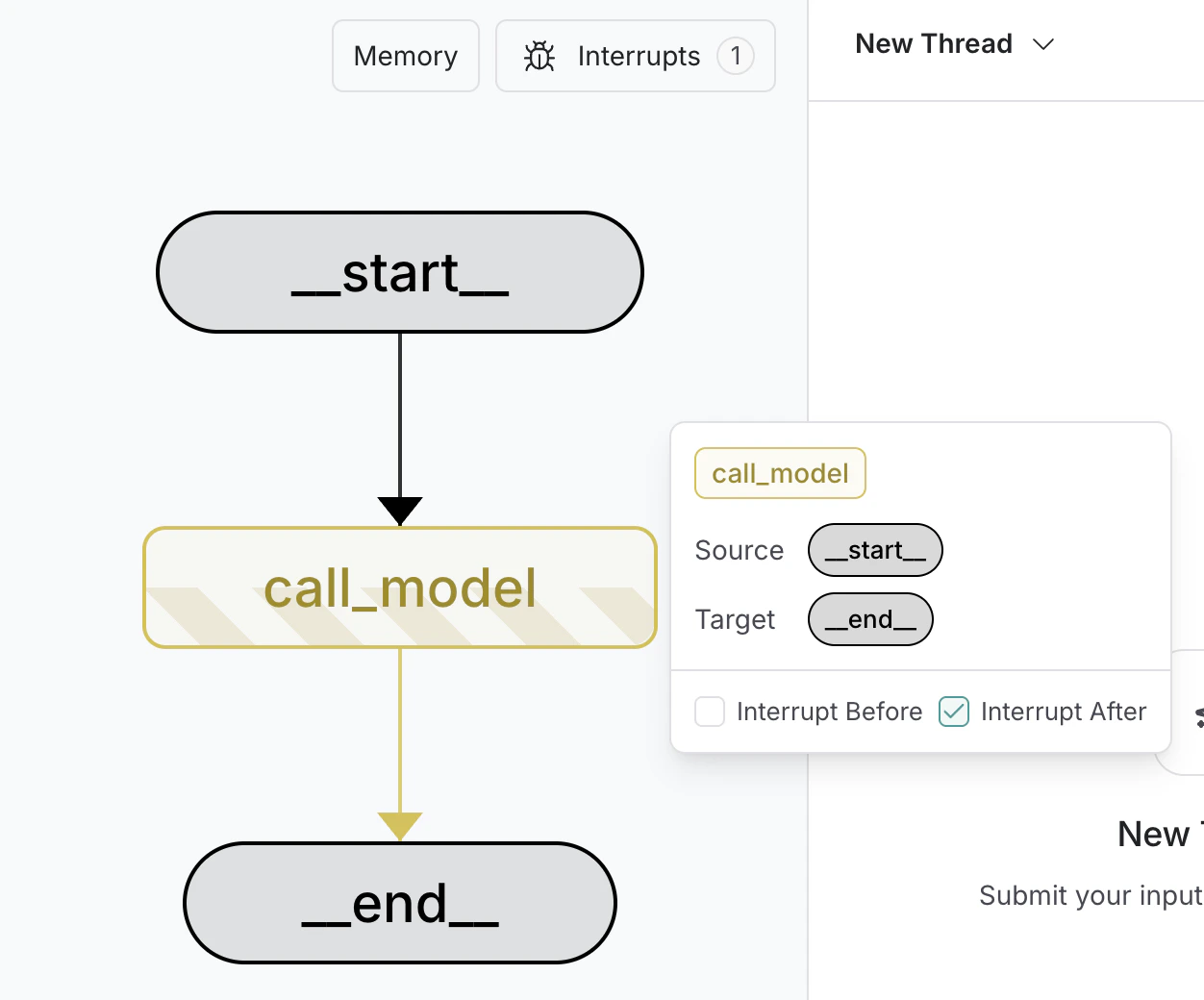
### 使用 LangSmith Studio
您可以在运行图之前在 UI 中使用 [LangSmith Studio](/langsmith/studio) 在图中设置静态中断。您还可以使用 UI 检查执行过程中任何点的图状态。
 ***
***
[Edit this page on GitHub](https://github.com/langchain-ai/docs/edit/main/src/i18n\zh-CN\oss\langgraph\interrupts.mdx) or [file an issue](https://github.com/langchain-ai/docs/issues/new/choose).
[Connect these docs](/use-these-docs) to Claude, VSCode, and more via MCP for real-time answers.