> ## Documentation Index
> Fetch the complete documentation index at: https://langchain-zh.cn/llms.txt
> Use this file to discover all available pages before exploring further.
# LangChain v1 更新了什么
**LangChain v1 是一个专注于构建智能体的、面向生产环境的基础框架。** 我们围绕三项核心改进简化了该框架:
LangChain 中构建智能体的新标准,替代 `langgraph.prebuilt.create_react_agent`。
新的 `content_blocks` 属性,提供跨提供商的现代 LLM 功能的统一访问。
`langchain` 命名空间已简化,专注于智能体的基本构建块,遗留功能已移至 `langchain-classic`。
要升级,
```bash pip theme={"theme":{"light":"catppuccin-latte","dark":"catppuccin-mocha"}}
pip install -U langchain
```
```bash uv theme={"theme":{"light":"catppuccin-latte","dark":"catppuccin-mocha"}}
uv add langchain
```
有关更改的完整列表,请参阅 [迁移指南](/oss/python/migrate/langchain-v1)。
## `create_agent`
[`create_agent`](https://reference.langchain.com/python/langchain/agents/factory/create_agent) 是 LangChain 1.0 中构建智能体的标准方式。它提供了比 [`langgraph.prebuilt.create_react_agent`](https://reference.langchain.com/python/langchain-classic/agents/react/agent/create_react_agent) 更简单的接口,同时通过使用 [middleware](#middleware) 提供了更大的自定义潜力。
```python theme={"theme":{"light":"catppuccin-latte","dark":"catppuccin-mocha"}}
from langchain.agents import create_agent
agent = create_agent(
model="claude-sonnet-4-6",
tools=[search_web, analyze_data, send_email],
system_prompt="You are a helpful research assistant."
)
result = agent.invoke({
"messages": [
{"role": "user", "content": "Research AI safety trends"}
]
})
```
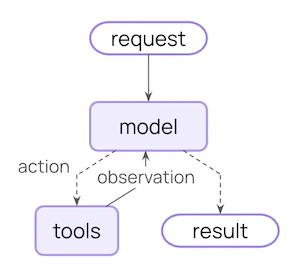
在底层,[`create_agent`](https://reference.langchain.com/python/langchain/agents/factory/create_agent) 基于基本的智能体循环构建——调用模型,让它选择要执行的工具,然后在它不再调用任何工具时结束:
更多信息,请参见 [Agents](/oss/python/langchain/agents)。
### Middleware
Middleware 是 [`create_agent`](https://reference.langchain.com/python/langchain/agents/factory/create_agent) 的定义特性。它提供了一个高度可定制的入口点,提高了您能构建内容的上限。
优秀的智能体需要 [上下文工程](/oss/python/langchain/context-engineering):在正确的时间将正确的信息传递给模型。Middleware 帮助您通过可组合的抽象控制动态提示、对话摘要、选择性工具访问、状态管理和护栏。
#### Prebuilt middleware
LangChain 为常见模式提供了一些 [预构建中间件](/oss/python/langchain/middleware#built-in-middleware),包括:
* [`PIIMiddleware`](https://reference.langchain.com/python/langchain/agents/middleware/pii/PIIMiddleware):在发送给模型之前删除敏感信息
* [`SummarizationMiddleware`](https://reference.langchain.com/python/langchain/agents/middleware/summarization/SummarizationMiddleware):当对话历史过长时压缩它
* [`HumanInTheLoopMiddleware`](https://reference.langchain.com/python/langchain/agents/middleware/human_in_the_loop/HumanInTheLoopMiddleware):对敏感工具调用要求批准
```python theme={"theme":{"light":"catppuccin-latte","dark":"catppuccin-mocha"}}
from langchain.agents import create_agent
from langchain.agents.middleware import (
PIIMiddleware,
SummarizationMiddleware,
HumanInTheLoopMiddleware
)
agent = create_agent(
model="claude-sonnet-4-6",
tools=[read_email, send_email],
middleware=[
PIIMiddleware("email", strategy="redact", apply_to_input=True),
PIIMiddleware(
"phone_number",
detector=(
r"(?:\+?\d{1,3}[\s.-]?)?"
r"(?:\(?\d{2,4}\)?[\s.-]?)?"
r"\d{3,4}[\s.-]?\d{4}"
),
strategy="block"
),
SummarizationMiddleware(
model="claude-sonnet-4-6",
trigger={"tokens": 500}
),
HumanInTheLoopMiddleware(
interrupt_on={
"send_email": {
"allowed_decisions": ["approve", "edit", "reject"]
}
}
),
]
)
```
#### Custom middleware
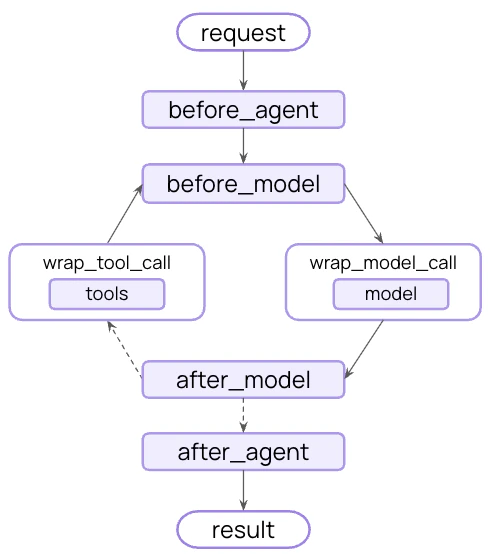
您也可以构建自定义中间件以满足您的需求。中间件在智能体执行的每一步都暴露钩子:
通过在 [`AgentMiddleware`](https://reference.langchain.com/python/langchain/agents/middleware/types/AgentMiddleware) 类的子类上实现以下任何钩子来构建自定义中间件:
| Hook | When it runs | Use cases |
| ----------------- | ------------------------ | --------------------------------------- |
| `before_agent` | Before calling the agent | Load memory, validate input |
| `before_model` | Before each LLM call | Update prompts, trim messages |
| `wrap_model_call` | Around each LLM call | Intercept and modify requests/responses |
| `wrap_tool_call` | Around each tool call | Intercept and modify tool execution |
| `after_model` | After each LLM response | Validate output, apply guardrails |
| `after_agent` | After agent completes | Save results, cleanup |
示例自定义中间件:
```python expandable theme={"theme":{"light":"catppuccin-latte","dark":"catppuccin-mocha"}}
from dataclasses import dataclass
from typing import Callable
from langchain_openai import ChatOpenAI
from langchain.agents.middleware import (
AgentMiddleware,
ModelRequest
)
from langchain.agents.middleware.types import ModelResponse
@dataclass
class Context:
user_expertise: str = "beginner"
class ExpertiseBasedToolMiddleware(AgentMiddleware):
def wrap_model_call(
self,
request: ModelRequest,
handler: Callable[[ModelRequest], ModelResponse]
) -> ModelResponse:
user_level = request.runtime.context.user_expertise
if user_level == "expert":
# More powerful model
model = ChatOpenAI(model="gpt-5")
tools = [advanced_search, data_analysis]
else:
# Less powerful model
model = ChatOpenAI(model="gpt-5-nano")
tools = [simple_search, basic_calculator]
return handler(request.override(model=model, tools=tools))
agent = create_agent(
model="claude-sonnet-4-6",
tools=[
simple_search,
advanced_search,
basic_calculator,
data_analysis
],
middleware=[ExpertiseBasedToolMiddleware()],
context_schema=Context
)
```
更多信息,请参见 [完整的中间件指南](/oss/python/langchain/middleware)。
### Built on LangGraph
因为 [`create_agent`](https://reference.langchain.com/python/langchain/agents/factory/create_agent) 是基于 [LangGraph](/oss/python/langgraph) 构建的,所以您自动获得了对长运行和可靠智能体的内置支持,通过:
会话在跨会话时自动持久化,具有内置的检查点功能
实时流式传输令牌、工具调用和推理轨迹
暂停智能体执行以在敏感操作前获得人类批准
将对话回退到任何时间点并探索替代路径和提示
您不需要学习 LangGraph 即可使用这些功能——它们开箱即用。
### Structured output
[`create_agent`](https://reference.langchain.com/python/langchain/agents/factory/create_agent) 改进了结构化输出生成:
* **Main loop integration**:结构化输出现在在主循环中生成,而不是需要额外的 LLM 调用
* **Structured output strategy**:模型可以选择调用工具或使用提供商侧的结构化输出生成
* **Cost reduction**:消除了额外 LLM 调用的额外费用
```python theme={"theme":{"light":"catppuccin-latte","dark":"catppuccin-mocha"}}
from langchain.agents import create_agent
from langchain.agents.structured_output import ToolStrategy
from pydantic import BaseModel
class Weather(BaseModel):
temperature: float
condition: str
def weather_tool(city: str) -> str:
"""Get the weather for a city."""
return f"it's sunny and 70 degrees in {city}"
agent = create_agent(
"gpt-4.1-mini",
tools=[weather_tool],
response_format=ToolStrategy(Weather)
)
result = agent.invoke({
"messages": [{"role": "user", "content": "What's the weather in SF?"}]
})
print(repr(result["structured_response"]))
# results in `Weather(temperature=70.0, condition='sunny')`
```
**错误处理**:通过 `ToolStrategy` 的 `handle_errors` 参数控制错误处理:
* **Parsing errors**:模型生成的数据与所需结构不匹配
* **Multiple tool calls**:模型为结构化输出架构生成了 2 个或更多工具调用
***
## Standard content blocks
内容块支持目前仅适用于以下集成:
* [`langchain-anthropic`](https://pypi.org/project/langchain-anthropic/)
* [`langchain-aws`](https://pypi.org/project/langchain-aws/)
* [`langchain-openai`](https://pypi.org/project/langchain-openai/)
* [`langchain-google-genai`](https://pypi.org/project/langchain-google-genai/)
* [`langchain-ollama`](https://pypi.org/project/langchain-ollama/)
更广泛的内容块支持将逐渐扩展到更多提供商。
新的 [`content_blocks`](https://reference.langchain.com/python/langchain-core/messages/base/BaseMessage) 属性引入了跨提供商工作的消息内容的标准表示形式:
```python theme={"theme":{"light":"catppuccin-latte","dark":"catppuccin-mocha"}}
from langchain_anthropic import ChatAnthropic
model = ChatAnthropic(model="claude-sonnet-4-6")
response = model.invoke("What's the capital of France?")
# Unified access to content blocks
for block in response.content_blocks:
if block["type"] == "reasoning":
print(f"Model reasoning: {block['reasoning']}")
elif block["type"] == "text":
print(f"Response: {block['text']}")
elif block["type"] == "tool_call":
print(f"Tool call: {block['name']}({block['args']})")
```
### Benefits
* **Provider agnostic**:无论提供商如何,使用相同的 API 访问推理轨迹、引用、内置工具(网络搜索、代码解释器等)和其他功能
* **Type safe**:所有内容块类型的完整类型提示
* **Backward compatible**:标准内容可以 [延迟加载](/oss/python/langchain/messages#standard-content-blocks),因此没有相关的破坏性更改
更多信息,请参见我们的 [内容块指南](/oss/python/langchain/messages#standard-content-blocks)。
***
## Simplified package
LangChain v1 简化了 [`langchain`](https://pypi.org/project/langchain/) 包命名空间,专注于智能体的基本构建块。精简后的命名空间暴露了最有用和最相关的功能:
### Namespace
| Module | What's available | Notes |
| ------------------------------------------------------------------------------------- | --------------------------------------------------------------------------------------------------------------------------------------------------------------------------------------------------------------------------- | ------------------------------------------------------------------------------------------- |
| [`langchain.agents`](https://reference.langchain.com/python/langchain/agents) | [`create_agent`](https://reference.langchain.com/python/langchain/agents/factory/create_agent), [`AgentState`](https://reference.langchain.com/python/langchain/agents/middleware/types/AgentState) | Core agent creation functionality |
| [`langchain.messages`](https://reference.langchain.com/python/langchain/messages) | Message types, [content blocks](https://reference.langchain.com/python/langchain-core/messages/content/ContentBlock), [`trim_messages`](https://reference.langchain.com/python/langchain-core/messages/utils/trim_messages) | Re-exported from [`langchain-core`](https://reference.langchain.com/python/langchain-core/) |
| [`langchain.tools`](https://reference.langchain.com/python/langchain/tools) | [`@tool`](https://reference.langchain.com/python/langchain-core/tools/convert/tool), [`BaseTool`](https://reference.langchain.com/python/langchain-core/tools/base/BaseTool), injection helpers | Re-exported from [`langchain-core`](https://reference.langchain.com/python/langchain-core/) |
| [`langchain.chat_models`](https://reference.langchain.com/python/langchain/models) | [`init_chat_model`](https://reference.langchain.com/python/langchain/chat_models/base/init_chat_model), [`BaseChatModel`](https://reference.langchain.com/python/langchain-core/language_models/chat_models/BaseChatModel) | Unified model initialization |
| [`langchain.embeddings`](https://reference.langchain.com/python/langchain/embeddings) | [`Embeddings`](https://reference.langchain.com/python/langchain-core/embeddings/embeddings/Embeddings), [`init_embeddings`](https://reference.langchain.com/python/langchain/embeddings/base/init_embeddings) | Embedding models |
其中大多数是从 `langchain-core` 重新导出的,以便为您提供用于构建智能体的聚焦 API 表面。
```python theme={"theme":{"light":"catppuccin-latte","dark":"catppuccin-mocha"}}
# Agent building
from langchain.agents import create_agent
# Messages and content
from langchain.messages import AIMessage, HumanMessage
# Tools
from langchain.tools import tool
# Model initialization
from langchain.chat_models import init_chat_model
from langchain.embeddings import init_embeddings
```
### `langchain-classic`
遗留功能已移至 [`langchain-classic`](https://pypi.org/project/langchain-classic),以保持核心包精简且专注。
**`langchain-classic` 中包含:**
* Legacy chains and chain implementations
* Retrievers (e.g. `MultiQueryRetriever` or anything from the previous `langchain.retrievers` module)
* The indexing API
* The hub module (for managing prompts programmatically)
* [`langchain-community`](https://pypi.org/project/langchain-community) exports
* Other deprecated functionality
如果您使用此功能中的任何一项,请安装 [`langchain-classic`](https://pypi.org/project/langchain-classic):
```bash pip theme={"theme":{"light":"catppuccin-latte","dark":"catppuccin-mocha"}}
pip install langchain-classic
```
```bash uv theme={"theme":{"light":"catppuccin-latte","dark":"catppuccin-mocha"}}
uv add langchain-classic
```
然后更新您的导入:
```python theme={"theme":{"light":"catppuccin-latte","dark":"catppuccin-mocha"}}
from langchain import ... # [!code --]
from langchain_classic import ... # [!code ++]
from langchain.chains import ... # [!code --]
from langchain_classic.chains import ... # [!code ++]
from langchain.retrievers import ... # [!code --]
from langchain_classic.retrievers import ... # [!code ++]
from langchain import hub # [!code --]
from langchain_classic import hub # [!code ++]
```
## Migration guide
查看我们的 [迁移指南](/oss/python/migrate/langchain-v1) 以帮助将代码更新为 LangChain v1。
## Reporting issues
请在 [GitHub](https://github.com/langchain-ai/langchain/issues) 上报告发现的任何 1.0 问题,并使用 `'v1'` [标签](https://github.com/langchain-ai/langchain/issues?q=state%3Aopen%20label%3Av1)。
## Additional resources
阅读公告
深入探讨中间件
完整的智能体文档
新的内容块 API
如何迁移到 LangChain v1
报告问题或贡献
## See also
* [Versioning](/oss/python/versioning) – Understanding version numbers
* [Release policy](/oss/python/release-policy) – Detailed release policies
***
[Edit this page on GitHub](https://github.com/langchain-ai/docs/edit/main/src/i18n\zh-CN\oss\python\releases\langchain-v1.mdx) or [file an issue](https://github.com/langchain-ai/docs/issues/new/choose).
[Connect these docs](/use-these-docs) to Claude, VSCode, and more via MCP for real-time answers.