

在继续本指南之前,请先阅读 LangSmith 架构概述 和 连接外部 ClickHouse 的指南。
架构概述
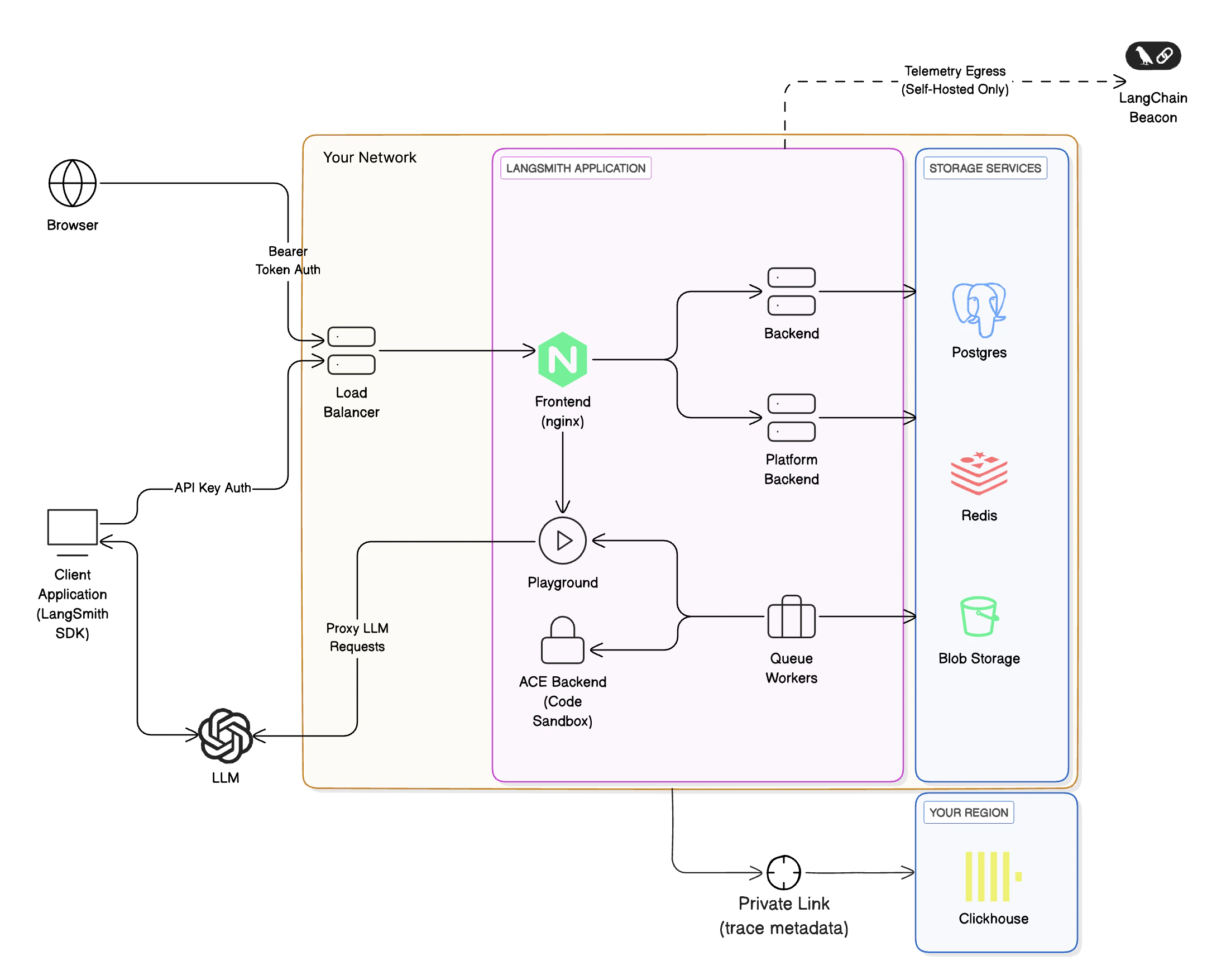
将 LangSmith 托管的 ClickHouse 与您的自托管 LangSmith 实例结合使用的架构,与使用完全自托管的 ClickHouse 实例类似,但有几个关键区别:- 您需要在您的 LangSmith 实例和 LangSmith 托管的 ClickHouse 实例之间建立私有网络连接。这是为了确保您的数据安全,并且您可以从自托管的 LangSmith 实例连接到 ClickHouse 实例。
- 使用此选项时,追踪的敏感信息(输入和输出)将存储在您云环境内的云对象存储(S3 或 GCS)中,而不是 ClickHouse 中,以确保敏感信息不会离开您的 VPC。有关特定数据字段存储位置的更多详细信息,请参阅数据存储。
- LangSmith 团队将监控您的 ClickHouse 实例,并确保其平稳运行。这使我们能够跟踪诸如运行摄取延迟和查询性能等指标。
要求
- 您必须使用受支持的 Blob 存储选项。 请阅读 Blob 存储指南 了解更多信息。
- 要使用私有端点,请确保您的 VPC 位于 ClickHouse Cloud 支持的区域中。否则,您将需要使用一个我们将通过防火墙规则进行保护的公共端点。您的 VPC 需要有一个 NAT 网关,以便我们能够将您的流量加入允许列表。
- 您必须拥有一个可以连接到 LangSmith 托管 ClickHouse 服务的 VPC。您需要与我们的团队合作来设置必要的网络。
- 您必须运行一个 LangSmith 自托管实例。您可以将我们的托管 ClickHouse 服务与 Kubernetes 和 Docker 安装一起使用。
数据存储
ClickHouse 存储运行和反馈数据,具体包括:- 所有反馈数据字段。
- 部分运行数据字段。
inputs、outputs、errors、manifests、extras 和 events,因为这些字段可能包含 LLM 提示词和补全。使用 LangSmith 托管的 ClickHouse 时,这些敏感字段存储在您云环境内的云对象存储(S3 或 GCS)中,而运行数据的其余部分存储在 ClickHouse 中,确保敏感信息永远不会离开您的 VPC。
存储的反馈数据字段
由于所有反馈数据都存储在 ClickHouse 中,请勿在反馈(分数和注释/评论)或存储的运行数据字段中提到的任何其他运行字段中发送敏感信息。
| Field Name | Type | Description |
|---|---|---|
id | UUID | Unique identifier for the record itself |
created_at | datetime | Timestamp when the record was created |
modified_at | datetime | Timestamp when the record was last modified |
session_id | UUID | Unique identifier for the experiment or tracing project the run was a part of |
run_id | UUID | Unique identifier for a specific run within a session |
key | string | A key describing the criteria of the feedback, e.g. 'correctness' |
score | number | Numerical score associated with the feedback key |
value | string | Reserved for storing a value associated with the score. Useful for categorical feedback. |
comment | string | Any comment or annotation associated with the record. This can be a justification for the score given. |
correction | object | Reserved for storing correction details, if any |
feedback_source | object | Object containing information about the feedback source |
feedback_source.type | string | The type of source where the feedback originated, e.g. 'api', 'app', 'evaluator' |
feedback_source.metadata | object | Reserved for additional metadata, currently |
feedback_source.user_id | UUID | Unique identifier for the user providing feedback |
存储的运行数据字段
运行数据字段在托管的 ClickHouse 数据库和您的云对象存储(例如 S3 或 GCS)之间拆分存储。对于存储在对象存储中的运行字段,ClickHouse 中仅保留引用或指针。例如,
inputs 和 outputs 的内容被卸载到 S3/GCS,ClickHouse 记录在 inputs_s3_urls 和 outputs_s3_urls 字段中存储相应的 S3 URL。| 字段 | 存储位置 |
|---|---|
id | ClickHouse |
name | ClickHouse |
inputs | 对象存储 |
run_type | ClickHouse |
start_time | ClickHouse |
end_time | ClickHouse |
extra | 对象存储 |
error | 对象存储 |
outputs | 对象存储 |
events | 对象存储 |
tags | ClickHouse |
trace_id | ClickHouse |
dotted_order | ClickHouse |
status | ClickHouse |
child_run_ids | ClickHouse |
direct_child_run_ids | ClickHouse |
parent_run_ids | ClickHouse |
feedback_stats | ClickHouse |
reference_example_id | ClickHouse |
total_tokens | ClickHouse |
prompt_tokens | ClickHouse |
completion_tokens | ClickHouse |
total_cost | ClickHouse |
prompt_cost | ClickHouse |
completion_cost | ClickHouse |
first_token_time | ClickHouse |
session_id | ClickHouse |
in_dataset | ClickHouse |
parent_run_id | ClickHouse |
execution_order (已弃用) | ClickHouse |
serialized | ClickHouse |
manifest_id (已弃用) | ClickHouse |
manifest_s3_id | ClickHouse |
inputs_s3_urls | ClickHouse |
outputs_s3_urls | ClickHouse |
price_model_id | ClickHouse |
app_path | ClickHouse |
last_queued_at | ClickHouse |
share_token | ClickHouse |
Connect these docs to Claude, VSCode, and more via MCP for real-time answers.


