LangSmith 提供了一个协作界面,用于创建、测试和迭代提示词。 虽然您可以在运行时动态地从 LangSmith 获取提示词到您的应用程序中,但您可能更倾向于将提示词与您自己的数据库或版本控制系统同步。为了支持这种工作流,LangSmith 允许您通过 Webhook 接收提示词更新的通知。 为什么通过 GitHub 同步提示词?
  • 版本控制: 将您的提示词与应用程序代码一起在熟悉的系统中进行版本管理。
  • CI/CD 集成: 当关键提示词发生变化时,触发自动的暂存或生产环境部署。
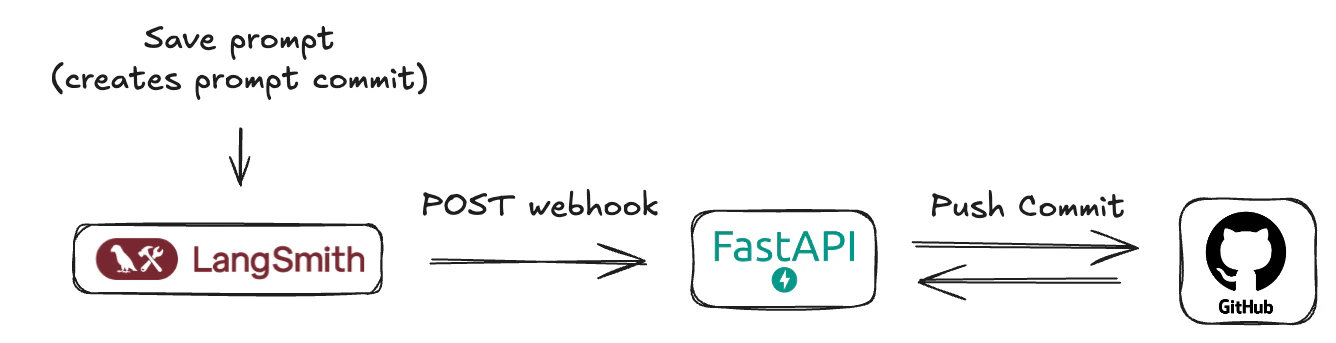
提示词 Webhook 示意图

先决条件

在开始之前,请确保您已设置好以下内容:
  1. GitHub 账户: 一个标准的 GitHub 账户。
  2. GitHub 仓库: 创建一个新的(或选择一个现有的)仓库,用于存储您的 LangSmith 提示词清单。这可以是与您的应用程序代码相同的仓库,也可以是一个专门用于提示词的仓库。
  3. GitHub 个人访问令牌(PAT):
    • LangSmith 的 Webhook 不直接与 GitHub 交互——它们会调用一个由创建的中间服务器。
    • 此服务器需要一个 GitHub PAT 来进行身份验证并向您的仓库提交更改。
    • 必须包含 repo 作用域(对于公共仓库,public_repo 就足够了)。
    • 前往 GitHub > 设置 > 开发者设置 > 个人访问令牌 > 令牌(经典)
    • 点击 生成新令牌(经典)
    • 为其命名(例如,“LangSmith Prompt Sync”),设置过期时间,并选择所需的作用域。
    • 点击 生成令牌立即复制它——之后将不再显示。
    • 安全地存储该令牌,并将其作为环境变量提供给您的服务器。

理解 LangSmith 的“提示词提交”和 Webhook

在 LangSmith 中,当您保存对提示词的更改时,本质上是在创建一个新版本或一个“提示词提交”。这些提交可以触发 Webhook。 Webhook 将发送一个包含新提示词清单的 JSON 负载。
{
  "prompt_id": "f33dcb51-eb17-47a5-83ca-64ac8a027a29",
  "prompt_name": "我的提示词",
  "commit_hash": "commit_hash_1234567890",
  "created_at": "2021-01-01T00:00:00Z",
  "created_by": "Jane Doe",
  "manifest": {
    "lc": 1,
    "type": "constructor",
    "id": ["langchain", "schema", "runnable", "RunnableSequence"],
    "kwargs": {
      "first": {
        "lc": 1,
        "type": "constructor",
        "id": ["langchain", "prompts", "chat", "ChatPromptTemplate"],
        "kwargs": {
          "messages": [
            {
              "lc": 1,
              "type": "constructor",
              "id": [
                "langchain_core",
                "prompts",
                "chat",
                "SystemMessagePromptTemplate"
              ],
              "kwargs": {
                "prompt": {
                  "lc": 1,
                  "type": "constructor",
                  "id": [
                    "langchain_core",
                    "prompts",
                    "prompt",
                    "PromptTemplate"
                  ],
                  "kwargs": {
                    "input_variables": [],
                    "template_format": "mustache",
                    "template": "你是一个聊天机器人。"
                  }
                }
              }
            },
            {
              "lc": 1,
              "type": "constructor",
              "id": [
                "langchain_core",
                "prompts",
                "chat",
                "HumanMessagePromptTemplate"
              ],
              "kwargs": {
                "prompt": {
                  "lc": 1,
                  "type": "constructor",
                  "id": [
                    "langchain_core",
                    "prompts",
                    "prompt",
                    "PromptTemplate"
                  ],
                  "kwargs": {
                    "input_variables": ["question"],
                    "template_format": "mustache",
                    "template": "{{question}}"
                  }
                }
              }
            }
          ],
          "input_variables": ["question"]
        }
      },
      "last": {
        "lc": 1,
        "type": "constructor",
        "id": ["langchain", "schema", "runnable", "RunnableBinding"],
        "kwargs": {
          "bound": {
            "lc": 1,
            "type": "constructor",
            "id": ["langchain", "chat_models", "openai", "ChatOpenAI"],
            "kwargs": {
              "temperature": 1,
              "top_p": 1,
              "presence_penalty": 0,
              "frequency_penalty": 0,
              "model": "gpt-4.1-mini",
              "extra_headers": {},
              "openai_api_key": {
                "id": ["OPENAI_API_KEY"],
                "lc": 1,
                "type": "secret"
              }
            }
          },
          "kwargs": {}
        }
      }
    }
  }
}
理解 LangSmith 的提示词提交 Webhook 通常在工作区级别触发非常重要。这意味着,如果您的 LangSmith 工作区中任何提示词被修改并保存了一个“提示词提交”,Webhook 就会触发并发送该提示词的更新清单。负载可以通过提示词 ID 来识别。您的接收服务器设计时应考虑到这一点。

实现用于接收 Webhook 的 FastAPI 服务器

为了有效处理 LangSmith 在提示词更新时发送的 Webhook 通知,需要一个中间服务器应用程序。该服务器将作为 LangSmith 发送的 HTTP POST 请求的接收器。在本指南中,为演示目的,我们将概述如何创建一个简单的 FastAPI 应用程序来承担此角色。 这个公开可访问的服务器将负责:
  1. 接收 Webhook 请求: 监听传入的 HTTP POST 请求。
  2. 解析负载: 从请求体中提取并解释 JSON 格式的提示词清单。
  3. 提交到 GitHub: 以编程方式在您指定的 GitHub 仓库中创建一个新的提交,包含更新后的提示词清单。这确保您的提示词保持版本控制,并与 LangSmith 中的更改同步。
对于部署,可以使用像 Render.com(提供合适的免费套餐)、Vercel、Fly.io 或其他云提供商(AWS、GCP、Azure)来托管 FastAPI 应用程序并获取公共 URL。 服务器的核心功能将包括一个用于接收 Webhook 的端点、解析清单的逻辑,以及与 GitHub API 的集成(使用个人访问令牌进行身份验证)来管理提交。
main.py此服务器将监听来自 LangSmith 的传入 Webhook,并将接收到的提示词清单提交到您的 GitHub 仓库。
import base64
import json
import uuid
from typing import Any, Dict
import httpx
from fastapi import FastAPI, HTTPException, Body
from pydantic import BaseModel, Field
from pydantic_settings import BaseSettings, SettingsConfigDict

# --- 配置 ---
class AppConfig(BaseSettings):
    """
    应用程序配置模型。
    从环境变量加载设置。
    """
    GITHUB_TOKEN: str
    GITHUB_REPO_OWNER: str
    GITHUB_REPO_NAME: str
    GITHUB_FILE_PATH: str = "prompt_manifest.json"
    GITHUB_BRANCH: str = "main"
    model_config = SettingsConfigDict(
        env_file=".env",
        env_file_encoding='utf-8',
        extra='ignore'
    )

settings = AppConfig()

# --- Pydantic 模型 ---
class WebhookPayload(BaseModel):
    """
    定义传入 Webhook 负载的预期结构。
    """
    prompt_id: UUID = Field(
        ...,
        description="提示词的唯一标识符。"
    )
    prompt_name: str = Field(
        ...,
        description="提示词的名称/标题。"
    )
    commit_hash: str = Field(
        ...,
        description="触发 Webhook 的提交事件的标识符。"
    )
    created_at: str = Field(
        ...,
        description="指示事件创建时间的时间戳(建议使用 ISO 格式)。"
    )
    created_by: str = Field(
        ...,
        description="创建事件的用户名称。"
    )
    manifest: Dict[str, Any] = Field(
        ...,
        description="要提交到 GitHub 的主要内容或配置数据。"
    )

# --- GitHub 辅助函数 ---
async def commit_manifest_to_github(payload: WebhookPayload) -> Dict[str, Any]:
    """
    辅助函数,用于将清单直接提交到配置的分支。
    """
    github_api_base_url = "https://api.github.com"
    repo_file_url = (
        f"{github_api_base_url}/repos/{settings.GITHUB_REPO_OWNER}/"
        f"{settings.GITHUB_REPO_NAME}/contents/{settings.GITHUB_FILE_PATH}"
    )
    headers = {
        "Authorization": f"Bearer {settings.GITHUB_TOKEN}",
        "Accept": "application/vnd.github.v3+json",
        "X-GitHub-Api-Version": "2022-11-28",
    }
    manifest_json_string = json.dumps(payload.manifest, indent=2)
    content_base64 = base64.b64encode(manifest_json_string.encode('utf-8')).decode('utf-8')
    commit_message = f"feat: 通过 webhook 更新 {settings.GITHUB_FILE_PATH} - 提交 {payload.commit_hash}"
    data_to_commit = {
        "message": commit_message,
        "content": content_base64,
        "branch": settings.GITHUB_BRANCH,
    }
    async with httpx.AsyncClient() as client:
        current_file_sha = None
        try:
            params_get = {"ref": settings.GITHUB_BRANCH}
            response_get = await client.get(repo_file_url, headers=headers, params=params_get)
            if response_get.status_code == 200:
                current_file_sha = response_get.json().get("sha")
            elif response_get.status_code != 404: # 如果不是 404(未找到),则是意外错误
                response_get.raise_for_status()
        except httpx.HTTPStatusError as e:
            error_detail = f"GitHub API 错误(获取文件 SHA):{e.response.status_code} - {e.response.text}"
            print(f"[ERROR] {error_detail}")
            raise HTTPException(status_code=e.response.status_code, detail=error_detail)
        except httpx.RequestError as e:
            error_detail = f"连接到 GitHub 的网络错误(获取文件 SHA):{str(e)}"
            print(f"[ERROR] {error_detail}")
            raise HTTPException(status_code=503, detail=error_detail)
        if current_file_sha:
            data_to_commit["sha"] = current_file_sha
        try:
            response_put = await client.put(repo_file_url, headers=headers, json=data_to_commit)
            response_put.raise_for_status()
            return response_put.json()
        except httpx.HTTPStatusError as e:
            error_detail = f"GitHub API 错误(提交内容):{e.response.status_code} - {e.response.text}"
            if e.response.status_code == 409: # 冲突
                error_detail = (
                    f"GitHub API 冲突(提交内容):{e.response.text}。"
                    "这可能是由于过时的 SHA 或分支保护规则引起的。"
                )
            elif e.response.status_code == 422: # 无法处理的实体
                error_detail = (
                    f"GitHub API 无法处理的实体(提交内容):{e.response.text}。"
                    f"请确保分支 '{settings.GITHUB_BRANCH}' 存在且负载格式正确。"
                )
            print(f"[ERROR] {error_detail}")
            raise HTTPException(status_code=e.response.status_code, detail=error_detail)
        except httpx.RequestError as e:
            error_detail = f"连接到 GitHub 的网络错误(提交内容):{str(e)}"
            print(f"[ERROR] {error_detail}")
            raise HTTPException(status_code=503, detail=error_detail)

# --- FastAPI 应用程序 ---
app = FastAPI(
    title="最小化 Webhook 到 GitHub 提交服务",
    description="接收 Webhook 并将其 'manifest' 部分直接提交到 GitHub 仓库。",
    version="0.1.0",
)

@app.post("/webhook/commit", status_code=201, tags=["GitHub Webhooks"])
async def handle_webhook_direct_commit(payload: WebhookPayload = Body(...)):
    """
    Webhook 端点,用于接收事件并直接提交到配置的分支。
    """
    try:
        github_response = await commit_manifest_to_github(payload)
        return {
            "message": "Webhook 接收成功,清单已直接提交到 GitHub。",
            "github_commit_details": github_response.get("commit", {}),
            "github_content_details": github_response.get("content", {})
        }
    except HTTPException:
        raise # 如果是辅助函数抛出的 HTTPException,则重新抛出
    except Exception as e:
        error_message = f"发生意外错误:{str(e)}"
        print(f"[ERROR] {error_message}")
        raise HTTPException(status_code=500, detail="发生内部服务器错误。")

@app.get("/health", status_code=200, tags=["Health"])
async def health_check():
    """
    一个简单的健康检查端点。
    """
    return {"status": "ok", "message": "服务正在运行。"}

# 要运行此服务器(保存为 main.py):
# 1. 安装依赖:pip install fastapi uvicorn pydantic pydantic-settings httpx python-dotenv
# 2. 创建一个 .env 文件,包含您的 GitHub 令牌和仓库详情。
# 3. 使用 Uvicorn 运行:uvicorn main:app --reload
# 4. 部署到像 Render.com 这样的公共平台。
此服务器的关键方面:
  • 配置(.env): 它期望一个包含 GITHUB_TOKENGITHUB_REPO_OWNERGITHUB_REPO_NAME.env 文件。您还可以自定义 GITHUB_FILE_PATH(默认:LangSmith_prompt_manifest.json)和 GITHUB_BRANCH(默认:main)。
  • GitHub 交互: commit_manifest_to_github 函数处理获取当前文件 SHA(用于更新)然后提交新清单内容的逻辑。
  • Webhook 端点(/webhook/commit): 这是您的 LangSmith Webhook 将指向的 URL 路径。
  • 错误处理: 包含了基本的 GitHub API 交互错误处理。
将此服务器部署到您选择的平台(例如,Render),并记下其公共 URL(例如,https://prompt-commit-webhook.onrender.com)。

在 LangSmith 中配置 Webhook

一旦您的 FastAPI 服务器部署完成并获得了其公共 URL,您就可以在 LangSmith 中配置 Webhook:
  1. 导航到您的 LangSmith 工作区。
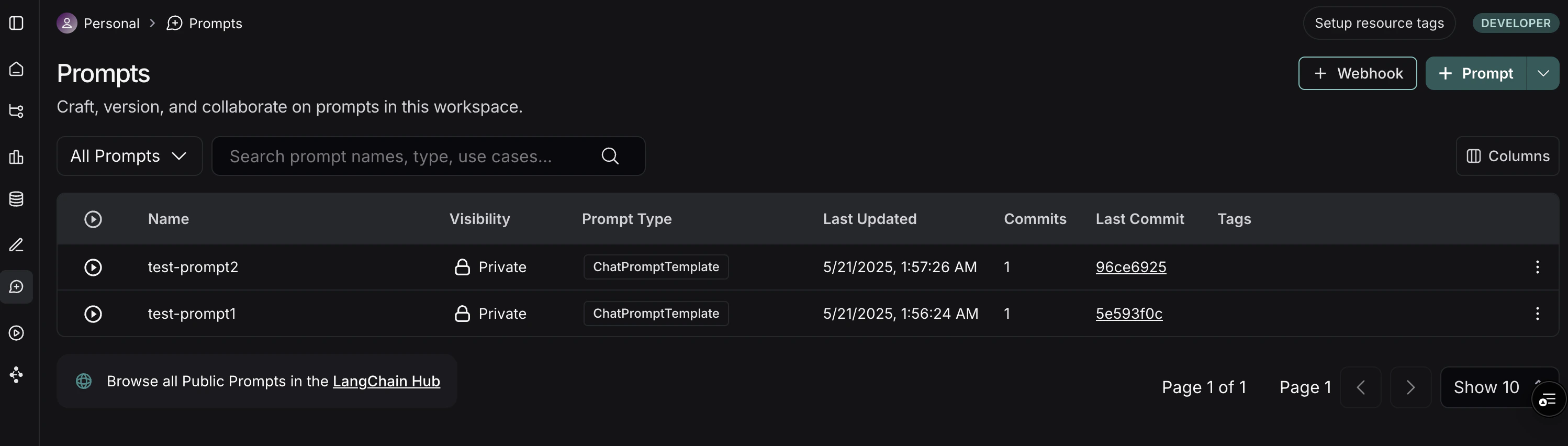
  2. 进入 Prompts 部分。在这里您将看到您的提示词列表。 LangSmith Prompts 部分
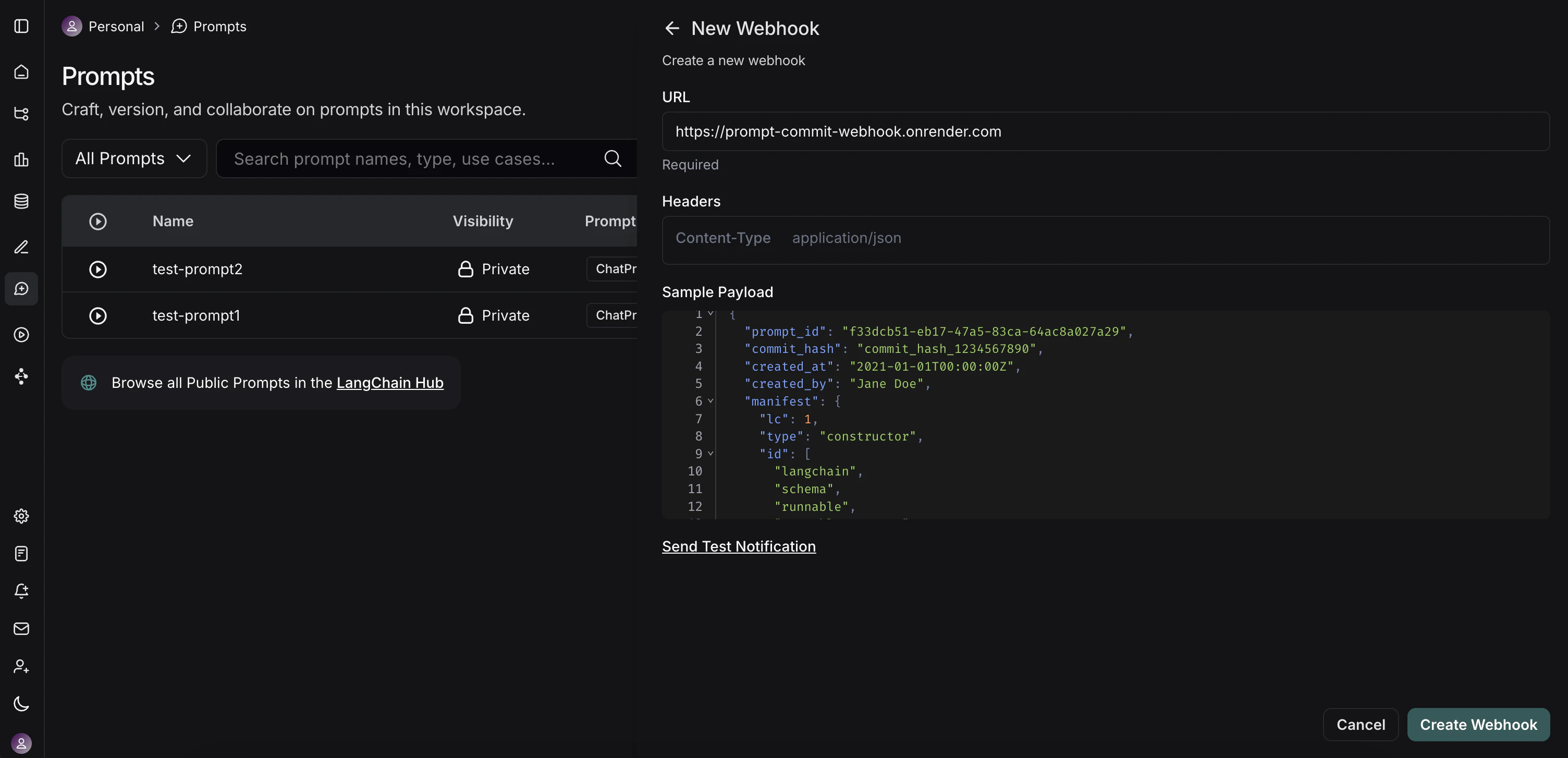
  3. 在 Prompts 页面的右上角,点击 + Webhook 按钮。
  4. 您将看到一个用于配置 Webhook 的表单: LangSmith Webhook 配置模态框
    • Webhook URL: 输入您部署的 FastAPI 服务器端点的完整公共 URL。对于我们的示例服务器,这将是 https://prompt-commit-webhook.onrender.com/webhook/commit
    • Headers(可选):
      • 您可以添加自定义头部,LangSmith 将在每个 Webhook 请求中发送这些头部。
  5. 测试 Webhook: LangSmith 提供了一个“发送测试通知”按钮。使用此按钮向您的服务器发送一个示例负载。检查您的服务器日志(例如,在 Render 上),以确保它接收到请求并成功处理(或调试任何问题)。
  6. 保存 Webhook 配置。

工作流程实践

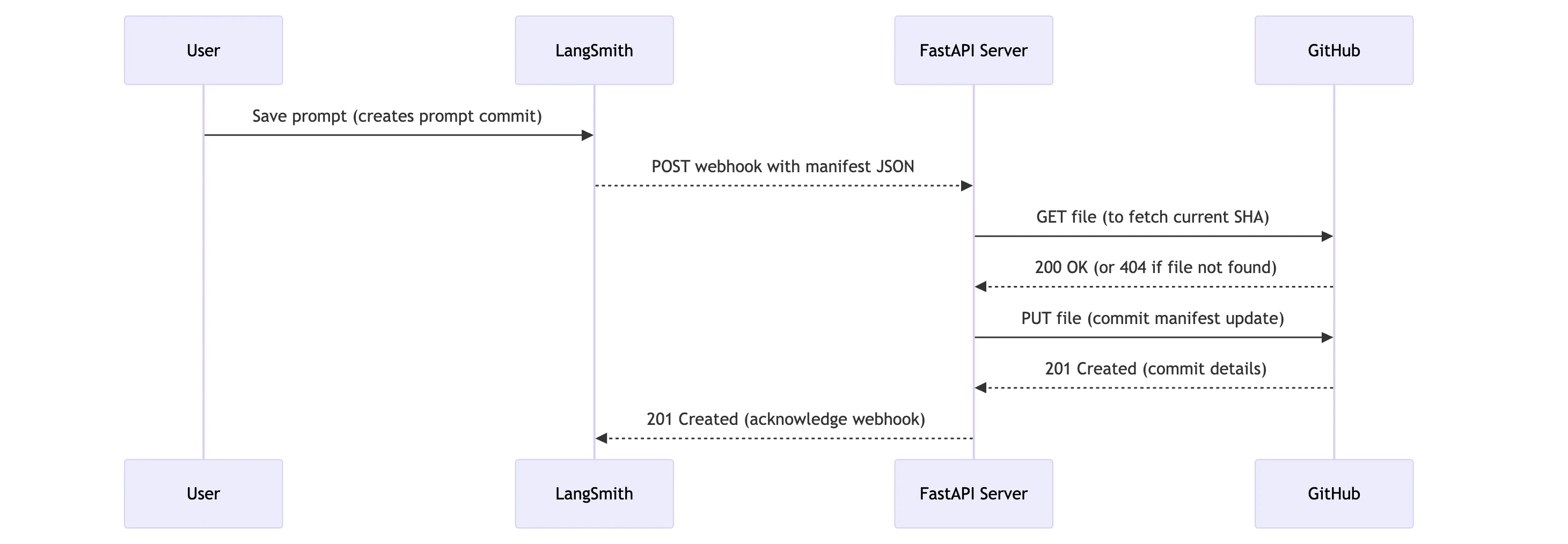
工作流程示意图显示:用户在 LangSmith 中保存提示词,LangSmith 向 FastAPI 服务器发送 Webhook,该服务器与 GitHub 交互以更新文件 现在,一切设置就绪后,以下是发生的情况:
  1. 提示词修改: 用户(开发人员或非技术团队成员)在 LangSmith UI 中修改提示词并保存,创建一个新的“提示词提交”。
  2. Webhook 触发: LangSmith 检测到这个新的提示词提交并触发配置的 Webhook。
  3. HTTP 请求: LangSmith 向您的 FastAPI 服务器的公共 URL(例如,https://prompt-commit-webhook.onrender.com/webhook/commit)发送一个 HTTP POST 请求。此请求的正文包含整个工作区的 JSON 提示词清单。
  4. 服务器接收负载: 您的 FastAPI 服务器的端点接收到请求。
  5. GitHub 提交: 服务器解析请求体中的 JSON 清单。然后,它使用配置的 GitHub 个人访问令牌、仓库所有者、仓库名称、文件路径和分支来:
    • 检查清单文件是否已存在于指定分支的仓库中,以获取其 SHA(这对于更新现有文件是必需的)。
    • 使用最新的提示词清单创建一个新的提交,如果文件已存在则更新它。提交消息将指示这是来自 LangSmith 的更新。
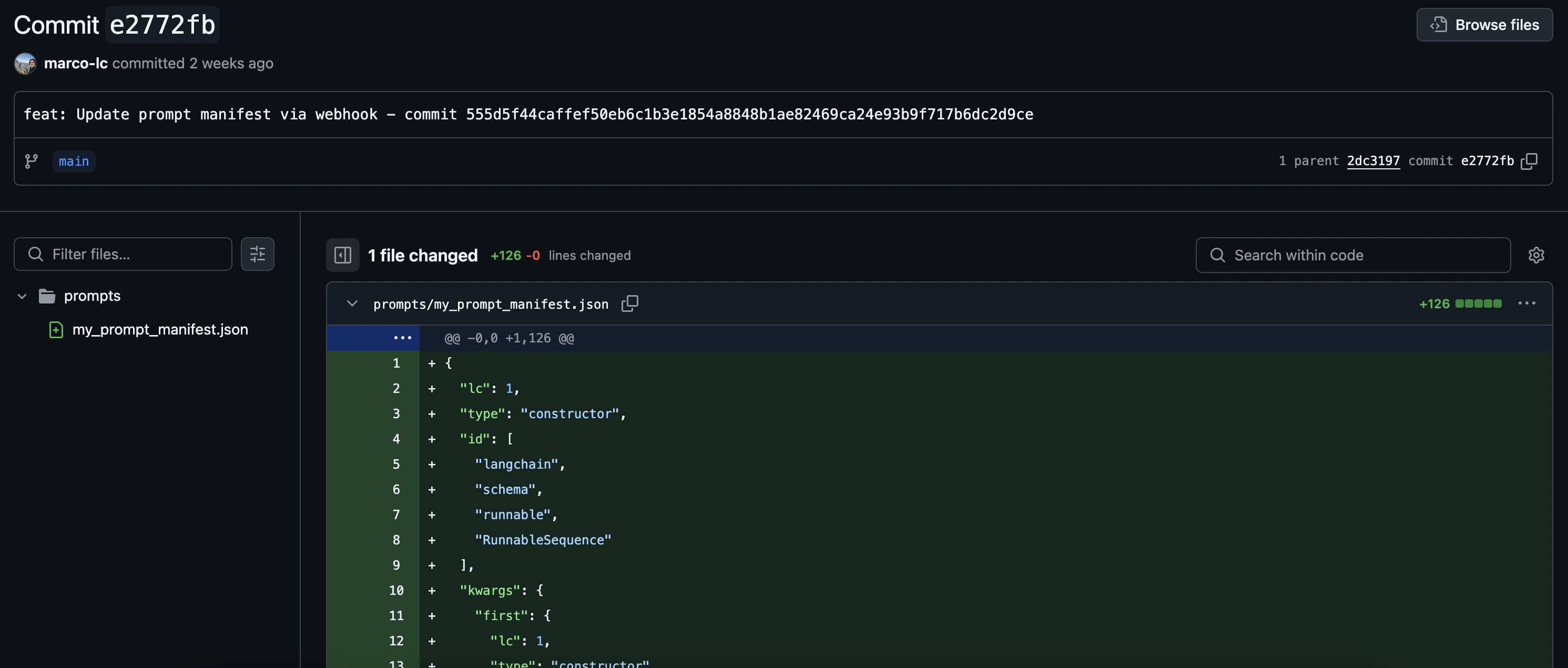
  6. 确认: 您应该会在 GitHub 仓库中看到新的提交。 清单提交到 GitHub
您现在已经成功地将 LangSmith 提示词与 GitHub 同步!

超越简单的提交

我们的示例 FastAPI 服务器执行的是整个提示词清单的直接提交。然而,这只是一个起点。您可以扩展服务器的功能以执行更复杂的操作:
  • 细粒度提交: 解析清单,如果您更倾向于在仓库中使用更细粒度的结构,则将更改提交到单独的提示词文件。
  • 触发 CI/CD: 让服务器触发 CI/CD 流水线(例如,Jenkins、GitHub Actions、GitLab CI)来部署暂存环境、运行测试或构建新的应用程序版本,而不是(或除了)提交。
  • 更新数据库/缓存: 如果您的应用程序从数据库或缓存加载提示词,直接更新这些存储。
  • 通知: 向 Slack、电子邮件或其他通信渠道发送关于提示词更改的通知。
  • 选择性处理: 根据 LangSmith 负载中的元数据(如果可用,例如哪个特定提示词更改或由谁更改),您可以应用不同的逻辑。