

- 由于更高效的二进制文件传输,上传和下载速度更快。
- 在 LangSmith UI 中增强了对不同文件类型的可视化展示。
- UI
- SDK
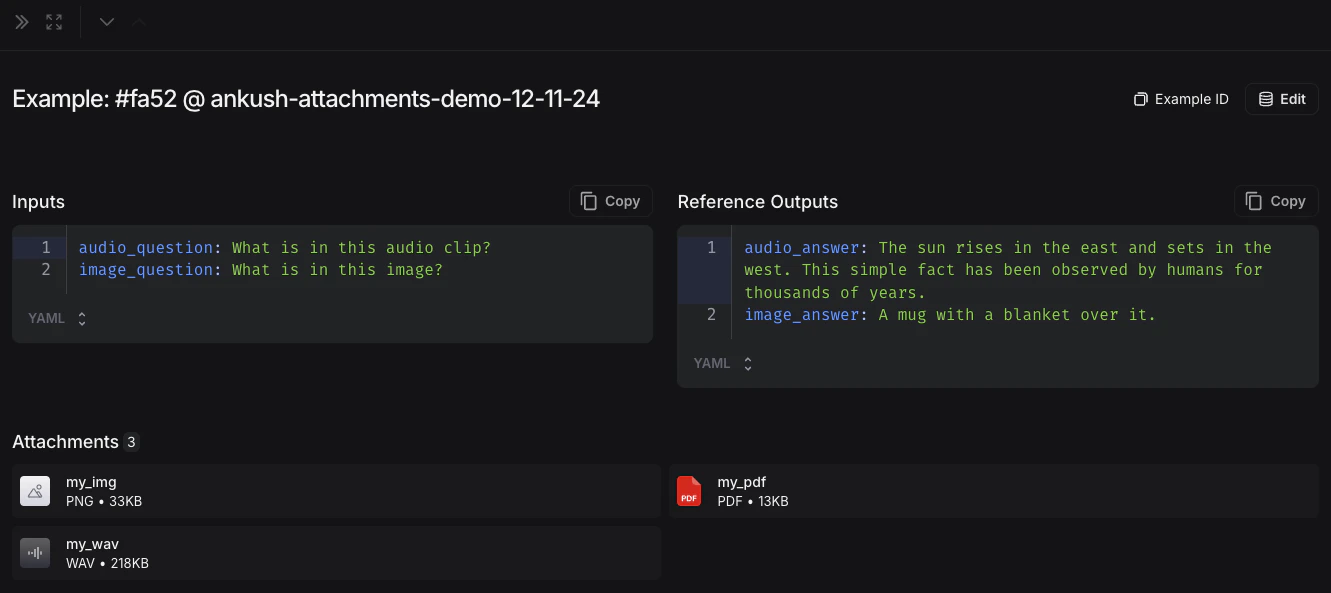
1. 创建带有附件的示例
您可以通过几种不同的方式向数据集添加带有附件的示例。从现有运行记录添加
将运行记录添加到 LangSmith 数据集时,可以选择性地将附件从源运行记录传播到目标示例。要了解更多信息,请参阅在应用中管理数据集。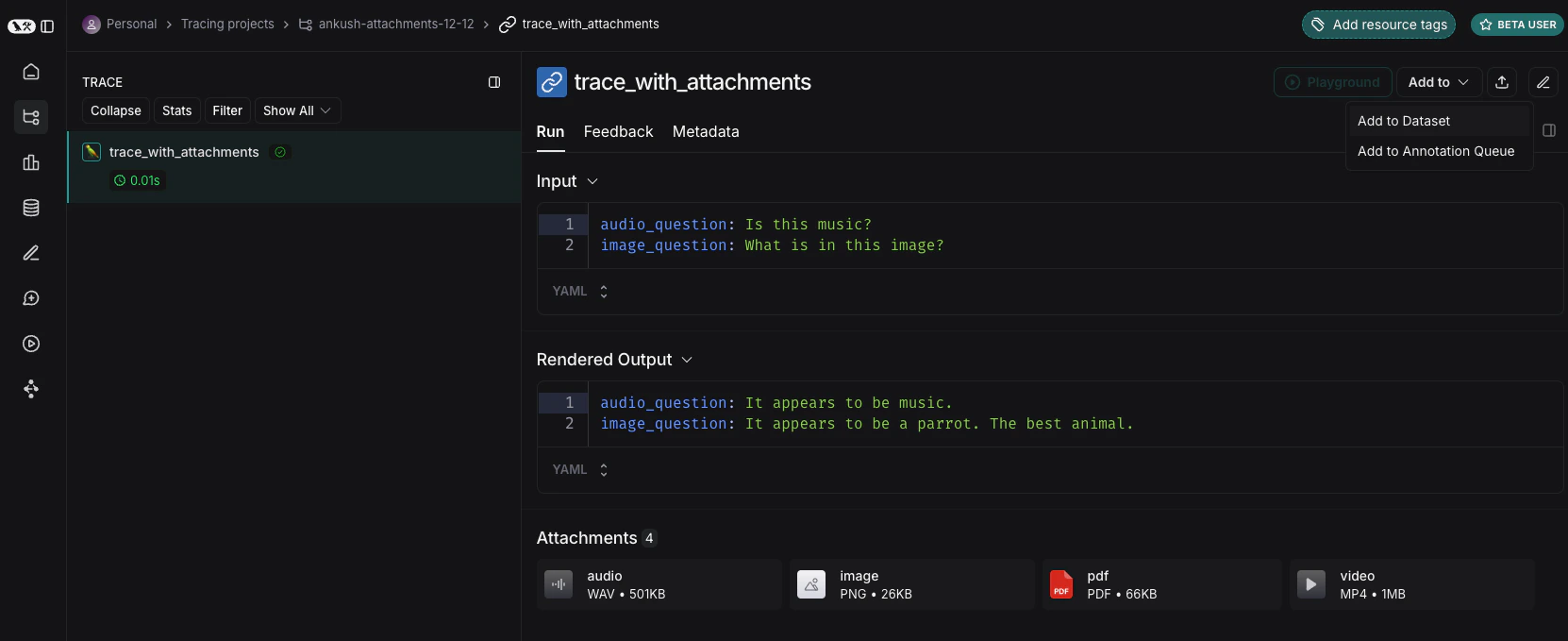
从头创建
您可以直接从 LangSmith UI 创建带有附件的示例。点击数据集 UI 中Examples 标签页的 + Example 按钮。然后使用“上传文件”按钮上传附件: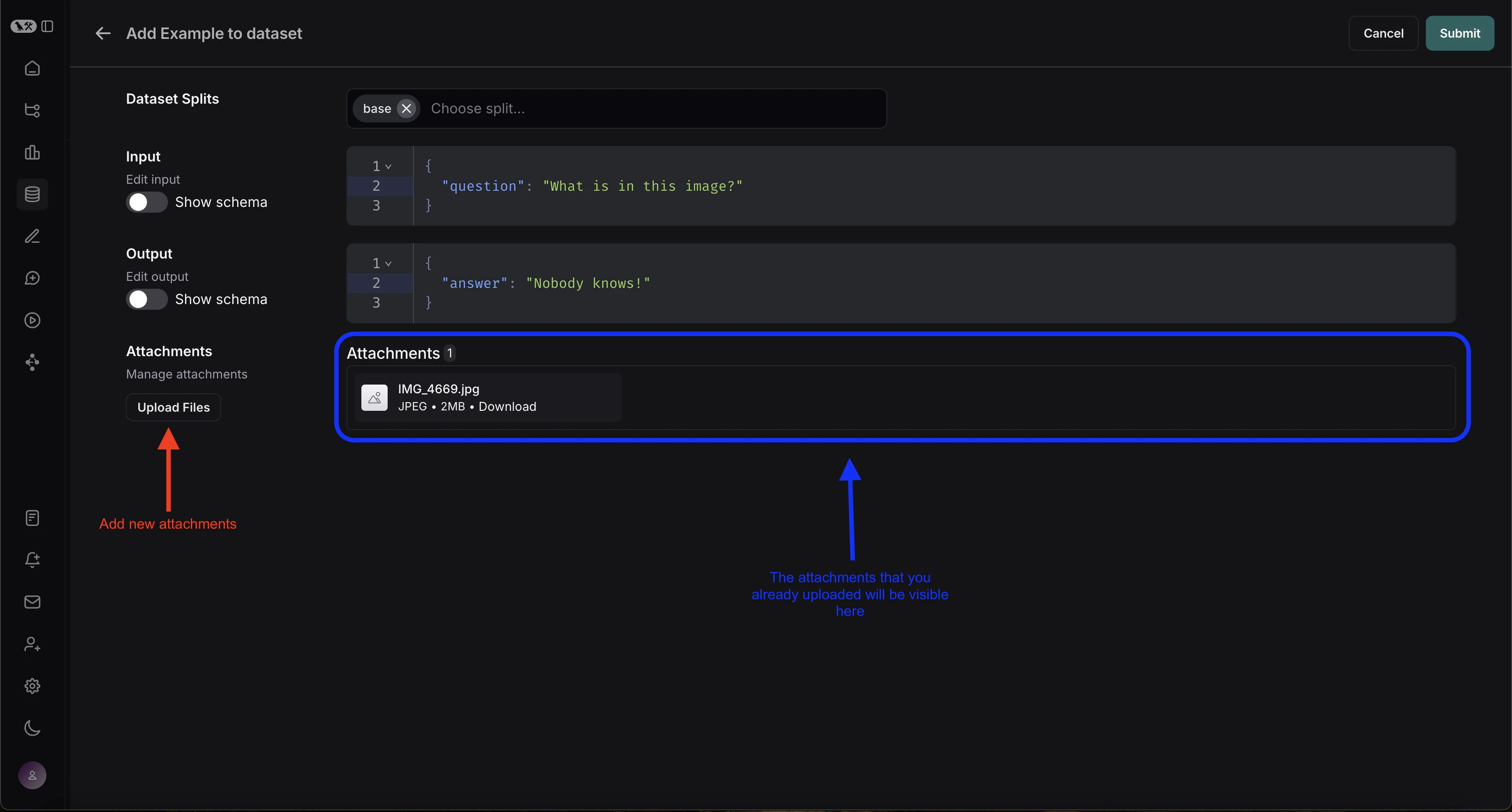
2. 创建多模态提示词
LangSmith UI 允许您在评估多模态模型时,在提示词中包含附件:首先,点击您想要添加多模态内容的消息中的文件图标。接着,为每个示例添加要包含的附件的模板变量。-
如果您想包含特定附件,可以使用建议的变量名,例如
{{attachment.file_name}},这将映射附件列表中名为file_name的文件,并将其传递给评估器。 -
如果您想包含所有附件,请使用
{{attachments}}变量。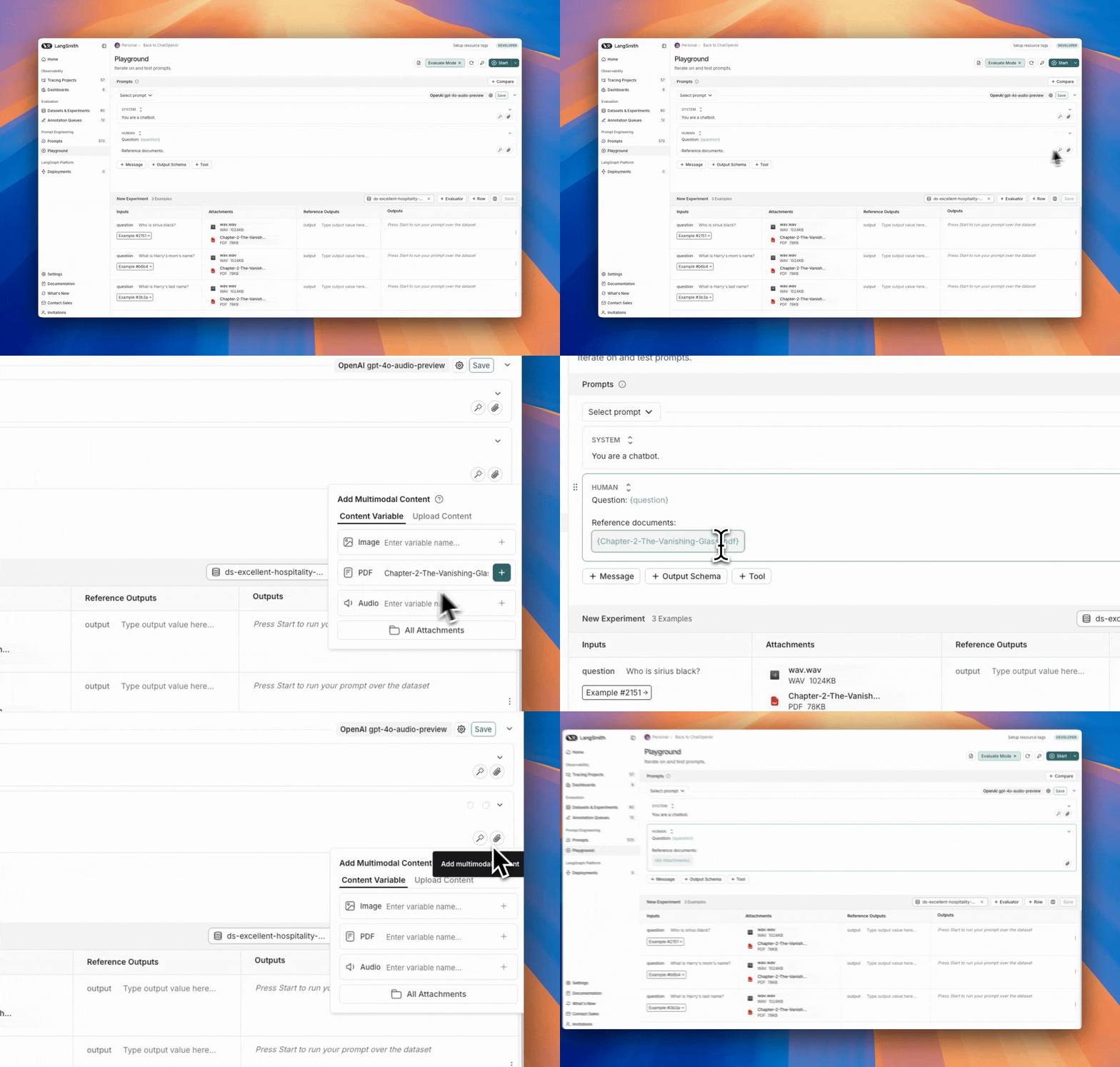
3. 定义自定义评估器
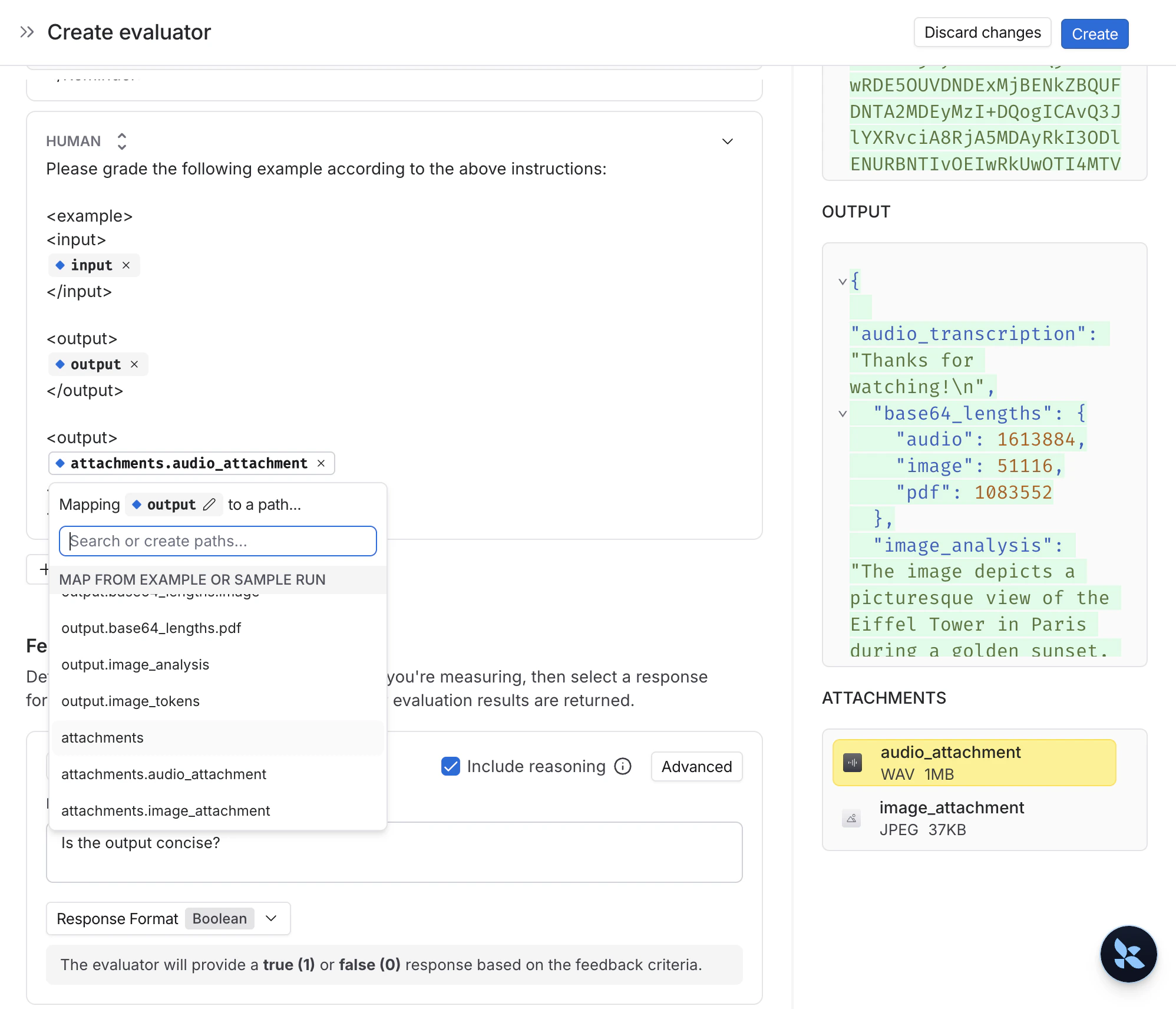
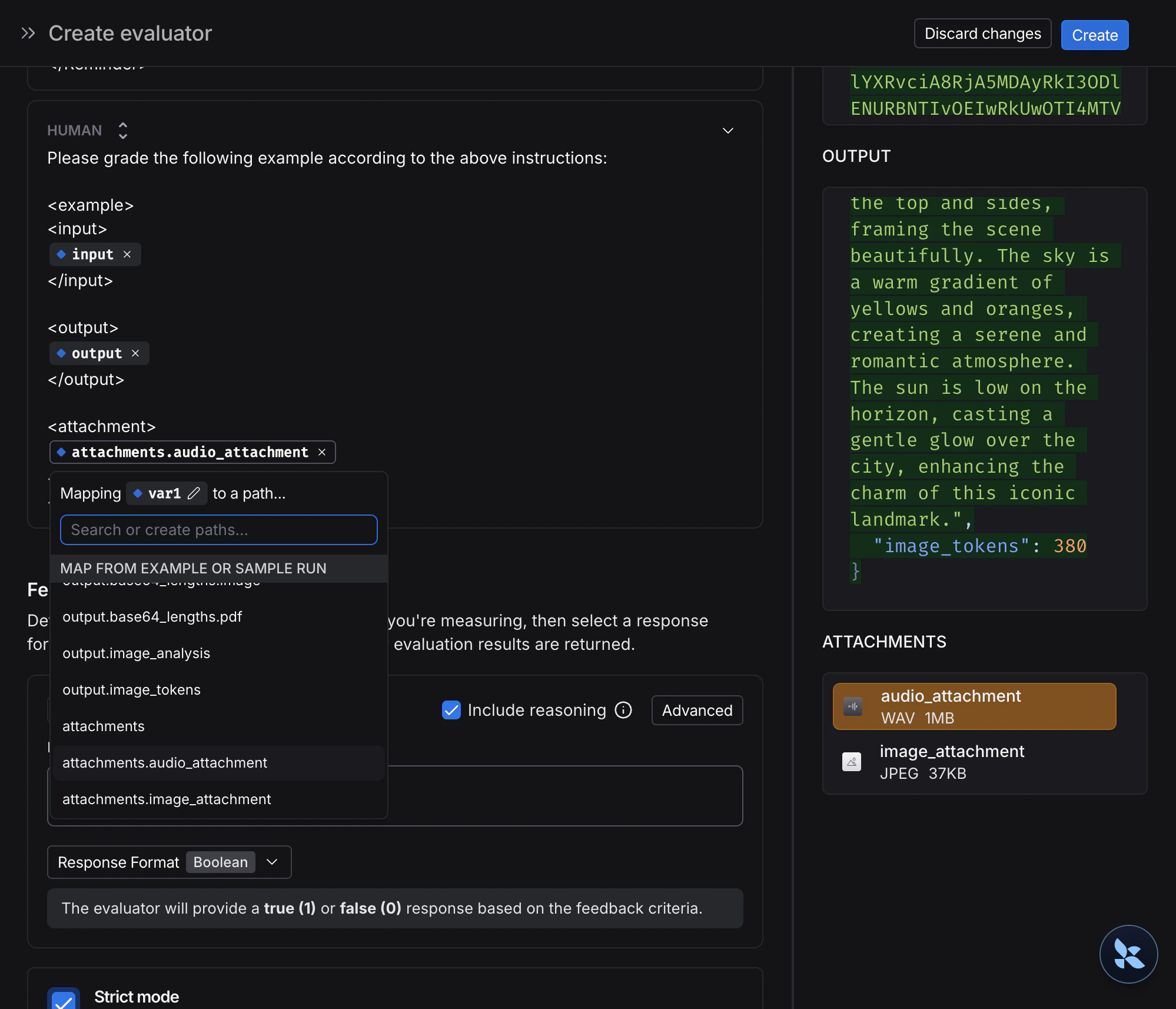
您可以创建使用数据集示例中多模态内容的评估器。由于您的数据集已包含带有附件的示例(在步骤 1 中添加),您可以直接在评估器中引用它们。操作如下:- 从数据集页面选择 + Evaluator。
-
在 Template variables 编辑器中,添加要包含的附件变量:
- 如果您想包含特定附件,可以使用建议的变量名,例如
{{attachment.file_name}},这将映射附件列表中名为file_name的文件,并将其传递给评估器。 - 如果您想包含所有附件,请使用
{{attachments}}变量。
- 如果您想包含特定附件,可以使用建议的变量名,例如
- 检查图像描述是否与实际图像内容匹配。
- 验证转录是否准确反映了音频内容。
- 确认从 PDF 中提取的文本是否正确。
- OCR → 文本校正:使用视觉模型从文档中提取文本,然后评估提取输出的准确性。
- 语音转文字 → 转录质量:使用语音模型将音频转录为文本,然后根据您的参考评估转录结果。
如果您的追踪记录在输入或输出中包含 base64 编码的多模态内容(例如,如果您遵循了记录多模态追踪记录指南),则无需附件即可评估它们。在评估器提示词中使用标准变量映射——例如
{{input}} 或 {{output}}——base64 内容将正确传递给 LLM 评估器进行可视化和评估。4. 更新带有附件的示例
UI 中附件大小限制为 20MB。
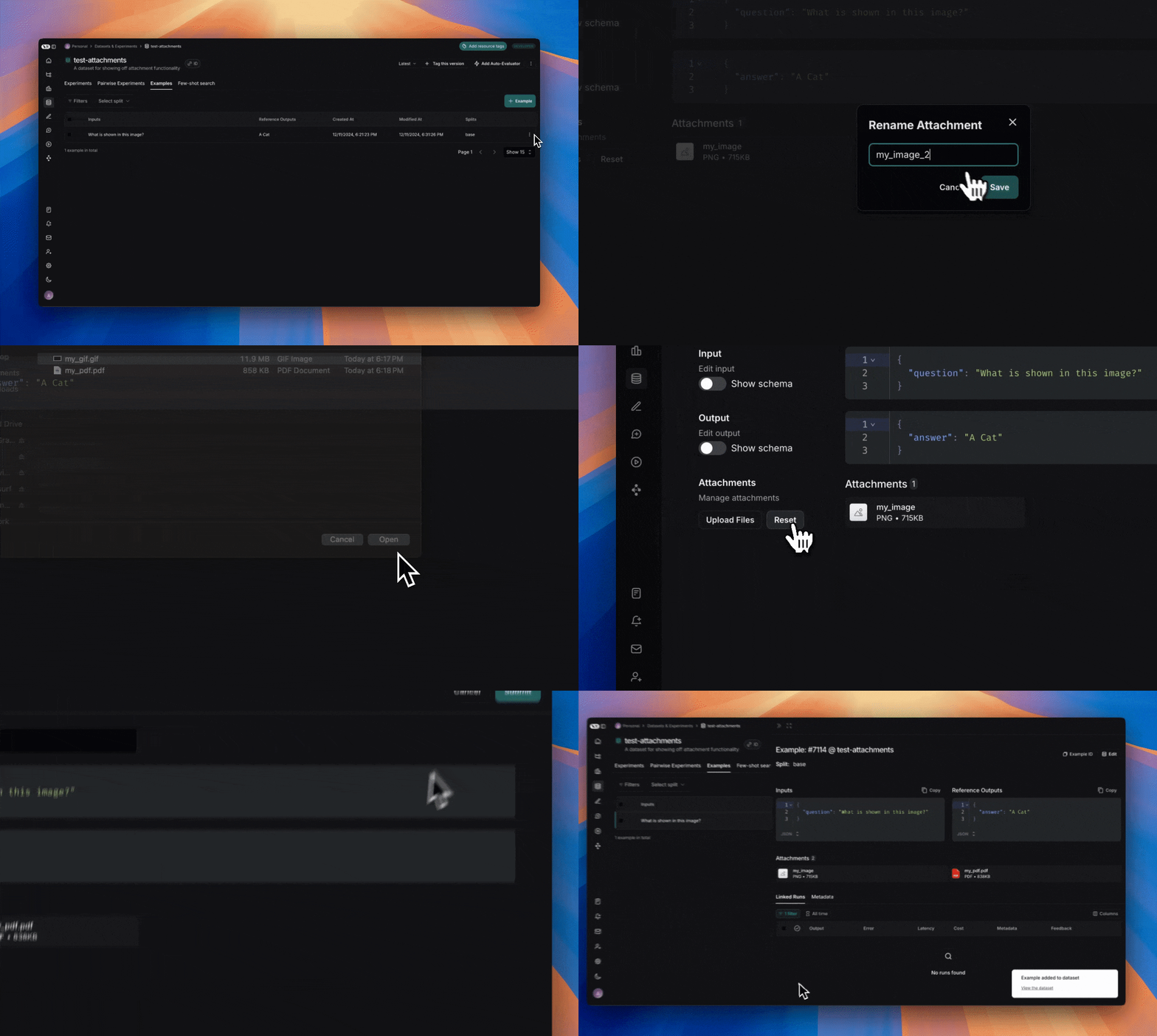
- 上传新附件
- 重命名和删除附件
- 使用快速重置按钮将附件重置到之前的状态
1. 创建带有附件的示例
要使用 SDK 上传带有附件的示例,请使用 create_examples / update_examples Python 方法或 uploadExamplesMultipart / updateExamplesMultipart TypeScript 方法。Python
需要langsmith>=0.3.13import requests
import uuid
from pathlib import Path
from langsmith import Client
# 公开可用的测试文件
pdf_url = "https://www.w3.org/WAI/ER/tests/xhtml/testfiles/resources/pdf/dummy.pdf"
wav_url = "https://openaiassets.blob.core.windows.net/$web/API/docs/audio/alloy.wav"
img_url = "https://www.w3.org/Graphics/PNG/nurbcup2si.png"
# 以字节形式获取文件
pdf_bytes = requests.get(pdf_url).content
wav_bytes = requests.get(wav_url).content
img_bytes = requests.get(img_url).content
# 创建数据集
ls_client = Client()
dataset_name = "attachment-test-dataset"
dataset = ls_client.create_dataset(
dataset_name=dataset_name,
description="Test dataset for evals with publicly available attachments",
)
inputs = {
"audio_question": "What is in this audio clip?",
"image_question": "What is in this image?",
}
outputs = {
"audio_answer": "The sun rises in the east and sets in the west. This simple fact has been observed by humans for thousands of years.",
"image_answer": "A mug with a blanket over it.",
}
# 定义带有附件的示例
example_id = uuid.uuid4()
example = {
"id": example_id,
"inputs": inputs,
"outputs": outputs,
"attachments": {
"my_pdf": {"mime_type": "application/pdf", "data": pdf_bytes},
"my_wav": {"mime_type": "audio/wav", "data": wav_bytes},
"my_img": {"mime_type": "image/png", "data": img_bytes},
# 通过本地文件路径指定附件的示例:
# "my_local_img": {"mime_type": "image/png", "data": Path(__file__).parent / "my_local_img.png"},
},
}
# 创建示例
ls_client.create_examples(
dataset_id=dataset.id,
examples=[example],
# 如果您想从本地文件上传附件,请取消注释此标志:
# dangerously_allow_filesystem=True
)
TypeScript
需要版本 >= 0.2.13您可以使用uploadExamplesMultipart 方法上传带有附件的示例。请注意,这与标准的 createExamples 方法是不同的方法,后者目前不支持附件。每个附件的数据类型需要是 Uint8Array 或 ArrayBuffer。Uint8Array:适用于直接处理二进制数据。ArrayBuffer:表示固定长度的二进制数据,可以根据需要转换为Uint8Array。
import { Client } from "langsmith";
import { v4 as uuid4 } from "uuid";

// 公开可用的测试文件
const pdfUrl = "https://www.w3.org/WAI/ER/tests/xhtml/testfiles/resources/pdf/dummy.pdf";
const wavUrl = "https://openaiassets.blob.core.windows.net/$web/API/docs/audio/alloy.wav";
const pngUrl = "https://www.w3.org/Graphics/PNG/nurbcup2si.png";

// 辅助函数:以 ArrayBuffer 形式获取文件
async function fetchArrayBuffer(url: string): Promise<ArrayBuffer> {
  const response = await fetch(url);
  if (!response.ok) {
    throw new Error(`Failed to fetch ${url}: ${response.statusText}`);
  }
  return response.arrayBuffer();
}

// 以 ArrayBuffer 形式获取文件
const pdfArrayBuffer = await fetchArrayBuffer(pdfUrl);
const wavArrayBuffer = await fetchArrayBuffer(wavUrl);
const pngArrayBuffer = await fetchArrayBuffer(pngUrl);

// 创建 LangSmith 客户端(确保在环境变量中设置了 LANGSMITH_API_KEY)
const langsmithClient = new Client();

// 创建唯一的数据集名称
const datasetName = "attachment-test-dataset:" + uuid4().substring(0, 8);

// 创建数据集
const dataset = await langsmithClient.createDataset(datasetName, {
  description: "Test dataset for evals with publicly available attachments",
});

// 定义带有附件的示例
const exampleId = uuid4();
const example = {
  id: exampleId,
  inputs: {
      audio_question: "What is in this audio clip?",
      image_question: "What is in this image?",
  },
  outputs: {
      audio_answer: "The sun rises in the east and sets in the west. This simple fact has been observed by humans for thousands of years.",
      image_answer: "A mug with a blanket over it.",
  },
  attachments: {
    my_pdf: {
      mimeType: "application/pdf",
      data: pdfArrayBuffer
    },
    my_wav: {
      mimeType: "audio/wav",
      data: wavArrayBuffer
    },
    my_img: {
      mimeType: "image/png",
      data: pngArrayBuffer
    },
  },
};

// 将带有附件的示例上传到数据集
await langsmithClient.uploadExamplesMultipart(dataset.id, [example]);
除了以字节形式传入外,附件也可以指定为本地文件的路径。为此,请为附件
data 值传入路径,并指定参数 dangerously_allow_filesystem=True:client.create_examples(..., dangerously_allow_filesystem=True)
2. 运行评估
定义目标函数
现在我们有了包含带有附件示例的数据集,我们可以定义一个目标函数来在这些示例上运行。以下示例简单地使用 OpenAI 的 GPT-4o 模型来回答关于图像和音频片段的问题。Python
您正在评估的目标函数必须有两个位置参数才能使用与示例关联的附件,第一个必须命名为inputs,第二个必须命名为 attachments。inputs参数是一个字典,包含示例的输入数据(不包括附件)。attachments参数是一个字典,将附件名称映射到一个包含预签名 URL、mime_type 和文件字节内容读取器的字典。您可以使用预签名 URL 或读取器来获取文件内容。attachments 字典中的每个值都是一个具有以下结构的字典:
{
    "presigned_url": str,
    "mime_type": str,
    "reader": BinaryIO
}
from langsmith.wrappers import wrap_openai
import base64
from openai import OpenAI

client = wrap_openai(OpenAI())

# 定义使用附件的目标函数
def file_qa(inputs, attachments):
    # 从读取器读取音频字节并将其编码为 base64
    audio_reader = attachments["my_wav"]["reader"]
    audio_b64 = base64.b64encode(audio_reader.read()).decode('utf-8')

    audio_completion = client.chat.completions.create(
        model="gpt-4o-audio-preview",
        messages=[
            {
                "role": "user",
                "content": [
                    {
                        "type": "text",
                        "text": inputs["audio_question"]
                    },
                    {
                        "type": "input_audio",
                        "input_audio": {
                            "data": audio_b64,
                            "format": "wav"
                        }
                    }
                ]
            }
        ]
    )

    # 除了 base64 编码的图像外,大多数模型还支持直接接收图像 URL
    # 您可以将图像预签名 URL 直接传递给模型
    image_url = attachments["my_img"]["presigned_url"]
    image_completion = client.chat.completions.create(
        model="gpt-4.1-mini",
        messages=[
          {
            "role": "user",
            "content": [
              {"type": "text", "text": inputs["image_question"]},
              {
                "type": "image_url",
                "image_url": {
                  "url": image_url,
                },
              },
            ],
          }
        ],
    )

    return {
        "audio_answer": audio_completion.choices[0].message.content,
        "image_answer": image_completion.choices[0].message.content,
    }
TypeScript
在 TypeScript SDK 中,如果includeAttachments 设置为 true,则使用 config 参数将附件传递给目标函数。config 将包含 attachments,它是一个将附件名称映射到以下形式对象的映射:{
presigned_url: string,
mime_type: string,
}
import OpenAI from "openai";
import { wrapOpenAI } from "langsmith/wrappers";

const client: any = wrapOpenAI(new OpenAI());

async function fileQA(inputs: Record<string, any>, config?: Record<string, any>) {
  const presignedUrl = config?.attachments?.["my_wav"]?.presigned_url;
  if (!presignedUrl) {
    throw new Error("No presigned URL provided for audio.");
  }

  const response = await fetch(presignedUrl);
  if (!response.ok) {
    throw new Error(`Failed to fetch audio: ${response.statusText}`);
  }

  const arrayBuffer = await response.arrayBuffer();
  const uint8Array = new Uint8Array(arrayBuffer);
  const audioB64 = Buffer.from(uint8Array).toString("base64");

  const audioCompletion = await client.chat.completions.create({
    model: "gpt-4o-audio-preview",
    messages: [
      {
        role: "user",
        content: [
          { type: "text", text: inputs["audio_question"] },
          {
            type: "input_audio",
            input_audio: {
              data: audioB64,
              format: "wav",
            },
          },
        ],
      },
    ],
  });

  const imageUrl = config?.attachments?.["my_img"]?.presigned_url
  const imageCompletion = await client.chat.completions.create({
    model: "gpt-4.1-mini",
    messages: [
      {
        role: "user",
        content: [
          { type: "text", text: inputs["image_question"] },
          {
            type: "image_url",
            image_url: {
              url: imageUrl,
            },
          },
        ],
      },
    ],
  });

  return {
    audio_answer: audioCompletion.choices[0].message.content,
    image_answer: imageCompletion.choices[0].message.content,
  };
}
定义自定义评估器
您也可以在 UI 中定义一个引用这些附件输入和输出的多模态评估器。基于 UI 的评估器会在每个实验(包括从 SDK 调用的实验)上自动运行。有关说明,请参考 UI 标签页。
# 假设您已安装 pydantic
from pydantic import BaseModel

def valid_image_description(outputs: dict, attachments: dict) -> bool:
  """使用 LLM 判断图像描述和图像是否一致。"""
  instructions = """
  Does the description of the following image make sense?
  Please carefully review the image and the description to determine if the description is valid.
  """

  class Response(BaseModel):
      description_is_valid: bool

  image_url = attachments["my_img"]["presigned_url"]
  response = client.beta.chat.completions.parse(
      model="gpt-4.1",
      messages=[
          {
              "role": "system",
              "content": instructions
          },
          {
              "role": "user",
              "content": [
                  {"type": "image_url", "image_url": {"url": image_url}},
                  {"type": "text", "text": outputs["image_answer"]}
              ]
          }
      ],
      response_format=Response
  )
  return response.choices[0].message.parsed.description_is_valid

ls_client.evaluate(
  file_qa,
  data=dataset_name,
  evaluators=[valid_image_description],
)
import { zodResponseFormat } from 'openai/helpers/zod';
import { z } from 'zod';
import { evaluate } from "langsmith/evaluation";

const DescriptionResponse = z.object({
  description_is_valid: z.boolean(),
});

async function validImageDescription({
  outputs,
  attachments,
}: {
  outputs?: any;
  attachments?: any;
}): Promise<{ key: string; score: boolean}> {
  const instructions = `Does the description of the following image make sense?
Please carefully review the image and the description to determine if the description is valid.`;

  const imageUrl = attachments?.["my_img"]?.presigned_url
  const completion = await client.beta.chat.completions.parse({
      model: "gpt-4.1",
      messages: [
          {
              role: "system",
              content: instructions,
          },
          {
              role: "user",
              content: [
                  { type: "image_url", image_url: { url: imageUrl } },
                  { type: "text", text: outputs?.image_answer },
              ],
          },
      ],
      response_format: zodResponseFormat(DescriptionResponse, 'imageResponse'),
  });

  const score: boolean = completion.choices[0]?.message?.parsed?.description_is_valid ?? false;
  return { key: "valid_image_description", score };
}

const resp = await evaluate(fileQA, {
  data: datasetName,
  // 需要传递标志以包含附件
  includeAttachments: true,
  evaluators: [validImageDescription],
  client: langsmithClient
});
3. 更新带有附件的示例
在上面的代码中,我们展示了如何向数据集添加带有附件的示例。也可以使用 SDK 更新这些相同的示例。与现有示例一样,当您使用附件更新数据集时,数据集会进行版本控制。因此,您可以导航到数据集版本历史记录以查看对每个示例所做的更改。要了解更多信息,请参阅在 UI 中创建和管理数据集。更新带有附件的示例时,您可以通过几种不同的方式更新附件:- 传入新附件
- 重命名现有附件
- 删除现有附件
- 任何未显式重命名或保留的现有附件将被删除。
- 如果您将不存在的附件名称传递给
retain或rename,将引发错误。 - 在
attachments和attachment_operations字段中出现相同附件名称的情况下,新附件优先于现有附件。
example_update = {
  "id": example_id,
  "attachments": {
      # 这些是全新的附件
      "my_new_file": ("text/plain", b"foo bar"),
  },
  "inputs": inputs,
  "outputs": outputs,
  # 不在 rename/retain 中的任何附件将被删除。
  # 在这种情况下,如果我们上传了 "my_img",它将被删除。
  "attachments_operations": {
      # 保留的附件将保持完全不变
      "retain": ["my_pdf"],
      # 重命名附件会保留原始数据
      "rename": {
          "my_wav": "my_new_wav",
      }
  },
}

ls_client.update_examples(dataset_id=dataset.id, updates=[example_update])
import { ExampleUpdateWithAttachments } from "langsmith/schemas";

const exampleUpdate: ExampleUpdateWithAttachments = {
  id: exampleId,
  attachments: {
    // 这些是全新的附件
    "my_new_file": {
      mimeType: "text/plain",
      data: Buffer.from("foo bar")
    },
  },
  attachments_operations: {
    // 保留的附件将保持完全不变
    retain: ["my_img"],
    // 重命名附件会保留原始数据
    rename: {
      "my_wav": "my_new_wav",
    },
    // 不在 rename/retain 中的任何附件将被删除
    // 在这种情况下,那就是 "my_pdf"
  },
};

await langsmithClient.updateExamplesMultipart(dataset.id, [exampleUpdate]);
Connect these docs to Claude, VSCode, and more via MCP for real-time answers.